- Covering empty ports helps prevent dust, lint, and small spills that can cause long-term connection failures.
- It is especially useful on laptops due to constant exposure to dirt in backpacks and bags; on desktops it makes sense in dusty environments.
- Plugs and blanking plates do not improve computer security on their own; for that, it is necessary to disable ports via software or from the BIOS.
- In networking, RJ45 blanking plates provide physical protection and a professional finish on patch panels and connection boards.
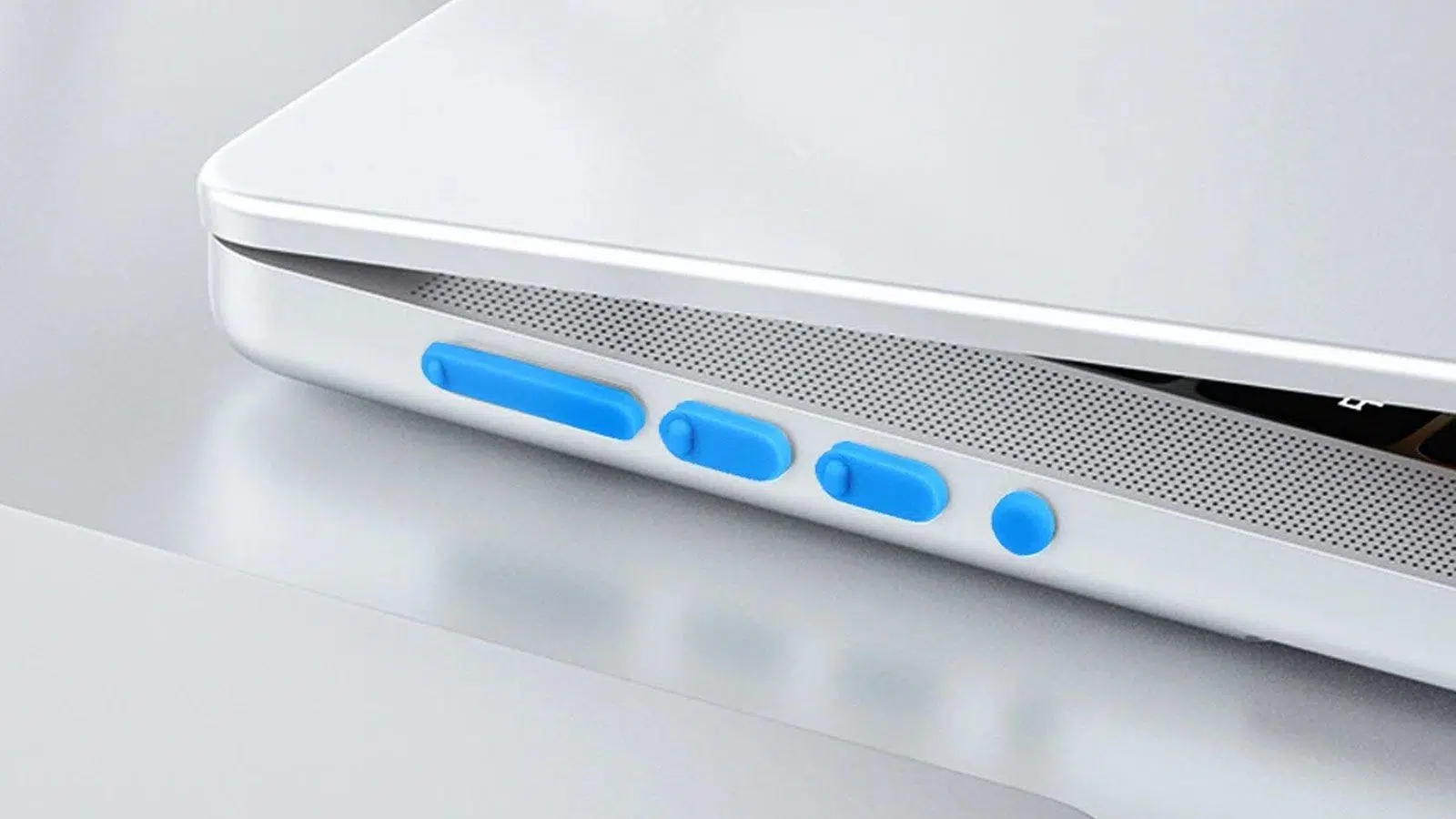
If you use your computer daily, you probably have more free ports than you're using, and you may have wondered if it makes sense to cover empty PC ports with plugs, blanking plates, or physical blockers. It's not paranoia: dust, lint, dirt, and even small spills can end up causing connection problems or, in the worst-case scenario, malfunctions.
Furthermore, with the arrival of wireless charging in mobile phones and Bluetooth accessories , many connectors are being used less and less. This has led to a proliferation of silicone plugs, RJ45 port covers, and USB locking devices. Let's see what they're really for, when it's worth using them, what they can and can't do for your device's security, and how you can go a step further by disabling USB ports from Windows if you're looking for complete control.
Why are more and more ports being covered on mobile phones and computers?
On mobile phones, the charging port has gone from being essential for everything to being almost relegated to specific tasks. With the widespread adoption of wireless charging and cloud storage , many users no longer connect their phones to computers to transfer photos or files, but instead sync everything via Wi-Fi or mobile data.
This change in habits has led many people to buy silicone plugs for their charging ports , not so much for aesthetic reasons as to prevent dust, lint from pockets, or dirt from backpacks from accumulating. If the connector becomes clogged, charging can become intermittent, cause errors, or even stop working altogether.
Something similar happens with computers, although with some differences. Laptops tend to have fewer ports than we actually need, but even then there are ports we never use, while desktop PCs usually have many more connectors than we really need , both on the front and back of the tower.
That's why accessories have appeared specifically designed to physically cover ports we don't use : silicone covers for USB, HDMI or DisplayPort, blank covers for RJ45 on network panels, or USB port blockers with a small locking mechanism that fits into the port and requires a key or tool to remove.
Does it make sense to cover the ports on a laptop?
Protecting the connectors on a laptop makes perfect sense, especially if you carry it around everywhere. When transported in backpacks, cases, or briefcases, it's constantly exposed to lint, food scraps, sand, or dirt that gets in through every crack and crevice.
The USB ports, HDMI port, card reader, and the charging port itself are perfect entry points for dirt. Although they may look fine at first glance, dust particles can accumulate inside, hindering contact between the male connector (for example, the USB cable) and the female connector (the laptop's port).
Furthermore, laptops often find themselves in more "dangerous" environments than desktop computers: cafe tables, desks piled high with papers, narrow tray tables on trains or airplanes, etc. In these situations, a simple gesture like spilling a few drops of water, coffee, or soda can end up entering an unused port.
Covering those connectors with silicone sleeves or small plugs can act as a physical barrier against minor spills . It's not a foolproof shield, not by a long shot, but in certain situations it can make the difference between a liquid directly contacting the metal contacts or remaining on the surface of the plug.
It's also useful if you tend to put your laptop in and take it out of your backpack carelessly. The plugs prevent lint or fabric fragments from getting caught inside the connectors, which over time can lead to loose connections or ports that wobble when you plug something in.
And on a desktop PC, is it worth covering the ports?
The situation is slightly different with desktop computers. They are usually placed on a fixed desk, on the floor next to the table, or on a piece of furniture, and are not moved around constantly. This makes them less exposed to bumps, being moved, and loose dust from backpacks or cases, but it doesn't protect them from other problems caused by drafts and ambient dust.
A desktop PC, especially if it's in a well-ventilated room with open windows or near the floor, can accumulate a significant amount of dust over time. This dust enters through the ventilation grilles, but it can also seep in through the rarely used rear and front ports .
On the back, it is very common to have several free USB ports on the motherboard , analog audio connectors, old PS/2 ports, or even integrated video outputs that are not used because the image comes out through the dedicated graphics card.
Furthermore, many modern graphics cards include multiple video outputs ( HDMI, DisplayPort , sometimes DVI), and in most cases, the user only connects one or two. The rest remain connected, accumulating dust over time. Covering them with specific silicone or plastic plugs prevents this dust from building up right on the contacts.
On the front panel, the USB ports and audio connectors tend to get very dirty if the PC is on the floor or near your feet. Covering them when not in use can help prevent lint and dirt from the floor from getting in , which is especially helpful in the long run for ports that are only used occasionally.
Impact on equipment performance and ventilation
A very common question is whether covering ports can affect airflow inside the tower or, in the case of laptops, chassis ventilation. The answer is clear: I/O ports are not part of the ventilation system , so covering them does not harm thermal performance.
You can plug the USB, HDMI, DisplayPort, RJ45, or even the laptop's charging port when it's not in use, without worrying about proper airflow. The fans are designed to work with specific vents and openings, and don't rely on port openings to move air.
The only thing you should avoid is covering areas that are designed as part of the airflow: grilles, ventilation slots, open expansion slots at the back of the case (if they aren't designed to have blanking plates), or the laptop's own air vents. Doing so could cause a temperature increase and restrict airflow.
Covering the other connectors will have no noticeable effect on system performance, stability, or noise. It's purely a matter of physical maintenance: less dust and dirt in sensitive areas.
It's also important to clarify that a port covered with silicone, plastic, or a physical blocker is still an electrical component like any other. If the inside of the device has temperature problems, simply covering or uncovering the connectors won't fix anything; you'll need to look at the fans, heatsinks, and overall airflow.
Protection against dust, dirt and small spills
The main benefit of covering empty ports is simple: protecting the internal contacts from dust and other debris . Every time you plug and unplug something, or simply due to static electricity, it's normal for dust to stick to the metal surfaces.
This dust can cause poor contacts, intermittent connections, problems recognizing USB drives, or even make certain cables move around inside the port. If the dust is very heavy, you may need to use electronic cleaning products or even call a repair service.
For laptops and other devices that are frequently exposed, a plug also helps minimize the risk of liquid damage. It won't work miracles if a whole glass of water is spilled on the keyboard, but for small spills or minor splashes, it can be enough to prevent the liquid from penetrating deeply into the port.
On desktop towers, due to their size and design, the chances of liquid spilling directly into a rear port are considerably lower, unless it's intentional or a very specific accident. However, in office environments where cups, bottles, or thermoses are placed near the towers, it's wise to have some extra physical protection.
It's also important to remember that keeping the ports clean makes future maintenance easier. When you need to blow out compressed air, check connections, or replace peripherals, working on connectors that haven't been full of dust makes everything faster, safer, and less prone to errors.
Computer security: what a port plug DOES and DOES NOT do
A common misconception is that putting a silicone plug or blanking cap on a port makes it secure against cyberattacks. The reality is that these standard plugs don't include locking mechanisms and anyone can remove them with their fingers.
Therefore, covering unused ports only provides a weak physical barrier against dirt. It doesn't prevent anyone from plugging in a USB drive, external hard drive, or malicious device as soon as they remove the cover. From a cybersecurity perspective, it's about as effective as putting a sticker over the connector.
If your goal is to prevent other people from using the computer's USB ports (for example, in a shared office, classroom, or customer service area), you should apply security measures at the software or firmware level , not just physical ones.
These measures include password-protecting system access, encrypting storage drives, and, very importantly, disabling ports you don't want anyone using . This can be done from the operating system, through group policies on corporate networks, or from the computer's BIOS/UEFI.
There are specific USB blockers with locks that do add a physical layer of security, as they are inserted into the port and can only be removed with a special tool or key. Even so, their function is to deter and complicate accidental access , but they do not replace the logical security measures configured in the system.
How to disable USB ports in Windows from the registry
If you want to go a step further and completely disable your USB ports, you can deactivate them at the operating system level. In Windows, this can be done by editing a specific key in the system registry (regedit) , although it's a delicate operation and you must follow the instructions precisely.
The first step is to open the Registry Editor. To do this, go to the Start menu and type regedit in the search box . "Registry Editor" will appear in the results; run it with administrator privileges to be able to make changes to system keys.
Within the Registry Editor, you'll see a tree of folders (keys) on the left. Navigate to the specific path that manages the USB storage service, located at HKEY_LOCAL_MACHINE\SYSTEM\CurrentControlSet\Services\UsbStor . Click on each level until you reach the "UsbStor" key.
With the “UsbStor” folder selected, several values will appear in the right panel. Locate the value called Start, which usually has a default value of 3. Double-click on it to edit it. Make sure the edit is done in hexadecimal format (it's usually set that way by default for that key).
In the Start parameter editing box, change the value from 3 to 4, save, and close the Registry Editor . Then, restart your computer for Windows to apply the changes. From that point on, USB storage devices will stop working; the system will not load the UsbStor service.
If at any point you regret this or need to re-enable the USB ports, repeat the process: go back to the key HKEY_LOCAL_MACHINE\SYSTEM\CurrentControlSet\Services\UsbStor , open the "Start" value and change the 4 back to a 3. After restarting, the USB ports will behave normally again.
Blanking plates for RJ45 ports and network panels
In networking environments, communication cabinets, and structured cabling, it's very common to use covers for unused spaces , also known as blanking plates, to provide a neat finish and protect the installation. A typical example is the cover for patch panels with standard RJ45 ports.
These covers are inserted into the gaps in panels and boards where a network connector hasn't been installed, or into RJ45 ports that need to be physically blocked. A blank cover like the Dixon White Unused Space Cover is designed precisely for these types of applications in networking, telecommunications, and UTP cabling.
Its main function is to protect the panel cavities from dust and dirt, helping to keep the installation clean and in good condition in the long term . In a rack or cabinet with many connections, preventing dirt from accumulating inside the cavities facilitates maintenance and reduces the risk of failures due to contamination.
Another important advantage of these covers is that they are very easy to install and remove. Their design is usually very simple, allowing for quick and tool-free installation on any network card or patch panel with RJ45 ports. It's a small detail that greatly improves the overall appearance.
These blanking plates are usually compatible with a wide variety of brands and models, as long as they adhere to the standard RJ45 port format. This makes them a very practical solution in offices, data centers, and corporate environments where structured cabling changes over time but maintaining order and aesthetics is desired.
Characteristics of a typical RJ45 blanking plate
Covers like the aforementioned Dixon MU5-B-WH are normally made of high-strength plastic , designed to withstand heavy use and repeated contact with technicians, cables, and tools inside communications cabinets or technical rooms.
Designed for standard RJ45 ports, their dimensions are tailored to the typical format of patch panels and wall plates. This ensures that, once installed, they fit snugly and won't come loose easily , preventing dust from getting inside.
White (or other neutral colors) helps create a uniform visual result, especially in installations where aesthetics are paramount. In corporate environments or exposed telecommunications installations, this type of professional and consistent finish makes all the difference.
In short, blank RJ45 covers are not only a practical maintenance accessory, but also a complement to achieve a more organized, clean and visually pleasing cabling , without empty spaces that give a sense of shoddy or unfinished installation.
USB port blockers with locking mechanism and dust covers
In addition to simple silicone plugs, USB port blockers with locking mechanisms are available on the market, designed both to protect against dust and to limit physical use of the connectors . A typical example is a pack of several blockers that fit into the ports and are removed with a specific tool.
These blockers insert into the USB port like any other device, but they have no internal circuitry. Their purpose is to prevent anyone from inserting a USB drive or other device without first removing the blocker with the appropriate tool , which is useful in environments where many people pass near the computer.
Although they are also marketed as dust protectors, the most interesting aspect of these accessories is that they add an extra layer of physical security to the ports. They are not invulnerable, but they can deter unauthorized use or accidental damage , for example, in stores, libraries, classrooms, or customer service areas.
It is important to distinguish these locking blockers from simple silicone plugs: the latter are easily removed with your fingers and their function is merely to prevent dirt, while the former are designed to actually restrict the connection of peripherals without supervision.
Even so, even using physical blockers, it is still essential to complement them with logical measures: strong passwords, accounts with limited permissions, updated antivirus, and clear policies on the use of external USB devices in the organization.
Combining good cleaning practices with well-chosen accessories and proper system configuration (including, if applicable, disabling UsbStor in the registry) allows you to have cleaner, tidier, and more controlled ports , reducing both hardware problems caused by dirt and certain security risks from unwanted access.
