- Modularity only affects cable management and ease of assembly; it does not guarantee better internal quality or performance.
- Modular power supplies facilitate airflow, aesthetics, and upgrades, at the cost of a higher price and proprietary connectors.
- In powerful systems with a flashy case, it's worth paying for modularity; in basic PCs, it's preferable to prioritize quality even if the power supply is not modular.
- Adequate power, 80 PLUS efficiency, and a good internal platform are more important than the type of cabling when choosing a power supply.
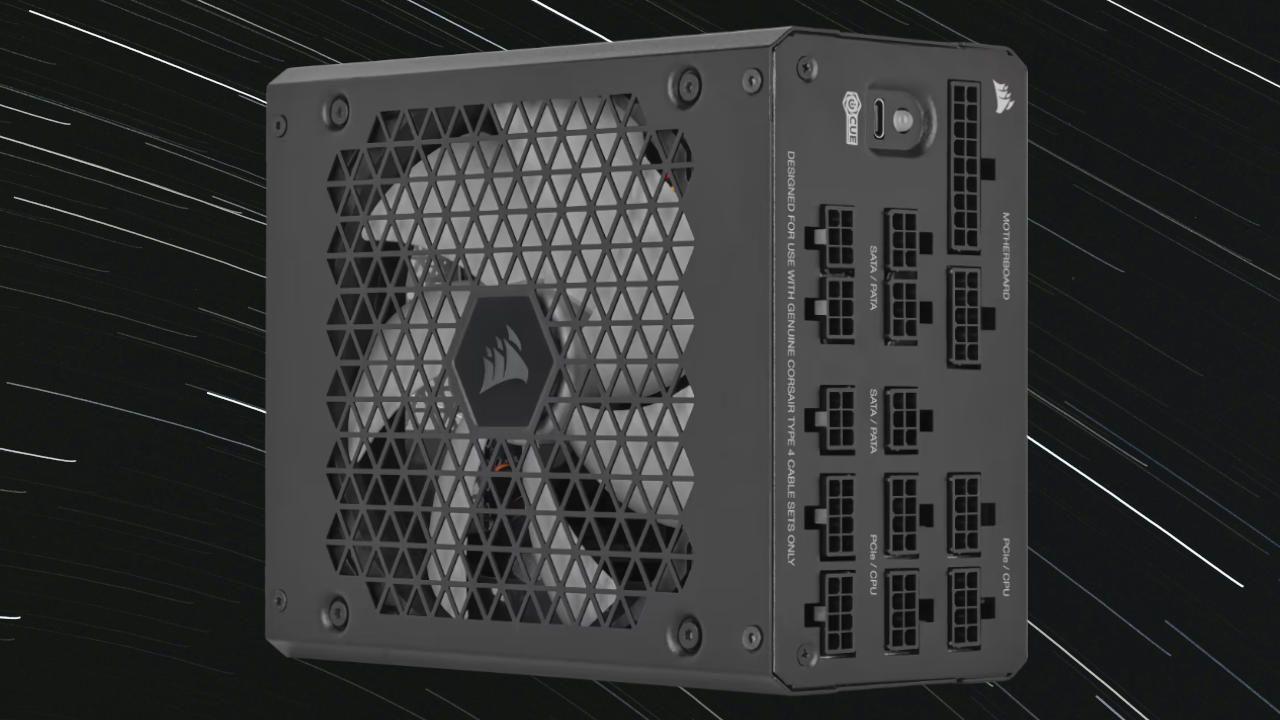
Choosing a power supply isn't just about wattage and brand . As soon as you start researching, a concept arises that raises a lot of questions: modular, semi-modular, and non-modular power supplies. And of course, the big question comes up: is it worth paying more for modularity, or is it better to save money and stick with a power supply with fixed wiring?
In the following lines, we'll calmly break down the real differences between a modular and a non-modular power supply , what each type offers, in which scenarios it's worth spending more, and in which it's just a waste of money. You'll see advantages, disadvantages, some myths that still circulate online, and practical tips for making an informed choice without being swayed by marketing alone.
What exactly is modularity in a power supply?
When we talk about modularity, we are referring to how the cabling connects to the power supply itself and how it fits with the components of a computer.
With the arrival of modular power supplies, this approach changed completely: now many models include a back panel with female connectors where we plug in the cables we're going to use, one by one. This way, the cable is no longer permanently soldered to the circuit, but becomes an accessory that we can connect or store in our bag.
Within this concept of modularity, we currently find three main families: non-modular (fixed wiring), semi-modular, and fully modular power supplies . The electrical operation is the same; what changes is the flexibility and cable management.
Historically, early PC power supplies all had fixed cables, and for years, excess loose cables in the case were commonplace. The first commercially available modular power supply arrived around 2004 from the Ultra brand, which even registered patents and engaged in legal disputes with other manufacturers; since then, modularity has gone from being something exotic to being present in virtually all mid-range and high-end power supplies.
Differences between non-modular, semi-modular and modular power supplies
Before going into specific advantages and disadvantages, it is important to make it very clear what defines each type of power supply in terms of its wiring system.
Non-modular or fixed-wired power supplies
Non-modular power supplies are the traditional type: all the cables are soldered directly to the power supply and there's no way to disconnect them from the case. The cable bundle passes through a rubber or plastic grommet and is distributed throughout the inside of the computer case.
This approach seems reasonable when we're talking about simple power supplies with few connectors, but as soon as you move on to models with more power, more PCIe rails, and more SATA and Molex connections, you 're almost guaranteed to have several unused cables . These cables end up coiled or hidden as best as possible, taking up space and obstructing airflow.
The great advantage of these power supplies is their very simple design: since they don't need a modular board or extra internal connectors, they are cheaper to manufacture and are usually the most economical option within the same quality range.
Modular power supplies (fully modular)
At the opposite end of the spectrum are fully modular power supplies, in which no cables are permanently attached . Not even the 24-pin ATX connector for the motherboard or the EPS CPU cable: absolutely everything is plugged and unplugged from the back of the power supply.
In practice, this means we can connect only the cables we're actually going to use for that specific setup. The rest stays in the box or accessory bag, instead of taking up space inside the chassis. For a clean build, with good ventilation and no unsightly "spaghetti" of cables, this approach is a delight.
Furthermore, this type of design lends itself to customization: many manufacturers offer or allow cable kits with sleeving, custom colors, or specific lengths , which are highly appreciated by those who build systems with side windows or exhibition builds.
Semi-modular power supplies
In between, we find semi-modular power supplies, designed as a compromise between price and convenience . In this case, certain essential cables (usually the 24-pin ATX connector and one or two EPS CPU cables) are soldered onto the power supply, while the rest (PCIe, SATA, Molex, etc.) are connected via the modular system.
The logic behind this solution is simple: these fixed cables are going to be used in any modern build , so it doesn't make sense to complicate or increase the cost of the design by making them detachable. In return, the user retains the option of doing without additional GPU cables or some SATA cables if their configuration is simple.
Advantages of modular power supplies versus non-modular ones
Once the concept is clear, let's look at why so many people consider modularity almost essential when building a mid-range or high-end PC. The list of advantages is long and very tangible in everyday use.
Cable management is much simpler.
Perhaps the most obvious benefit: by being able to choose which cables go into the case, the amount of excess cabling is drastically reduced . Instead of having to hide several unused cable bundles behind the motherboard tray or in the power supply bay, you simply don't connect them.
This is especially noticeable in compact cases or those with limited rear cable management space, where every centimeter counts. The less cable you have to bend, squeeze, and force, the easier the assembly will be and the less chance there is of anything getting pressed against a panel or fan.
Better airflow and lower temperatures
Fewer dangling cables mean less obstruction to airflow inside the chassis . Front fans can direct airflow towards the GPU and CPU cooler with less turbulence caused by tangled cable bundles.
In powerful systems, with high-consumption graphics cards and liquid cooling systems, this difference can help shave a few degrees off the temperature, resulting in less noise (the fans spin slower) and a longer lifespan for the components.
Easier assembly, maintenance and upgrades
One of the less discussed but most appreciated advantages is the ease of removing the power supply or changing components without having to undo all the cabling . With a modular power supply, if you need to remove the PSU from the case, you can disconnect the cables from the power supply itself and leave them connected to the components.
The same applies when upgrading your system: if you decide to add a new GPU or more storage, simply take the missing PCIe or SATA cable out of the bag , plug it into the power supply and the component, and you're good to go. You don't have a bunch of bent cables waiting to be used; they're neatly stored away until you need them.
Customization and aesthetics of the assembly
If you build a PC with a transparent side panel, it's hard not to notice the cables. Modular power supplies allow you to replace the entire set of cables with others that have individual sleeving , colors that match the rest of your setup, or even custom lengths so that nothing is left over.
With a non-modular power supply, customization is very limited: to change a cable you'd have to open the power supply, desolder and manipulate the internal components —a dangerous process that voids the warranty and makes no sense for the average user. In practice, you're limited to decorative extensions, which add even more length.
Easy storage and cable replacement
Another advantage is that if a cable deteriorates or develops a defect, you can replace it without having to replace the entire power supply . However, it must be a compatible cable set approved by the manufacturer, because the connectors on the power supply side are not standardized.
In addition, all the unused cabling is neatly stored in the bag included with most modular power supplies, instead of being tangled up at the bottom of the box taking up space and generating heat.
Disadvantages and risks of modular power supplies
As with everything in hardware, there's no single perfect solution for everyone. Modularity also has its drawbacks, and it's important to be aware of them before deciding how to spend your budget.
Higher price
Implementing a modular board with high-quality connectors, extra traces, and a more complex internal design increases the power supply's production cost . This translates to the final price: with the same power output, certification, and manufacturer, the modular version is typically significantly more expensive than the fixed-wire version.
This can lead to a common trap: seeing cheap models that "boast" of being modular, but internally cut corners on components, protections, or efficiency to keep the price down . In that scenario, it's much better to prioritize quality and safety and settle for a decent non-modular power supply than to install a modular one of dubious origin.
Non-standardized source-side connectors
Although the connectors that go to the motherboard, GPU, or hard drives are standard (ATX, PCIe, SATA, etc.), those that plug into the power supply itself vary between brands and models . There is no universal standard for that part.
This means you can't just mix and match cables from different manufacturers, because even if they physically fit, they might be wired differently at the pin level. Using the wrong cable can cause anything from malfunctions to serious component damage.
Furthermore, if you lose the original cables or mix them up without labeling, you're dependent on being able to find replacements specific to your model. Not all brands sell kits separately easily , and in some entry-level models, finding them can be a real pain.
Possible inconveniences in very small boxes
In most modern ATX and microATX towers there is no problem, but in certain compact chassis or those with a very tight power supply compartment, the extra length added by the modular board and connectors can complicate assembly.
In those extreme cases, a power supply with fixed cabling (usually a bit shorter) might fit better and leave more room for cable management. It's an uncommon situation, but it's always a good idea to check the dimensions of the PSU and the available space in the case.
Wiring planning and learning curve
For a novice user, encountering a fully modular power supply for the first time can be a bit daunting: you have to think about which cables you need, which connectors they go in , and avoid forgetting any essential ones before closing the box.
It's not complicated, but it does require some attention and can be a bit slower than simply pulling all the cables from a single bundle and connecting them one after the other, as you would with a non-modular power supply. In return, the result is usually much cleaner and more convenient in the long run.
Does modularity improve the quality or performance of the power supply?
One of the most common myths is that "modular power supplies are always high-end and therefore of better quality." This statement is false . Modularity, in and of itself, does not imply better electronics, better capacitors, or greater stability.
There are excellent modular power supplies with top-of-the-line components, high certifications (Gold, Platinum, even Titanium), and warranties of up to 10 or 12 years, but there are also modular models of very questionable quality , with inflated certifications and insufficient protections. Likewise, there are genuinely good and robust non-modular power supplies.
It was once said that modular motherboards could worsen efficiency or cause voltage drops due to the added resistance of the connectors, and even that these connectors would burn out easily. Today, in well-designed products, this is not a real problem.
In fact, some manufacturers take advantage of the modular board itself to add additional capacitors and filters at the output, further fine-tuning the power delivery to the components . Clear proof of this is that one of the most efficient power supplies on the market, like the Corsair AX1600i, is fully modular and offers excellent voltage control.
What truly determines the quality of a power supply unit (PSU) is its internal design, topology, components, and implemented protections (OCP, OVP, SCP, OTP, etc.), in addition to the manufacturer's reputation and independent testing . Modularity is a plus for convenience and aesthetics, not an automatic guarantee of reliability.
Impact on actual use according to equipment type
A practical way to decide if it's worth paying the extra cost of a modular power supply is to think about the type of PC you're building and how you're going to use it in the medium term.
High-performance and "top-of-the-range" equipment
If you're building a tower with one or more powerful GPUs, liquid cooling, multiple storage drives, and perhaps advanced RGB lighting, modularity is practically a must. The number of cables required is high , but you'll still have some left over if your power supply is designed for future expansion.
Office PC, multimedia, or tight budget
At the opposite extreme, if we're talking about an office computer, a simple HTPC, or a basic PC for browsing, working, and playing games occasionally, the absolute priority should be the basic quality of the power supply and not so much modularity.
For this type of user, a good mid-range non-modular power supply with decent 80 PLUS certification and comprehensive protections will be more than sufficient and will be cheaper than its modular equivalent. The internal components of the case won't be visible, and the overall power consumption of the system will be moderate.
Compact assemblies and space-saving enclosures
In very small cases (mini-ITX, some barebones, very short chassis), there are two factors to consider: the physical length of the power supply and the number of cables that need to be crammed into a very small space . Sometimes, a semi-modular power supply can be the perfect middle ground.
With a semi-modular power supply, you have the essential cables fixed and the rest plug-in, reducing excess cable compared to a non-modular one, but without lengthening the PSU as much or complicating the installation too much. It's always advisable to check the specific dimensions and reviews of both the case and the power supply.
Other key factors when choosing a font (beyond modularity)
It doesn't make much sense to obsess over whether a power supply is modular or not if we haven't first covered the basics: adequate wattage, efficiency, and compatibility . These factors have a more direct impact on the performance and safety of the equipment.
Power required
The power consumption in watts should be adjusted to your actual configuration, with some headroom for future upgrades, but without falling into the myth that "more watts is better ." The sensible approach is to use a reliable online power consumption calculator, input your components (CPU, GPU, drives, fans, etc.), and add a reasonable buffer.
Once you have that number, you can look for a quality power supply that comfortably covers it (for example, if your system draws around 450W under load, a good 650-750W power supply is usually more than enough to give you some headroom). Keep in mind that many power supplies offer their best efficiency around 40-60% load.
Energy efficiency and 80 PLUS certifications
The 80 PLUS certifications (Bronze, Silver, Gold, Platinum, Titanium) indicate what percentage of the power drawn from the wall outlet is converted into usable power for the PC. The higher the certification, the less electricity is wasted as heat.
In practice, this translates to slightly lower power consumption, less heat inside the case, and, in many cases, a quieter fan . For most users, a good Bronze or Gold power supply offers a very reasonable balance between price and efficiency.
Physical and connector compatibility
Before buying, make sure the power supply fits in your case (maximum supported length) and that it includes the necessary connectors for your components : number of PCIe cables for the GPU(s), sufficient SATA connectors for hard drives and SSDs, possible additional cables for liquid cooling pumps, etc.
If you choose a modular or semi-modular power supply, also check the number of available ports on the motherboard. It's better to have a few extra connectors than to be short and unable to upgrade your system without changing the PSU.
Recommended brands and ranges as a reference
Not all power supplies are created equal, even if they advertise the same wattage. Some manufacturers and product lines have excellent reputations, while others prioritize price above all else. When choosing, it's best to focus on specific series rather than the generic brand name.
For example, within Corsair, lines like the RMx (e.g., RM750x) are high-quality, efficient modular power supplies , while ranges like the CV (e.g., CV650) opt for fixed cabling and more affordable prices while maintaining a decent level for modest systems.
EVGA offers product lines like SuperNOVA, which feature modular models with strong certifications and extensive warranties, designed for gaming PCs and workstations. Cooler Master, with its MWE series, offers both modular and non-modular options to suit different budgets.
In addition to these, there are other brands with a very good reputation in power supplies (Seasonic, be quiet!, Antec in certain ranges, etc.), so it is always advisable to consult independent reviews and updated lists of "best power supplies" to see which specific models stand out each year.
In any case, the key is clear: before paying extra for a modular power supply, make sure the internal platform is good , the warranty is reasonable, and the technical reviews (not just store reviews) support its performance.
Modular, semi-modular or non-modular, the important thing is that the power supply is safe, stable and efficient for your equipment, and that it fits your budget without sacrificing critical quality for a couple of prettier cables.
