- Pipes in Linux allow you to chain processes together by connecting stdout and stdin, with kernel support and tools like tee, xargs, and cpio for complex flows.
- An efficient CI/CD pipeline in Linux relies on good stage design, intensive use of caches, immutable artifacts, and parallel testing.
- Optimizing the Linux server (CPU, RAM, I/O, Docker) and the Jenkins, GitHub Actions or GitLab Runner executors is key to reducing times.
- Integrating security, observability, and cost control into the pipeline ensures reliable, traceable, and sustainable deployments in production environments.
Optimizing pipelines in Linux It's not just about chaining commands with the symbol |Behind it all lies a whole world of performance optimizationWorkflow design, CI/CD, security, and operating system tuning make all the difference between a slow, unstable pipeline and one that flies, is reliable, and inexpensive to maintain. If you work with Linux servers, whether automating tasks in the terminal or running continuous integration pipelines, understanding these details saves you a lot of time and headaches.
In this article we are going to combine two complementary perspectives: on the one hand, the Classic use of pipes in the Linux command line (pipes, redirects, commands like tee, xargs o cpio); on the other, the CI/CD pipeline optimization on Linux serversThis includes caching, test parallelization, Docker tuning, supply chain security, and advanced workflow metrics. All explained in Spanish (from Spain), with clear examples and a very practical approach.
What is a pipeline and how do pipes fit into Linux?
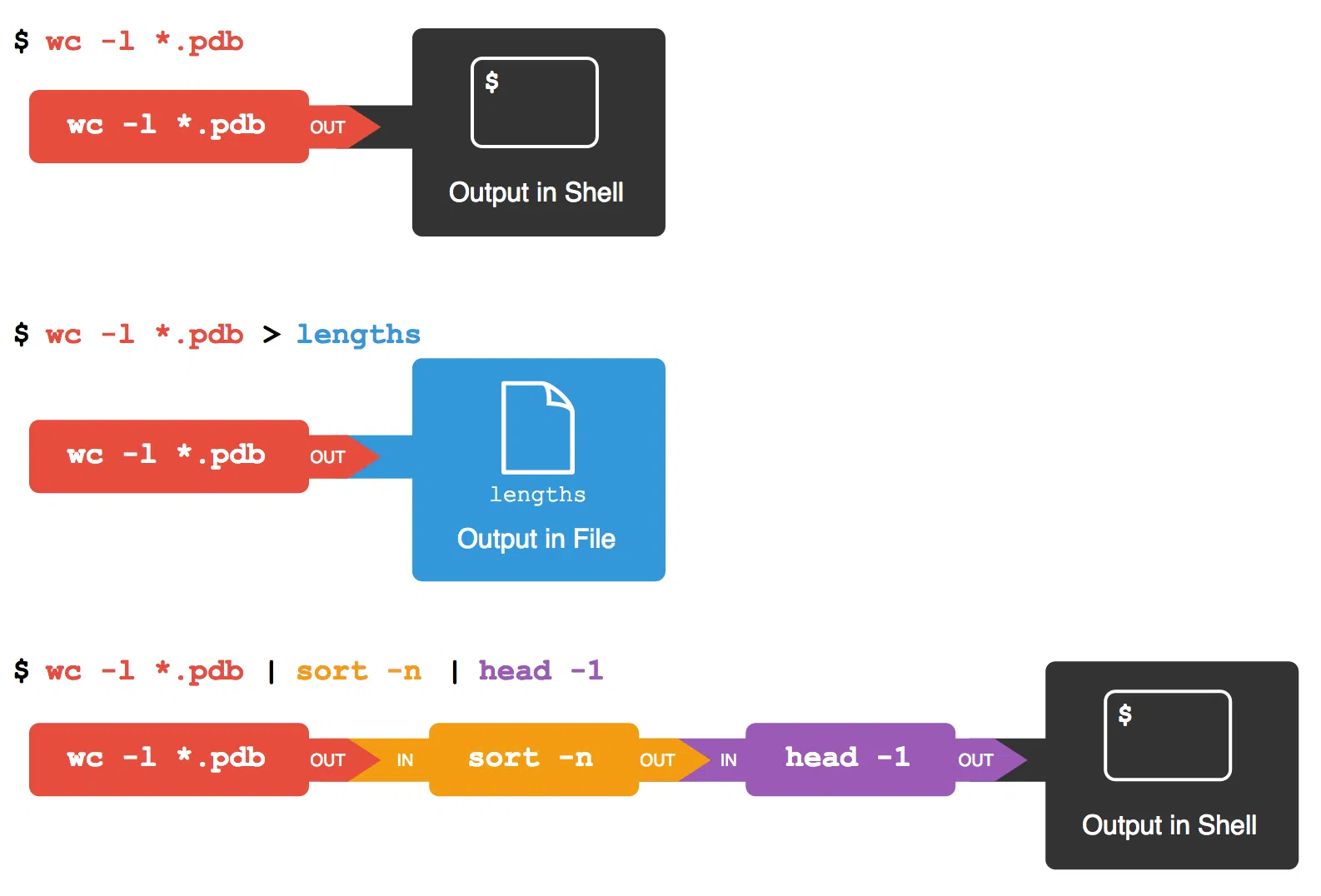
The term pipeline comes from the idea of a pipe : a flow of data that travels from one point to another. In computing, and specifically in Linux, a pipe is a mechanism that allows the standard output of one process to become the standard input of another. In other words, the output of one command is automatically fed into the next without passing through intermediate files.
In Unix-like systems, there are two main types of pipes . On the one hand, there are anonymous or unnamed pipes , which can only be used between closely related processes (for example, parent and child). On the other hand, there are named pipes , also known as FIFO (First In – First Out), which allow communication between processes that are not directly related and may even be on different machines connected to a network.
Anonymous pipes typically provide unidirectional communication : one process writes and the other reads. In contrast, named pipes allow for bidirectional communication if designed that way, for example, by opening the FIFO in read/write mode from both ends. They are widely used to coordinate daemon processes, scripts, or services that need to pass data to each other without blocking.
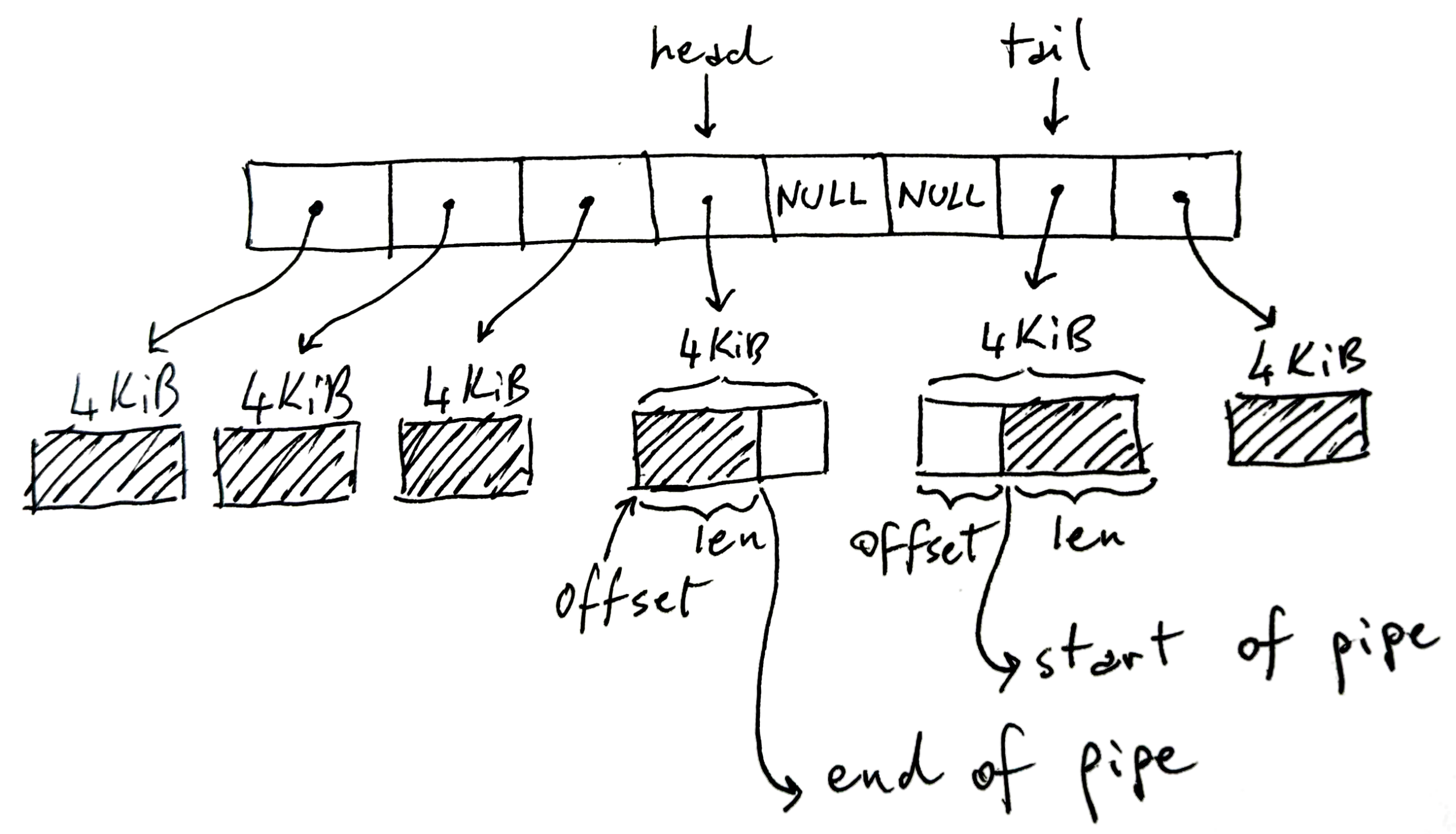
At the implementation level, support for the pipelines is in the linux kernelnot in the shell. The command interpreter (bash, zsh, etc.) simply creates the pipeline through system calls like pipe() y fork()redirect the file descriptors and then launch each program. The real magic of how processes are blocked, how the buffer is managed, and how data is propagated between producer and consumer is handled by the system kernel.
Understanding stdin, stdout and data flow
To work effectively with pipelines, it's crucial to understand what stdin, stdout, and stderr are . These aren't abstract concepts: every process in Linux starts with three open file descriptors, which point to specific resources managed by the kernel.
stdin (descriptor 0) and stdout (descriptor 1) can be viewed as byte streams connected to something: it could be a terminal, a file, a network socket, or a pipe. They are not simply buffers; they are references to kernel objects ( file -type structures ) that are in turn associated with inodes, sockets, or internal pipe structures.
Each process has its own descriptors, so that each command in a pipeline It views its stdin and stdout independently. On a line like ls | grep txt | wc -l, ls write in a pipe, grep It reads from one pipe and writes to another, and wc Read from the last one. To the user it appears as a single string, but internally they are multiple concatenated kernel bufferswith each process blocking and resuming depending on available space or data.
When the first process produces data faster than the second consumes it, the pipe buffer fills up. At that point, subsequent writes return, blocking the sending process until the consuming process... read enough information and frees up space. This prevents memory from spiraling out of control; data doesn't accumulate indefinitely unless you use non-blocking I/O or special signals. For example, in a case like dd if=/dev/sda | gzip -9and gzip compresses more slowly, dd he is forced to wait.
This backpressure mechanism makes pipelines quite stable even when there are performance imbalances between stages, something that is then also reflected in the design of CI/CD pipelines , where the slow stages become the bottleneck that needs to be measured and optimized.
Practical use of pipes in the Linux terminal
In everyday use, pipes are used to chain commands on a single line and transform data step by step. Instead of running a command, looking at the output, copying it, pasting it into another command, you can build small, highly flexible "data factories" in plain text.
A typical example in Unix environments is combining the command fortune, which shows random quotes, with cowsaywhich prints a "talking" cow. When using a pipe, Fortune's departure becomes Cowsay's messageall in a single command. It's a playful example, but it perfectly illustrates the idea of connecting simple tools for more complex tasks.
Another classic is to send the result of ls a wc to count lines, words, and characters. Something like ls | wc It allows you to quickly see how many items are listed. The beauty is that you don't need a single program to do everything, but rather... You create solutions with small, well-designed utilities..
It is also very common to chain together cat, sort y more (or another pager) to sort a text file and then browse through it page by page. With a pipe, content passes from one command to the next without being saved to explicit temporary files, which greatly simplifies scripting and administrative tasks.
In practical cases such as processing student lists and grades in separate files, you can use paste to merge columns, cut to select only the fields you're interested in and chained pipes to filter, sort, or transform everything in a single line of shell script. This pattern of break down a large problem into simple commands combined with pipes It is the essence of Unix philosophy.
Advanced commands to get the most out of pipes: tee, xargs and cpio
When you start to truly automate things in Linux, pipes become even more powerful thanks to some key tools. Among them are: tee, xargs y cpiowhich complement the standard data flow very well.
The command tee It acts like a "T" in a water pipe: it reads from stdin, writes to stdout, and also copies that same output to one or more files. It's ideal when you want view the output on screen and, at the same time, save it to review it later or process it at another stage. With the option -a It adds data to the end of the file instead of overwriting it.
For example, you can sort a list with sortsend the result to tee to store it in a log and, at the same time, pass it to more to paginate it. This way, in a single pipeline, you have sorting, saving to disk, and convenient viewing without repeating the sorting process.
The command xargs It's another fundamental piece when it comes to pipes. Its function is to take what arrives via stdin (usually a list of elements) and convert it into arguments for another command. It's especially useful when a program crashes because it receives too many parameters at once or when you want to break the work into batches with the option -n, which limits how many arguments are passed per execution.
For example, with ls | xargs -n 4 You divide the file list into groups of four, executing the target command (by default echo(or the one you specify) several times. This way you can build pipelines like "preview what I'm going to delete" by combining ls, xargs y echo rm before launching the actual wipe.
Be careful with complex inputs: paths with spaces or special characters can break the default behavior of xargsIn those cases it is usually used in combination with find and the option -print0, which separates elements with a null character, along with xargs -0 so that both ends use the same robust delimiter.
Lastly, cpio It is a lesser-known command than tarBut it's incredibly flexible for working with file streams via pipes. Unlike tar, it's designed from the ground up to operate with redirects and pipes: receives a list of files via stdin (usually generated with find) and produces or consumes "package" type files without their own compression, which you can then compress with gzip or similar.
The main modes of cpio allow creating files (-o), copy directory trees (-p) or extract content (-i(often referred to as “copy-in”). Options such as -u to overwrite, -m to preserve timestamps or -d to recreate the directory structure makes it possible to control in detail what is copied and how, especially useful in complex scripts where tar falls short.
Design and optimization of CI/CD pipelines on Linux servers
Beyond the traditional command line, the pipeline concept has become fundamental in the world of Continuous Integration and Continuous Delivery (CI/CD) . On a Linux server, a CI/CD pipeline is an automated sequence of steps: fetch code, install dependencies, compile, run tests, package artifacts, and deploy.
Linux is particularly well-suited for this because it stands out for its speed, stability, and ecosystem of automation tools . Platforms like Jenkins, GitHub Actions, and GitLab CI rely on Linux executors (physical machines, virtual machines, or containers) to run pipelines consistently.
Optimizing these pipelines means not only making them "work," but making them work with as little friction as possible. This means reducing checkout times, minimizing repetitive dependency installations, optimizing Docker images to avoid unnecessary rebuilds, reusing already generated artifacts, and keeping the environment secure and observable.
A basic good practice is to structure the pipeline into well-defined stages: build, test, and deploy . Ideally, you should compile only once, generate an artifact (binary, package, Docker image) that is tested in parallel in different variants (for example, various language versions), and then deploy the same artifact to staging and production environments without recompiling.
Working with immutable artifacts stored in repositories (S3, Nexus, Artifactory, container registries, or packages embedded in GitLab/GitHub) simplifies auditing, allows for rapid version rollbacks, and reduces the likelihood of "it works on my machine but not in production".
Prerequisites: distribution, CI user, and server hardening
Before getting bogged down in millisecond optimization here and there, it's important to establish a stable foundation on the Linux server that will act as the CI/CD executor. This starts with choosing the distribution and the minimum security configuration.
The most sensible approach is usually to standardize on an LTS or stable distribution that the team is familiar with: Ubuntu LTS, Debian Stable, or enterprise alternatives like AlmaLinux or Rocky Linux. Having all runers on the same version prevents unexpected behavior caused by different libraries or kernels between jobs.
Another recommendation is to configure a dedicated user for CI, without root privileges, with sudo very limited to only the essential commands (for example, systemctl o docker (if it's really necessary). This user must authenticate using SSH keys, both to access the server and to interact with Git repositories or other remote machines.
At the system level, it is advisable to maintain the server updated and minimally reinforcedThis includes applying security updates, configuring a restrictive firewall (for example, with UFW: denying all incoming traffic except what is necessary and allowing outgoing traffic), and enabling tools such as fail2ban to stop brute-force attacks on SSH and adjust some network and kernel parameters via sysctl to improve reliability and performance.
For example, it is common to raise the limit of inotify to prevent build systems that monitor many files from running out of resources, and adjust the parameter vm.swappiness to make the kernel more conservative when using swap, something especially relevant when CI jobs consume a lot of memory at a time.
Caches, Docker, and parallelization: the performance levers in CI/CD
If you look at where the time actually goes in an average pipeline, you'll see that a huge portion is lost installing dependencies and rebuilding Docker images . Addressing this is usually more effective than optimizing test code by a few milliseconds.
The first lever is dependency caching . Almost all dependency managers (pip, npm, Maven, Gradle, Go modules, etc.) use local cache directories. On a persistent Linux server, you can share these directories between jobs or mount them on a persistent volume. This way, each execution doesn't have to download half the internet again.
For Docker, enable BuildKit and structure well the Dockerfile This marks a turning point. Placing dependency installation right after copying the requirements file, and before the rest of the code, ensures that layers are reused as long as the versions of those dependencies remain unchanged. Furthermore, specific caches for pip, npm, etc., can be set up within the build itself.
The second major lever is the parallel test executionMany frameworks natively support concurrency: pytest with -n autoJava tools like Surefire, Jest in JavaScript with --maxWorkersetc. Dividing the suite by modules, folders or even by estimated time and balancing it among several workers allows reductions of 2 to 5 times in the duration of the testing phase without changing a single line of business.
Finally, there's the issue of artifacts and deployment . Instead of recompiling the same image for staging, pre-production, and production, the efficient approach is to build once, save the result to a repository, and tag it according to the deployment environment. This reduces CPU usage, avoids inconsistencies, and significantly speeds up long pipelines.
Optimizing Jenkins, GitHub Actions, and GitLab Runner on Linux
Each CI system has its own particularities, but they all benefit from the same basic ideas when running on Linux. The key is usually to use ephemeral and clean executors , maintain a well-sized persistent cache, and control concurrency.
In Jenkins, a common practice is to use lightweight, temporary agents (such as Docker containers or pods in Kubernetes or other container orchestration solutions ) to run jobs, while keeping the master node as simple as possible. These agents can be configured as systemd services on Linux servers, registering with the controller and starting automatically when the machine boots.
For GitHub Actions with self-hosted runners, it is recommended to deploy them in Linux virtual machines with fast SSDsTo create a large cache directory dedicated to actions (language dependencies, build caches, etc.), limit the number of concurrent jobs to avoid overloading the CPU and disk. Take advantage of the official caching action with paths such as ~/.cache/pip, ~/.npm o ~/.m2 It makes a huge difference in time.
In GitLab Runner, choosing between the shell executor and Docker depends on the balance between performance and isolation you require. The shell executor is faster because it runs directly on the host, but the Docker executor offers clean and replicable environments. You can also configure shared caching (local or on S3) and adjust the maximum number of concurrent jobs to take advantage of the hardware without overloading it.
In all these cases, having shared volumes for dependency caching while preventing workspaces from becoming cluttered between builds is crucial. Ephemeral machines or containers, which are created and destroyed with each pipeline or group of pipelines, greatly reduce "it worked yesterday, but it doesn't today" problems caused by remnants of previous builds.
Linux server performance: CPU, memory, I/O, and Docker
No matter how optimized your scripts are, if the Linux server running the pipeline isn't properly sized, you'll encounter endless queues and slow-moving jobs. A typical, reasonable configuration for a mid-range machine is 4-8 vCPUs and 8-16 GB of RAM , with SSD storage (ideally NVMe) and some swap space (2-4 GB) to handle peak loads without aggressively killing processes.
The file system also matters. Use ext4 or XFS with the option noatime In the volumes where you compile or write logs, reduce unnecessary I/O. Additionally, mounting a tmpfs for temporary files or short-lived artifacts (for example, /mnt/ci-tmp) speeds up intensive operations and prevents the disk from filling up with residual files between jobs.
Regarding Docker, daemon hygiene is key. Safely and regularly removing unused images and volumes, while maintaining hot base images, helps to control disk space and boot times. Commands like docker system prune With appropriate time filters, they allow cleaning without overloading recently used resources.
If your CI is container-intensive, you can also use mirrored registers to avoid always downloading from the internet, use BuildKit for concurrency and layer caching, and even configure CPU affinities (CPU sets) or dedicated nodes for the most demanding executors, preventing interference between neighboring workloads. Furthermore, understanding the CPU microarchitecture helps you better size resources for intensive CI workloads.
Security in the pipeline (DevSecOps) and deployments on Linux
A fast but insecure pipeline is a ticking time bomb. Integrating security into the pipeline itself and Docker container security is now standard in any DevSecOps strategy, and Linux offers many tools for this.
The first thing to do is treat secrets and credentials with the utmost care . They should never reside in the code or in versioned configuration files. Instead, they are stored in secret managers (GitLab masked variables, GitHub encrypted secrets, HashiCorp Vault, etc.) and injected only during the execution of the job that needs them, using short-lived tokens whenever possible.
Another important layer is the generation of SBOMs (Software Bill of Materials) and the signing of artifacts. Tools like Syft or CycloneDX allow you to list all the components that make up an image or binary, while Cosign or other verifiable signing solutions ensure that only artifacts that have gone through the pipeline and been validated are deployed.
In terms of network and access, it's advisable to segment CI and production networks , implement strict firewalls, audit execution logs, and rotate credentials regularly. Where SSH is used, it's better to use certificates or keys with expiration dates rather than static passwords.
When deploying on Linux, strategies like Blue/Green, rolling, and canary greatly reduce the impact of deployment errors. Running the application as a systemd service, placing an Nginx or HAProxy in front of it, and controlling traffic between versions with health checks allows you to achieve virtually zero downtime during updates.
For example, when reloading Nginx and restarting services with systemd using soft stop signals (such as SIGTERMWith reasonable wait times, you can drain active connections before the process stops, keeping the user experience intact while you switch versions in the background.
Observability, metrics, and costs in Linux pipelines
Once your pipelines are up and running, the next step is to measure them and understand where time and resources are going . It's not enough to know if a workflow succeeds or fails; you need to monitor the duration of each stage, queue time, success rate, deployment frequency, cache hit rate, and so on.
It is common to export system metrics using node_exporterCentralize logs with solutions like ELK or Loki, and visualize everything in Grafana dashboards. This way you can detect, for example, if the testing phase has increased in duration by 30% in the last week or if jobs are spending too much time waiting for an available executor; network traffic monitoring Open source tools complement that visibility.
It is also possible to instrument the pipeline itself, for example in GitHub Actions or GitLab CI, to to programmatically measure how many executions have been successful, how long each run has lasted, and what the overall status isA script that calls the provider's API, computes the total number of runs, the number of successful runs, the number of failed runs, the success rate, and the average duration, and saves everything in a JSON file (like pipeline-metrics.json) allows you to integrate these metrics into reports or dashboards.
With this information, you can make decisions about the size and number of runners : sometimes it's better to have more small runners than a few very large ones to reduce wait times. Autoscalability—for example, cloud autoscaling or dynamic pools of Kubernetes nodes—helps absorb peak activity during the day and minimize underutilized resources at night.
These practices not only improve the team's experience, but also help to adjust infrastructure costs by controlling CPU, memory, and especially storage consumption, which tends to skyrocket with images and caches if not cleaned regularly and on a planned basis.
Mastering both classic command-line pipes and modern CI/CD pipelines in Linux offers a powerful combination: you can automate everything from simple text filtering tasks to complex, maintainable, secure, and fast build, test, and deployment pipelines. Understanding how information flows between processes, how dependencies are cached, how servers are tuned, and how metrics and security are integrated allows you to build workflows that scale with your team and projects without becoming a constant bottleneck.