- New "Edit" editor in Terminal, with syntax and undo, ready with the edit command.
- The .NET Framework 3.5 is no longer preinstalled; it remains available on demand.
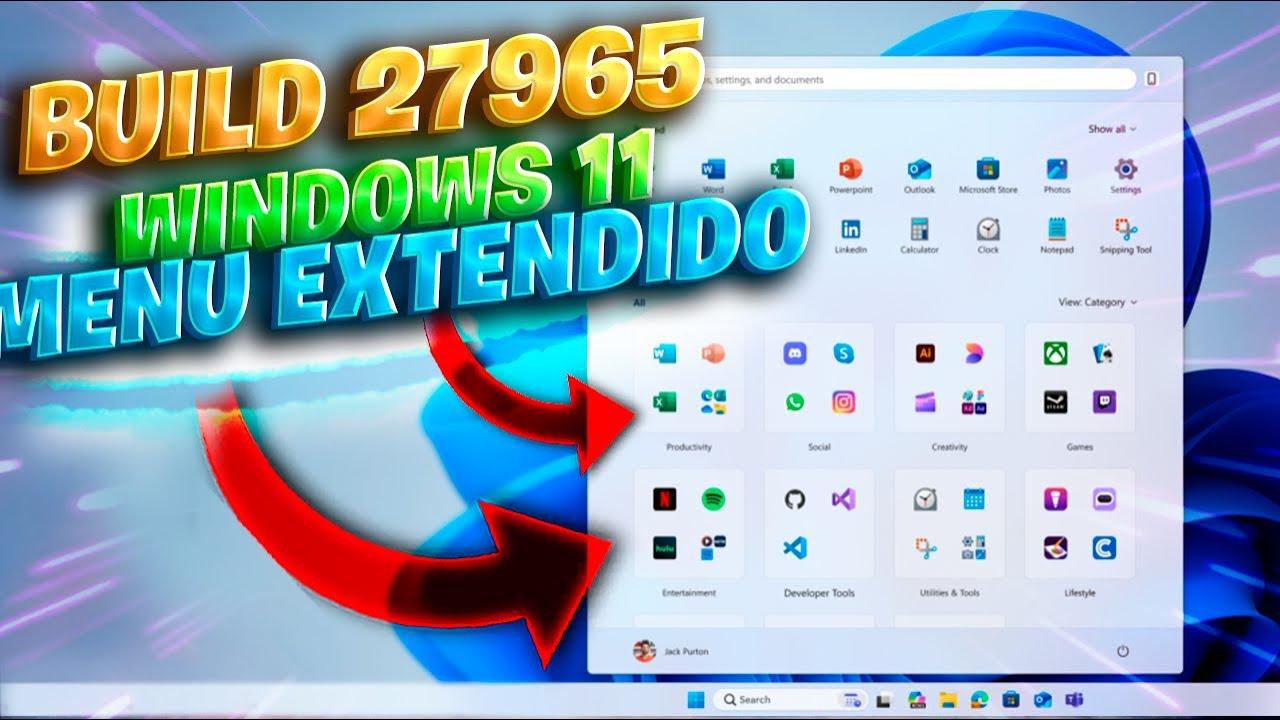
- Redesigned and scrollable Start Menu with integrated Mobile Link.
- Key fixes: Hidden taskbar and video playback issues.
Windows 11 Build 27965 brings changes designed for those who work with the system daily: developers, administrators, and advanced users. Microsoft continues to refine its platform and uses this version to introduce an editing tool directly in the terminal and adjust legacy components that no longer fit its roadmap.
Of all the announcements, two decisions stand out: first, a lightweight, console-integrated text editor called Edit has been added ; second, .NET Framework 3.5 is no longer included as a pre-installed component (although compatibility is maintained). In addition, there's a redesigned, scrollable Start menu , the integration of Mobile Link within the menu itself, and several fixes addressing annoying bugs such as the hidden taskbar and video playback issues.
Key new features coming in Build 27965
This version includes adjustments that, while not groundbreaking, do impact the daily user experience. For example, the inclusion of Edit as a native tool is a practical step forward for those who edit scripts or configuration files without opening full-fledged editors like Notepad or heavyweight IDEs. It's a streamlined solution for making quick changes from the Windows Terminal.
In parallel, Microsoft confirms that .NET Framework 3.5 will no longer be enabled by default . Support for it will not disappear, but the way to obtain it will change: it will have to be installed manually if an application requires it. This is another move in the strategy to simplify the system and focus efforts on modern technologies, thus reducing the maintenance of legacy components.
There are also interface improvements: the Start menu has been revamped with a scrollable design , making it easier to access more content without disrupting visual consistency. And for those who rely on their mobile devices, the Phone Link feature is now integrated directly into the menu, significantly shortening the process of connecting your PC and smartphone.
Finally, there's room for quality improvements: the bug that caused the taskbar to hide improperly has been fixed , and a problem affecting video playback on certain computers has been resolved. These kinds of fixes, while less flashy, are what make a difference in everyday use.
Edit: a text editor integrated into the Terminal
The star new feature for technical users is Edit, a text editor that runs from the command line . This open-source tool is lightweight and designed for speed—exactly what you need when you're tweaking a script, reviewing an .ini file, or modifying a configuration without leaving the console.
Its basic features include syntax highlighting (key for reading at a glance), an undo history for reverting if something goes wrong, and optimized performance for smooth navigation through text files. It's not intended to replace an IDE or complex editors, but it does adequately handle occasional editing tasks.
Its use could not be more direct: just write edit at the Windows TerminalFrom there, you can open and edit the file you're interested in without resorting to Notepad or external tools. This closeness to the console workflow is what makes Edit such a practical addition.
Microsoft's approach with Edit is clear: minimize interruptions . If you work with PowerShell scripts, CMD batches, or app configurations, having an editor just a command away saves time and reduces the context switching involved in opening resource-intensive graphical applications.
.NET Framework 3.5: No longer standard, but still available
Another significant change in Build 27965 is that .NET Framework 3.5 is no longer included by default in Windows 11. This doesn't mean it will stop working: compatibility with legacy apps is maintained; it just means the user (or administrator) will have to add this component when needed.
The underlying reason is strategic. Microsoft aims to streamline the system and reduce the maintenance of obsolete or soon-to-be-obsolete technologies, concentrating its efforts on modern .NET and the suite of tools that drive current development. This also avoids burdening all teams with features that many will never use.
What if an older application requires it? You can manually install .NET Framework 3.5 when needed. It's a typical component that some enterprise programs or legacy utilities require. The idea is to have it available on demand, not enabled for everyone from the first startup.
For IT departments, this change means reviewing deployment images and processes if they had .NET 3.5 as an active dependency. It's also advisable to document the onboarding procedure for scenarios where it's still essential.
Redesigned Start Menu and Mobile Link integration
On the front of the interface, the Start menu is now scrollable , making it easier to navigate content without cluttering your view. This adjustment is designed for users who accumulate apps and shortcuts and need more space without losing order.
The other visible change is that Phone Link is now integrated directly into the menu . This makes connecting your PC and smartphone much faster: opening messages, notifications, or transferring essential files feels more natural, as it's just a click away in the heart of Windows.
These design tweaks aren't just cosmetic changes. Usability improves when you reduce the number of steps to access what you use every day. And if you do this without sacrificing visual consistency, the experience feels more streamlined and efficient.
With these kinds of adjustments, Microsoft reinforces the idea that the Start menu should be a dynamic and useful panel , not just a grid of icons. The integration of services and improved navigation are steps in that direction.
Bug fixes and quality improvements
Beyond the new features, Build 27965 fixes long-standing issues . Of particular note is the fix for the bug that caused the taskbar to disappear unexpectedly, a behavior that negatively impacted productivity and caused confusion.
A video playback issue affecting some users has also been resolved . These types of incidents, even if they seem isolated, significantly impact the perceived stability of the system, especially on work or multimedia entertainment devices.
Adding corrections of this magnitude is part of continuous improvement: less friction and more reliability when working, playing, or simply using the equipment normally.
Who is this compilation especially interesting for?
If you work with scripts, automation, or administration, having Edit integrated into Terminal is a small but significant win . It allows for quick adjustments without interrupting your workflow or opening external editors, which translates into time saved throughout the day.
For those maintaining legacy applications, the new feature of .NET 3.5 requires reviewing dependencies and planning for on-demand installation . Support is still available, but the delivery method to the team has changed, a crucial factor in corporate environments.
And for the general public, the scrollable Home menu and Mobile Link integration are improvements that are noticeable from the first use. Small steps that add up to greater convenience and accessibility.
Context: Release Pace and Insider Channels
This build is part of a very active update cycle. Builds from the 279xx branch have been arriving in the Canary channel recently, and this new Build 27965 continues the trend of rapid iterations with changes focused on development, interface, and stability.
At the same time, Microsoft keeps two other channels alive with their own branches: Dev and Beta receive builds with cumulative KBs that test features and fixes at a slightly different pace, but synchronized at the calendar level with the general wave of updates.
For the curious user or the professional who wants to try out new features before anyone else, Insider channels are the way to see and evaluate these changes before they reach the general public. However, always with the usual caution: these are test builds and may not have final behavior.
Recent overview of updates and announcements
In recent days, a number of announcements and patches have accumulated, helping us understand the technological landscape surrounding Build 27965. Below, we've compiled, in an organized manner, the most relevant milestones that have appeared during this period for Windows and other platforms:
- Microsoft announced the Windows 11 Insider Preview Build 26220.6772 (KB5065797) on 06/10/25 for the development channel (DEV), and in parallel the Build 26120.6772 (KB5065797) for the Beta channel on the same date (published 07.10.2025).
- In the Canary branch the announcement was made Windows 11 Insider Preview Build 27959 dated 06/10/25 (publication 07.10.2025), continuing the 2795x builds.
- For public versions, the update KB5065789 from 09/29/25 (optional preview) targeting Windows 11 v. 25H2 (build 26200.6725), also referencing Windows 11 v. 24H2 (26100.6725) published on 30.09.2025.
- In addition, the Windows 11 Insider Preview Build 26220.6760 (KB5065793) for the DEV channel and its equivalent Build 26120.6760 (KB5065793) for the Beta channel, both dated 09/29/25 (published 09/30/2025).
- Windows 10 v. 22H2 received the KB5066198 (optional prerelease) on 09/25/25, which brought the build up to 19045.6396 (release 09/27/2025).
- Windows 11 v. 23H2 also added the KB5065790 (optional preview) on 09/23/25, resulting in build 22631.5984 (released 09/26/2025).
- On the Canary channel, advertisements of the Build 27954 (09/25/25, published 09/26/2025) and the Build 27950 (09/19/25, published 09/21/2025), consolidating the 2795x iteration rate.
- A was issued Out-of-band update 2025-09 (KB5068221) on 09/22/25 for Windows 11 v. 24H2, bumping to build 26100.6588 (released 09/23/2025).
- In parallel with the Windows news, Apple released iOS 26 and iPadOS 26.0.1 with security patches (30.09.2025), plus iOS / iPadOS 18.7.1 in branch 18 (30.09.2025), and updates for macOS 14 (Sonoma), 15 (Sequoia) and 26 (Tahoe) On the same date.
- The Apple ecosystem also received watchOS 26, tvOS 26, and visionOS 26 with security fixes on 09/29/2025 (released 09/30/2025) and a one-time adjustment to Watch 26.0.1 on 09/18/25 (published 09/19/2025).
This list shows a clear pattern: weeks with a lot of activity on all fronts, which fits with the arrival of a build like 27965 focused on polishing, modernizing and testing new integrations.
Microsoft emphasizes that certain older browsers are no longer supported . If you access the site with outdated software, you will see prompts recommending you upgrade to Microsoft Edge to benefit from the latest features and security improvements, as well as ongoing technical support.
Along these lines, the company offers ways to download Microsoft Edge and find more information related to Internet Explorer and Edge itself. It's a reminder that the Windows ecosystem evolves and that keeping tools up-to-date is part of system security.
Methodology and media coverage
Specialized technology media outlets often share their editorial policy with sections like "learn how we work ," which is useful for understanding how they verify information and what criteria they follow when covering news such as this Windows 11 Build 27965. In these publications, it is common to categorize news under tags like "Windows 11" to facilitate following the topic.
For the reader, this provides transparency and context regarding which sources are consulted and how each detail is verified before publication. When dealing with Insider builds or recent announcements, this methodological clarity helps to separate rumor from confirmed information.
What Windows 11 gains from these steps
With Edit, Microsoft brings tools closer to the real workflow of developers and administrators: fewer interruptions, fewer application switches, and more focus. By removing .NET 3.5 by default, it reduces legacy workload and reinforces its commitment to the modern stack.
On the visible side, the more flexible Start menu with integrated Mobile Link improves access to the features you use every day. And with the taskbar and video playback fixes, annoyances that, when accumulated, detracted from the overall experience have been addressed.
On a broader level, Build 27965 fits into a dynamic of continuous releases where each build brings pieces : sometimes they are big features, other times, small improvements with a big cumulative impact.
If you manage teams or develop for Windows, this build is a great opportunity to validate compatibility, measure performance, and fine-tune processes (for example, with the on-demand availability of .NET 3.5). It's also an ideal time to test more streamlined workflows in the console using Edit.
For general users, the benefits are readily apparent: a smoother startup, improved mobile integration , and a more refined system feel thanks to the included fixes. These aren't changes that require relearning, but rather improvements that are effortlessly noticeable.
Looking at the whole picture, this Build 27965 reaffirms the goal of simplifying, modernizing, and polishing Windows 11: more useful tools right where they are needed, less legacy baggage, a less obtrusive interface, and fixes that reduce everyday friction.
