- Implementation of encrypted tunnels using SSL/TLS protocols to guarantee total data privacy.
- Configuration flexibility between TUN modes for layer 3 routing and TAP modes for layer 2 bridging.
- Robust authentication management based on a Public Key Infrastructure (PKI) with digital certificates.
- Performance optimization through the use of UDP and modern technologies such as Data Channel Offload (DCO).

Today, protecting our digital footprint and maintaining privacy is nearly impossible if we don't take control. One of the best ways to secure our connection is by setting up our own VPN server , which allows us to create a secure tunnel between our devices and our local network, without relying on third parties who might be snooping on our data. If you have any doubts about performance, you can analyze whether a custom VPN versus a commercial one is the best option for your privacy.
If you're a little confused by the technical terms, don't worry, we'll break down the whole process here. OpenVPN is the star tool for this because it's open source, extremely flexible, and, although it takes some getting used to at first, it offers complete control over who enters your network and how encrypted information travels.

Fundamental Concepts and Functioning
Before we get into the details, it's important to understand that a VPN (Virtual Private Network) is essentially an extension of your local area network (LAN) over a public network like the internet. To achieve this, OpenVPN uses encrypted links based on SSL and TLS standards , ensuring that any hacker or sniffer attempting to capture traffic will only see unreadable noise.
A key point is deciding on the operating mode. TUN (Tunnel) mode is the most common, as it emulates a point-to-point Layer 3 device, ideal for routing IP traffic. On the other hand, TAP (Bridge) mode simulates a Layer 2 Ethernet card, allowing clients to appear to be physically on the same subnet, which is very useful for non-IP protocols or older games.
Prerequisites and Hardware
For this to work, you need a server. This could be a Windows 10 PC, a Debian server running Linux, a Raspberry Pi, or even a VPS in the cloud if you prefer not to have hardware at home. A stable internet connection is essential , and if you want to access it from outside your home, you'll need a public IP address. If your internet service provider has you behind CG-NAT , you'll have problems opening ports, so I recommend contacting them to request a real public IP address.

Configuration in Windows Environments
To set up the server on Windows, the first step is to download the official OpenVPN installer. During the installation process, it's crucial to check the box for EasyRSA 2 Certificate Management Scripts , as this is essential for generating the security keys. Once installed, the software creates a virtual TAP adapter, which will manage the VPN's IP address.
The most laborious part is creating the certificates. Using the command prompt as administrator, we must navigate to the Easy-RSA folder and run commands like `init-config` and edit the `vars.bat` file to enter our information. Then, we generate the Certificate Authority (CA), the server key, and the Diffie-Hellman (dh) parameters, which allow the server and client to agree on a secret key without having exchanged it beforehand.
Regarding the configuration file (.ovpn), you must define the protocol (usually UDP because it's faster and more resistant to DoS attacks), the port (the standard is 1194), and the paths to the created certificates. Don't forget to configure the IP address range that the server will assign to clients, for example, the 10.8.0.0/24 segment , to avoid conflicts with your home network.
Implementation on GNU/Linux (Debian)
On Linux, the process is more straightforward using the terminal. We install the package with apt install openvpn and we use Easy-RSA 3 for PKI management. Here we can opt for superior security using Elliptical Curves (EC) with the secp521r1 algorithm and SHA512 signatures, which reduces the processing load and increases the robustness of the encryption.

Once the server and client certificates have been generated, we create the file server.confIt is recommended to add the directive tls-crypt To protect the control channel and prevent denial-of-service attacks, we must enable it so that clients can access other devices in the house. IP forwarding (ip_forward) in the Linux kernel, allowing the server to act as a bridge to the local network. To strengthen protection, you can learn How to configure Fail2Ban to protect your Linux server.
Quick Alternatives and Business Solutions
If you don't want to struggle with the console, there are automatic installation scripts (like the famous one) openvpn-install.sh) that configure everything in a matter of seconds on a VPS. There are also OpenVPN AccessServer, a version with a much more intuitive web interface that allows you to manage users and download customer profiles without touching a single line of code.
For those seeking extreme performance, the new Data Channel Offload (DCO) feature integrated into modern Linux kernels moves encryption to the system core, doubling transfer speeds and drastically reducing CPU usage. If this seems too complex, there are alternatives such as setting up a VPN with WireGuard on a Raspberry Pi , which is more modern and faster, although OpenVPN remains the king in terms of compatibility and customization.
Connectivity and Remote Access
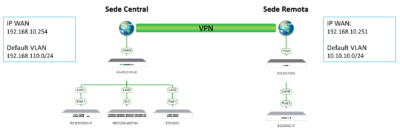
To allow the outside world to find your server, you need to access your router's settings and configure port forwarding for UDP port 1194 to your server's static IP address. If your public IP address changes frequently, it's best to set up a Dynamic DNS (DDNS) service like No-IP or DynDNS. This will allow you to connect using a name (e.g., myhome.ddns.net) instead of a numerical IP address.
On the client side, whether on Windows, Android, or iOS, you only need to import the .ovpn file and the corresponding certificates. It's important to verify that the cipher is the same on both ends, for example, AES-256-GCM , to avoid handshake errors or authentication failures during tunnel establishment.
Common Troubleshooting
It's normal for something to go wrong the first time. If the client is stuck in a waiting state, it's most likely that the Windows firewall or router is blocking the port. To optimize this, you can check advanced firewall settings on the servers . If you see "TLS Error" messages, verify that the ta.key file is identical on both the server and the client. Finally, if the connection is established but you can't reach the local network, check that you've created a static route in your router pointing to the VPN server's IP address.
Setting up a local OpenVPN server transforms any simple computer into a privacy stronghold, facilitating secure remote access to files, IP cameras, or printers without exposing them directly to the internet. Whether you opt for detailed manual configuration for complete control, use automated scripts on a VPS, or deploy it on compatible routers, the key lies in proper certificate management and precise port forwarding in the firewall.
