- Cat5e, Cat6, Cat6a, and Cat7 differ in bandwidth, maximum speed, shielding, and supported distance.
- Cat6 and, above all, Cat6a are today the best foundation for future-proof networks up to 10 Gbps.
- Cat7 offers extreme shielding but poses standardization and compatibility problems compared to Cat6a.
- The choice of cable depends on the environment, interference, budget, and actual network needs.
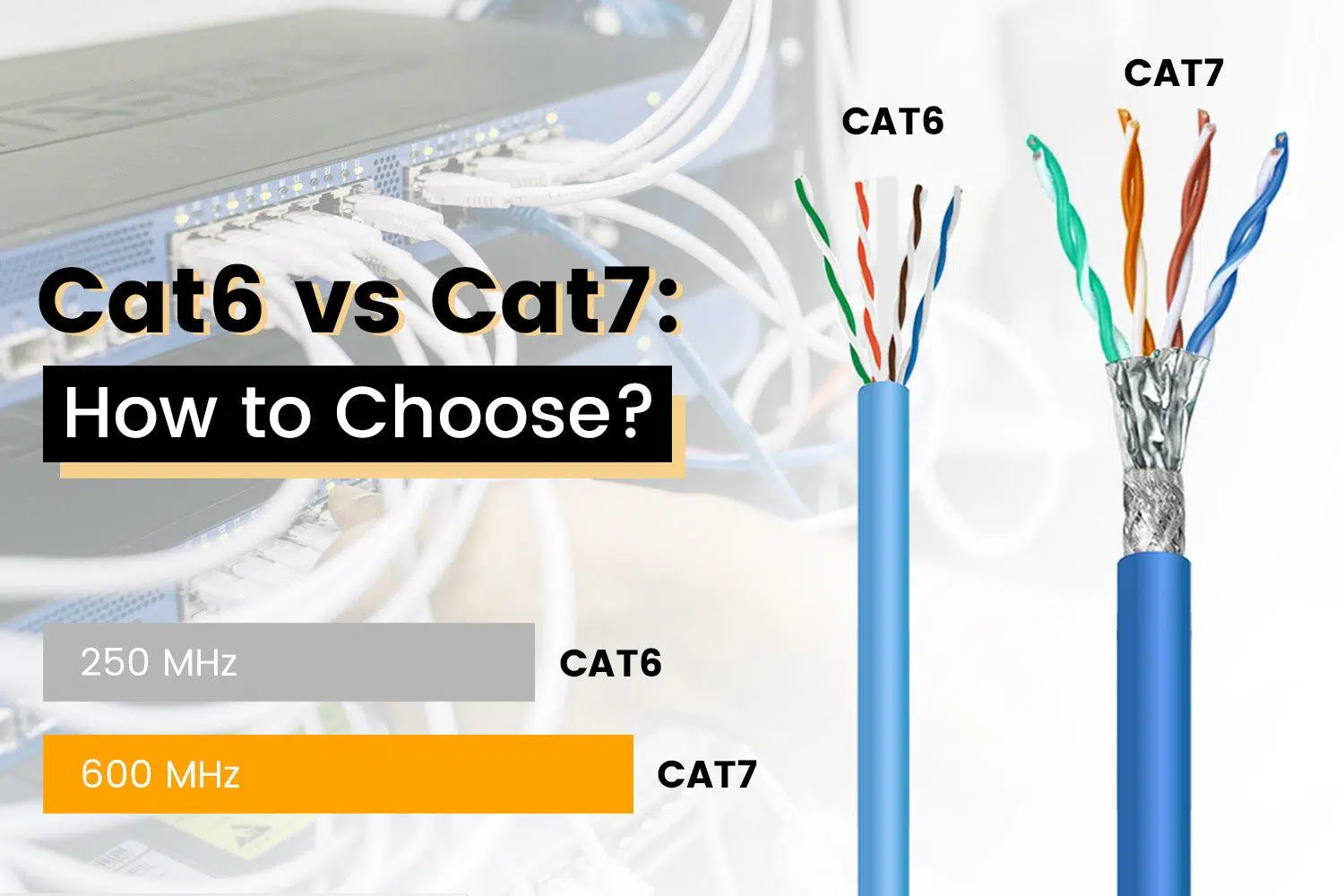
In any network project, from a small office to a large data center, the choice of Ethernet cable type can make the difference between an installation that's more than adequate for years and one that falls short after just a few months. Although all cables may look the same from the outside, the Cat5e, Cat6, Cat6a, and Cat7 categories offer significant differences in bandwidth, speed, shielding, compatibility, and cost.
Understanding the differences between Cat5, Cat6, and Cat7 cables (including their variants Cat5e and Cat6a, which are the real stars today) is key to avoiding wasted money and limiting network performance. The following sections detail their technical characteristics, provide clear comparisons, and offer practical recommendations for home use, professional applications, structured cabling installations, and even live sound environments.
What is structured cabling and why does cable category matter?
Structured cabling is the physical telecommunications infrastructure that connects all the equipment in a network: workstations, switches, routers, access points, patch panels, etc. Simply put, it's the "highway" along which data travels and on which computer networks, IP telephony systems, cameras, and video surveillance solutions rely.
The category of copper cable (Cat5e, Cat6, Cat6a, Cat7, Cat8…) determines its bandwidth capacity, maximum speed, and resistance to interference . Although the electronics can be replaced relatively easily, the cabling usually lasts for years, so choosing well from the start is a long-term investment and a way to make the network more future-proof.
Modern networks almost always use copper twisted-pair cables , with several pairs of wires twisted together to reduce crosstalk (interference between pairs). Depending on the category, these pairs may be unshielded (UTP) or shielded with different types of shielding (FTP, S/FTP, etc.) to improve performance against electromagnetic interference (EMI) and external noise.
The most common cable categories today are Cat5e, Cat6, Cat6a, and Cat7 , with Cat8 primarily reserved for data centers and very short distances at extreme speeds. Each offers different performance characteristics in terms of frequency, supported speed, and maximum distance.
When planning a structured cabling system, it is advisable to consider not only current needs, but also potential network growth , new applications (4K/8K video, virtual reality, high-quality IP voice and video), number of users, and the physical environment (quiet office, noisy industrial environment, concerts, stages, etc.).
Comparative table: Cat5, Cat5e, Cat6, Cat6a and Cat7
To quickly situate each category, this is the key information that is usually of interest in a first comparison: bandwidth, maximum speed, recommended distance, typical applications, type of shielding and compatibility with previous generations.
| Category | Bandwidth (MHz) | Typical maximum speed | Transmission standards | Usual distance | Primary use | Typical armor |
|---|---|---|---|---|---|---|
| Cat5 | 100 MHz | 10 / 100 Mbps | 10BASE-T, 100BASE-TX | Up to 100 m | Older basic home and office networks | UTP |
| Cat5e | 100 MHz | 1 Gbps | 1000BASE T | Up to 100 m | Gigabit networks for homes and SMEs | UTP |
| Cat6 | 250 MHz | 1 Gbps (100 m) / 10 Gbps (up to 55 m) | 1000BASE-T, 10GBASE-T (limited) | 100 mA 1 G / 55 mA 10 G | Demanding Gigabit networks, HD video | UTP/STP |
| Category 6a | 500 MHz | 10 Gbps | 10GBASE-T | Up to 100 m | Data centers and 10G networks | UTP / S/FTP |
| Cat7 | 600 MHz | 10 Gbps | 10GBASE-T, 1000BASE-T | Up to 100 m | Industrial environments and high EMI | S/FTP (individually shielded pairs) |
Although Cat7 has a slightly higher bandwidth than Cat6a, in practice both operate within the same effective performance range of 10 Gbps . The real difference lies in the level of shielding, the type of connector, and, above all, the standards each one adheres to.
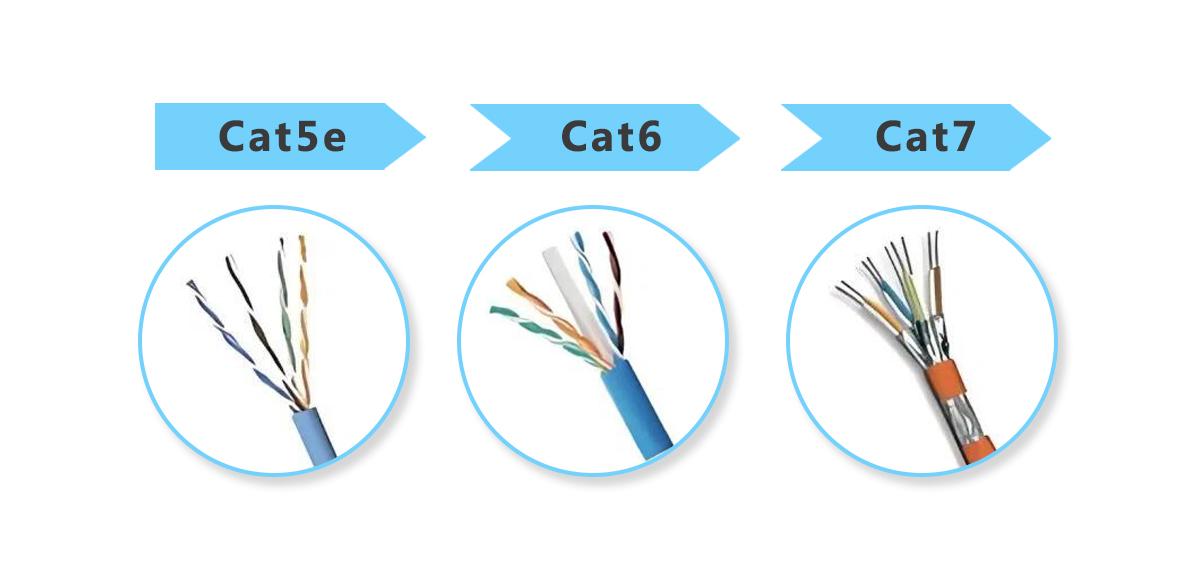
Detailed analysis of each Ethernet cable category
Cat5 cable: an outdated category
For years , "pure" Cat5 cable was the standard in small offices and homes, with a bandwidth of 100 MHz and support for speeds up to 100 Mbps. It enabled perfectly adequate Fast Ethernet networks for basic browsing, email, and little else, and was also used in many mixed telephony and data installations.
Today, Cat5 is practically obsolete, as it doesn't reliably support Gigabit networks like Cat5e does. Although it can still be found in older installations, it's not recommended for deploying new networks, even home networks, because it severely limits the maximum speed and performance of services like high-definition streaming or large backups.
In environments where only very basic voice and data applications are needed , Cat5 might still be acceptable, but considering the current cost of higher categories, there's not much point in continuing to install it.
Cat5e cable: the minimum recommended today
The natural evolution of Cat5 is Cat5e (Category 5 enhanced) , which improves crosstalk and internal noise control, allowing it to operate at speeds of up to 1 Gbps over the standard 100 MHz. It uses RJ45 connectors and typically features a UTP construction (without additional shielding), which simplifies installation and keeps costs down.
Cat5e is designed for Gigabit Ethernet 1000BASE-T networks , utilizing all four wire pairs. Under these conditions, it can reach lengths of up to 100 meters at 1 Gbps without major issues, making it the de facto standard in many homes and small offices.
In practice, a Cat5e cable allows for Full HD streaming, video calls, online gaming , and most current internet uses without problems, provided that the contracted connection does not exceed gigabit and there are no special latency requirements or massive internal traffic.
However, although Cat5e is still valid, it is worth remembering that its bandwidth and growth capacity are more limited than those of Cat6 or Cat6a, so in new installations with some future projection it is usually better to invest a little more and move up a category.
Cat6 cable: a clear leap in performance
Cat6 cable increases bandwidth to 250 MHz and strengthens specifications for crosstalk and system noise. It still uses RJ45 connectors and is manufactured in both UTP (unshielded) and shielded versions (e.g., STP or F/UTP) designed for electromagnetically noisy environments.
In terms of speed, Cat6 supports 1 Gbps up to 100 m without issues, just like Cat5e, but it can also operate at 10 Gbps (10GBASE-T) at distances of up to approximately 55 m under normal conditions. Beyond that distance, attenuation and noise limit performance, and a 10G connection is not guaranteed.
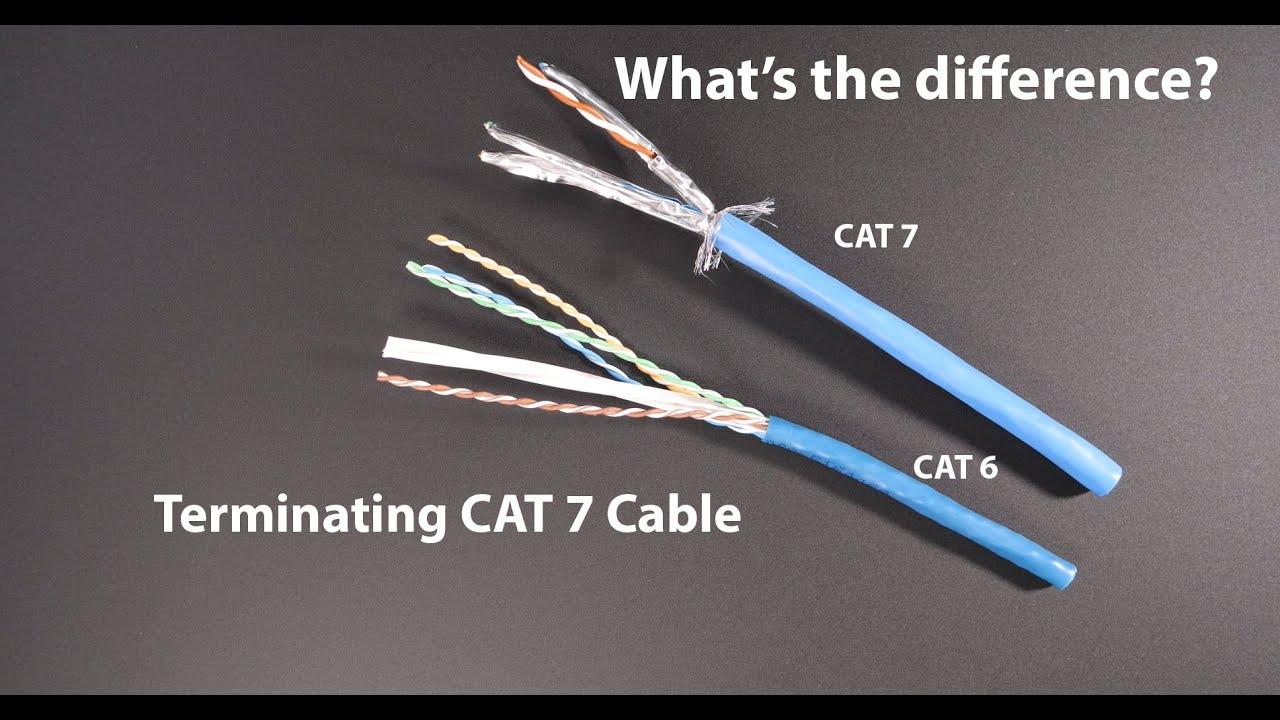
Many Cat6 cables incorporate an internal plastic separator or crosshead that physically separates the pairs, reducing crosstalk. Some models use 23 AWG copper or copper-clad aluminum conductors, which improves the conductor cross-section and, consequently, the cable's electrical performance.
Cat6 is a very balanced option for business networks , modern offices, classrooms, small data centers and even demanding homes, as it offers room to migrate to 10 Gbps in relatively short increments, with a still reasonable cost and an installation that is not as demanding as in higher categories.
Cat6a cable: the “serious” 10G option
The Cat6a (Category 6 Augmented) category was defined to meet the need to achieve 10 Gbps over copper up to a full 100 meters, while improving external crosstalk (interference between adjacent cables) and immunity to external noise.
Cat6a operates at up to 500 MHz bandwidth , twice that of Cat6, and is specifically designed for 10GBASE-T Ethernet . With a properly installed Cat6a cable and certified components, it's possible to achieve speeds of 10 Gbps over 100 meters, making it the workhorse for data centers that still rely on copper, as well as for corporate buildings that need a network with room to grow.
It is very common to find Cat6a cables with LSZH (Low Smoke Zero Halogen) coating , which offer better fire performance and emit less toxic smoke, something that is increasingly required in critical infrastructure, indoor installations and public buildings.
By design, Cat6a cables are typically thicker, somewhat more rigid, and heavier , with shielding for individual pairs or globally (F/UTP, S/FTP, etc.), precisely to address EMI and crosstalk issues at high frequencies. This means that installation can be somewhat more complex, especially in heavily congested conduits or those with tight bend radii.
Although Cat6a costs more than Cat6 and Cat5e, the price difference has been decreasing, and in many professional projects it is considered the optimal "future" option because it allows deploying 1 Gbps today and migrating to 10 Gbps tomorrow with the same cabling.
Cat7 cable: extreme shielding and standard issues
Cat7 cable was designed to offer a very high level of shielding, with an S/FTP structure in which each twisted pair is individually foil-shielded, and the cable as a whole has an additional layer of shielding. The result is excellent protection against electromagnetic interference (EMI) and crosstalk , ideal for very noisy environments.
Cat7 achieves a bandwidth of up to 600 MHz and is designed for speeds of 10 Gbps up to 100 m, so in purely numerical terms it is very similar to Cat6a. The main difference lies in its structure, the type of connector, and the standards it supports.
Instead of standard RJ45, Cat7 was initially designed to work with connectors like GG45 or TERA , which offer better performance at high frequencies but are incompatible with typical Cat5e/Cat6/Cat6a RJ45 connectivity. Furthermore, the TIA/EIA standard does not recognize Cat7, which is based on ISO/IEC standards, leading to compatibility and consistency issues among manufacturers.
Consequently, although Cat7 offers far superior shielding and excellent interference immunity, its use can complicate interoperability with traditional RJ45 equipment and panels, and in many cases does not provide real improvements over a good certified Cat6a system, which is TIA standard and fully backward compatible with Cat5e/Cat6.
Speed, distance, bandwidth and their impact on the network
When comparing categories, it's important to understand how bandwidth (MHz), data rate (Gbps), and maximum cable length relate to each other . Higher bandwidth allows more information to be transmitted per unit of time, but it also makes the system more susceptible to crosstalk and interference, hence the need for better shielding and more robust designs.
For guidance, the typical behavior of each most commonly used category in twisted-pair copper can be summarized as follows:
- Cat5e: up to 1 Gbps, 100 MHz, 100 m distance in 1000BASE-T.
- Cat6: up to 10 Gbps, 250 MHz, 55 m to 10 Gbps and 100 m to 1 Gbps.
- Category 6a: up to 10 Gbps, 500 MHz, 100 mA 10 Gbps.
- Cat7: up to 10 Gbps, 600 MHz, 100 mA 10 Gbps.
Over long distances, the main limiting factor is signal attenuation and crosstalk . For example, a Cat6 cable can provide a 10 Gbps link in an office where the distance between the communications cabinet and a workstation does not exceed 50-55 m, but it is not a suitable option for a horizontal, floor-to-floor 10 Gbps backbone.
Cat6a and Cat7 more reliably maintain signal integrity at 10 Gbps in the usual 100 m of structured cabling (communication rooms, patch panel, user sockets, etc.), making them natural candidates for installations that want to get the most out of 10G Ethernet over copper.
When we talk about future categories like Cat8, we enter a different scenario: frequencies up to 2000 MHz , speeds of 25/40 Gbps but only in very short stretches (up to about 30 m) and almost always in data center environments where switches and servers are very close together.
Shielding and construction types: UTP vs S/FTP
Another major difference between the categories lies in the type of shielding. Cat5e and many Cat6 cables are UTP (Unshielded Twisted Pair) , meaning they rely solely on the twisting of the pairs and manufacturing controls to minimize crosstalk. These cables are more flexible, easier to handle, and less expensive.
Many Cat6a implementations, and virtually all Cat7 implementations, use shielded structures (S/FTP, F/UTP, etc.) , with one or more layers of metallic foil surrounding the pairs (and sometimes the entire assembly). This design significantly reduces EMI and crosstalk, making the cable perform better in demanding environments.
The downside is clear: shielded cables typically have a larger diameter, are more rigid, weigh more, and are somewhat more complex to install . Furthermore, to fully utilize the shielding's potential, it's crucial that the system is properly designed in terms of grounding and shielding continuity at connectors, panels, and outlets.
In typical home and small office installations, a well-installed Cat6 UTP system is usually sufficient and more economical. However, in data centers, buildings with high cable density, industrial environments, machine rooms, or scenarios with a lot of electronics, shielded Cat6a or Cat7 solutions should be seriously considered.
Compatibility between Cat5e, Cat6, Cat6a and Cat7
TIA standards require that Cat6 and Cat6a be backward compatible with lower categories such as Cat5e, Cat5, and Cat3. This means that components can be mixed (provided the limitations are understood) and that if older equipment is connected to modern cabling, it will operate at the maximum speed supported by both ends.
For example, a laptop with a 100 Mbps network card will work without issue when connected to a Cat6 or Cat6a port, although the speed will obviously be limited to 100 Mbps. The same applies to Gigabit devices connected over a Cat6a cable designed for 10 Gbps: 1 Gbps will be negotiated , and the network will be fully functional.
In the case of Cat7, the situation is somewhat more complex. Since it's a cable defined by ISO/IEC and not TIA/EIA , and uses connectors other than RJ45 (such as GG45 or TERA), direct compatibility with previous infrastructures is not guaranteed. Some manufacturers offer hybrid solutions or Cat7 cables that terminate in RJ45, but it's essential to carefully review the specifications and standards they comply with.
Looking ahead, many experts recommend opting for Cat6 or, even better, Cat6a as the reference structured cabling systems, because they combine good performance, backward compatibility, and a very solid international regulatory base.
Which category to choose: Cat5e, Cat6, Cat6a or Cat7?
Choosing the ideal Ethernet cable depends on several factors: budget, required speed, installation environment, link distances, and anticipated network growth . Cabling an 80 m² apartment is not the same as cabling a ten-story office building or a music festival.
If only performance and cost are considered, the general recommendations are usually these:
- Cat5e: acceptable for simple home networks and small offices with links up to 1 Gbps and without major growth expectations.
- Cat6: good value for money for advanced homes and SMEs, with the possibility of 10 Gbps in short stretches and better crosstalk control.
- Category 6a: Recommended option for new infrastructures that want to be prepared for 10 Gbps at 100 m, especially in companies and data centers.
- Cat7It only makes sense in very specific cases where extreme shielding is needed and there is total control over the compatibility of connectors and equipment.
Since the price difference between Cat5e, Cat6, and Cat6a has narrowed considerably, many corporate projects consider it unwise to continue installing Cat5e except in very specific cases. Opting for Cat6 or Cat6a requires a slightly larger investment, but avoids having to redo all the cabling when the network needs to upgrade to higher speeds.
Furthermore, since Cat6 and Cat6a are fully backward compatible, even if the network currently operates at 1 Gbps, the cabling will already be ready to support a future upgrade to 10 Gbps simply by changing switches and network cards, without any construction work or new conduits.
Practical applications: home, business, data centers and industry
In a home environment, Cat5e or Cat6 cabling is usually sufficient for browsing, streaming, remote work, and online gaming. Even with 1 Gbps fiber connections, these categories perform perfectly well for typical indoor distances.
In modern offices, professional practices, and small businesses, where large files, backups, cloud services, and IP telephony are shared , Cat6 is becoming the sensible minimum, and Cat6a is gaining strength as a medium- and long-term option, especially if growth in the number of users or services is expected.
In data centers and technical rooms, the trend is towards shielded Cat6a or fiber optic cabling , especially when sustained speeds of 10 Gbps are required across many simultaneous links. Cat7 and Cat8 are reserved for very specific cases and are usually used alongside large-scale fiber deployments.
In industrial environments, production plants, or areas with a lot of electrical machinery, the critical factor is electromagnetic interference . This is where shielded (S/FTP) Cat6a or Cat7 cables make perfect sense, as they are capable of maintaining signal integrity in situations that would easily cripple a simple Cat5e UTP cable.
Use of Ethernet cables in live sound and events
A particular case is that of live sound applications , where digital audio over Ethernet protocols (Dante, AVB, AES67, etc.) connect mixing consoles, stage racks, and monitoring systems. Reliability and low latency are especially important here.
In a fixed installation within a venue (theater, concert hall, auditorium), it's generally a good idea to use Cat6 or Cat6a cabling, preferably shielded if the installation runs near power cables, lighting equipment, or metal structures that could introduce noise. This ensures that the links can handle both audio and other IP services with sufficient headroom.
For a small gig with a console at FOH and a rack on stage separated by a short distance, many companies use good quality Cat5e or Cat6 cables, often in "tactical" or ruggedized form, with shielded connectors. At these distances, and if the environment isn't extremely noisy, this is more than sufficient, provided that well-made and tested cables are used.
When it comes to long cable runs at festivals, arenas, or stadiums , things change. In these cases, it's very common to opt for Cat6a or even fiber optic cable, whether due to distance, interference, or the need for redundancy. A high-quality, well-shielded twisted-pair cable, assembled in a robust multi-cable and with appropriate connectors, can save a lot of headaches during a complex event.
Regarding why some sound companies still prefer large analog multicore systems from FOH to amplifiers instead of running everything from a digital stage rack, the reasons are usually related to trust and redundancy: some technicians trust an analog system that has been tested for years, others value not depending on a single data network, and in some cases the available equipment or budget determines the type of solution adopted.
Choosing the right Ethernet cable isn't a technical whim, but a strategic decision that directly affects the performance, stability, and lifespan of your network , whether in a home, a large company, a data center, or a live sound system. A thorough understanding of what Cat5e, Cat6, Cat6a, and Cat7 offer allows you to tailor your choice to your specific environment, avoid unnecessary extra costs, and, above all, ensure you don't run out of bandwidth when it's most needed.

Table of Contents
- 1 What is structured cabling and why does cable category matter?
- 2 Comparative table: Cat5, Cat5e, Cat6, Cat6a and Cat7
- 3 Detailed analysis of each Ethernet cable category
- 4 Speed, distance, bandwidth and their impact on the network
- 5 Shielding and construction types: UTP vs S/FTP
- 6 Compatibility between Cat5e, Cat6, Cat6a and Cat7
- 7 Which category to choose: Cat5e, Cat6, Cat6a or Cat7?
- 8 Practical applications: home, business, data centers and industry
- 9 Use of Ethernet cables in live sound and events