- Infinity Fabric connects the internal blocks of Ryzen and its frequency directly influences latency and performance.
- Total capacity, number of modules and range type (SR/DR) determine stable RAM frequencies.
- The quality of the silicon in the CPU and motherboard sets the real ceiling for FCLK and the memory controller.
- Voltages such as SoC and VDDG, along with FCLK adjustment, are critical to avoid instabilities that are difficult to reproduce.
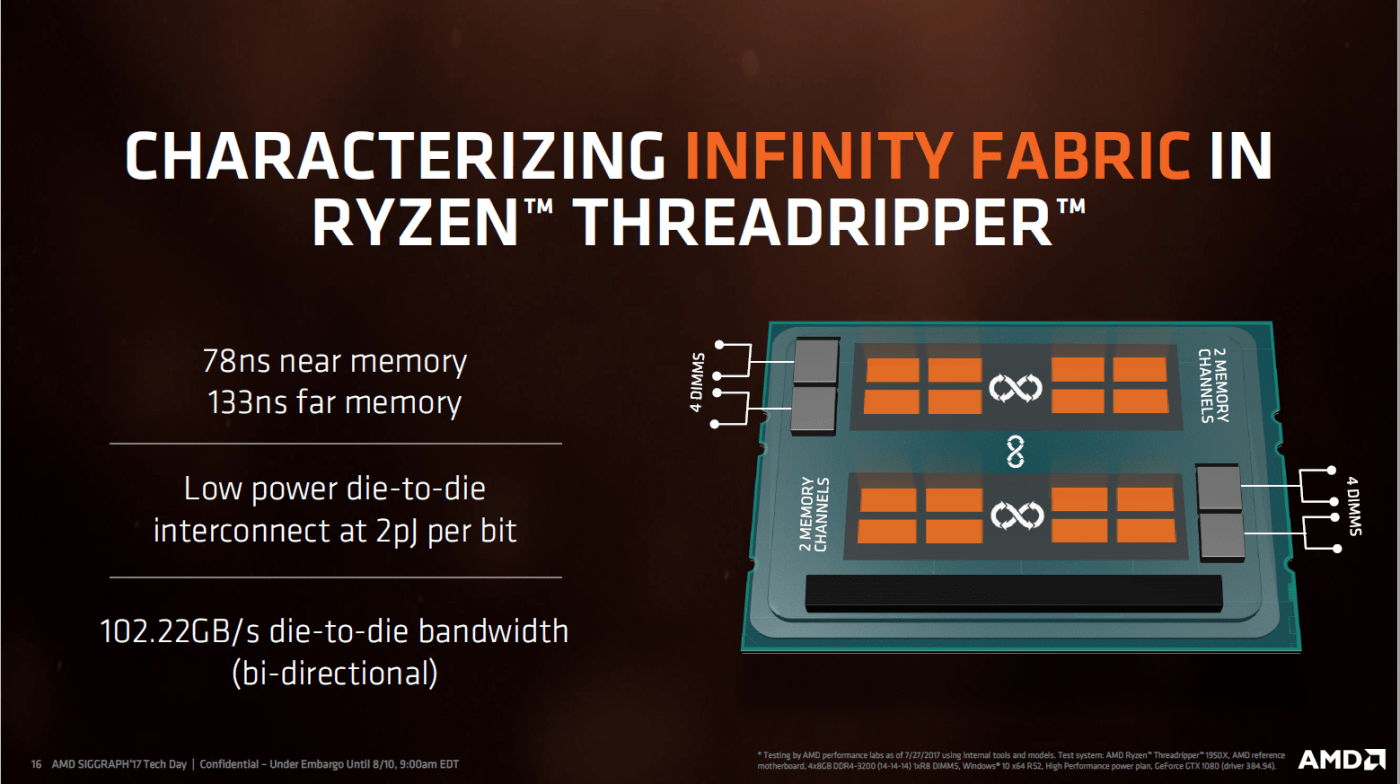
When discussing Ryzen processors and their real-world performance in games and applications, one of the key aspects that raises the most questions is how Infinity Fabric influences RAM and overall system behavior . Many users encounter unusual limits when increasing frequencies, unrepeatable instabilities, or performance drops when upgrading RAM capacity, and the root of the problem almost always lies in the relationship between the Zen architecture, the Infinity Fabric bus, and the integrated memory controller.
While at first glance it might seem like just a matter of "increasing the RAM clock speed and calling it a day," the reality is much more complex. The total installed capacity, the number of modules, whether they are single- or dual-row, the CPU silicon quality, and even the motherboard all combine to define how far you can push the system without sacrificing stability. Understanding this delicate balance is helpful both for fine-tuning a new PC and for getting the most out of an existing Ryzen system without experiencing black screens and phantom restarts.
What is Infinity Fabric and why is it so important in Ryzen?
In Ryzen processors, AMD uses its own interconnect called Infinity Fabric as an "internal highway" to connect the different blocks of the chip . It's not just another bus: it's the system that links the CCDs (core chiplets) , the I/O chip, the memory controller, the PCIe, and other internal components. Its frequency and stability directly affect the system's performance and latency.
In the first generations of Ryzen (Zen and Zen+), the Infinity Fabric frequency (usually referred to as FCLK) was closely tied to the effective frequency of the RAM . In practice, they worked synchronously: if you set the RAM to 3200 MHz (DDR, 1600 MHz actual), Infinity Fabric operated at 1600 MHz. This "coupling" meant that any improvement in the memory was also reflected in an increase in the speed of the Infinity Fabric itself, reducing latency between cores and improving FPS in many games.
With Zen 2 and Zen 3, things were refined, allowing the use of asynchronous modes (FCLK as opposed to MCLK) above certain thresholds, but the core idea remains: Infinity Fabric stability is fundamental for a robust system . If you push this aspect too far, even if the RAM appears stable in benchmarks, you may encounter sporadic crashes, desktop freezes, or cold restarts that are not easily attributed to any specific setting.
To further complicate matters, IF's operation is tied to the SoC's voltage and other fine-tuned platform parameters. This means that simply increasing the frequency isn't enough ; you have to carefully manage the associated voltages and settings, especially when you're exceeding the "sweet spot" values for each generation.
In practice, this translates into a kind of individual ceiling for each CPU: some units comfortably reach 1900 MHz FCLK, while others barely reach 1800-1867 MHz, even within the same model like a Ryzen 7 3800X. This variation falls squarely into the realm of the "silicon lottery."
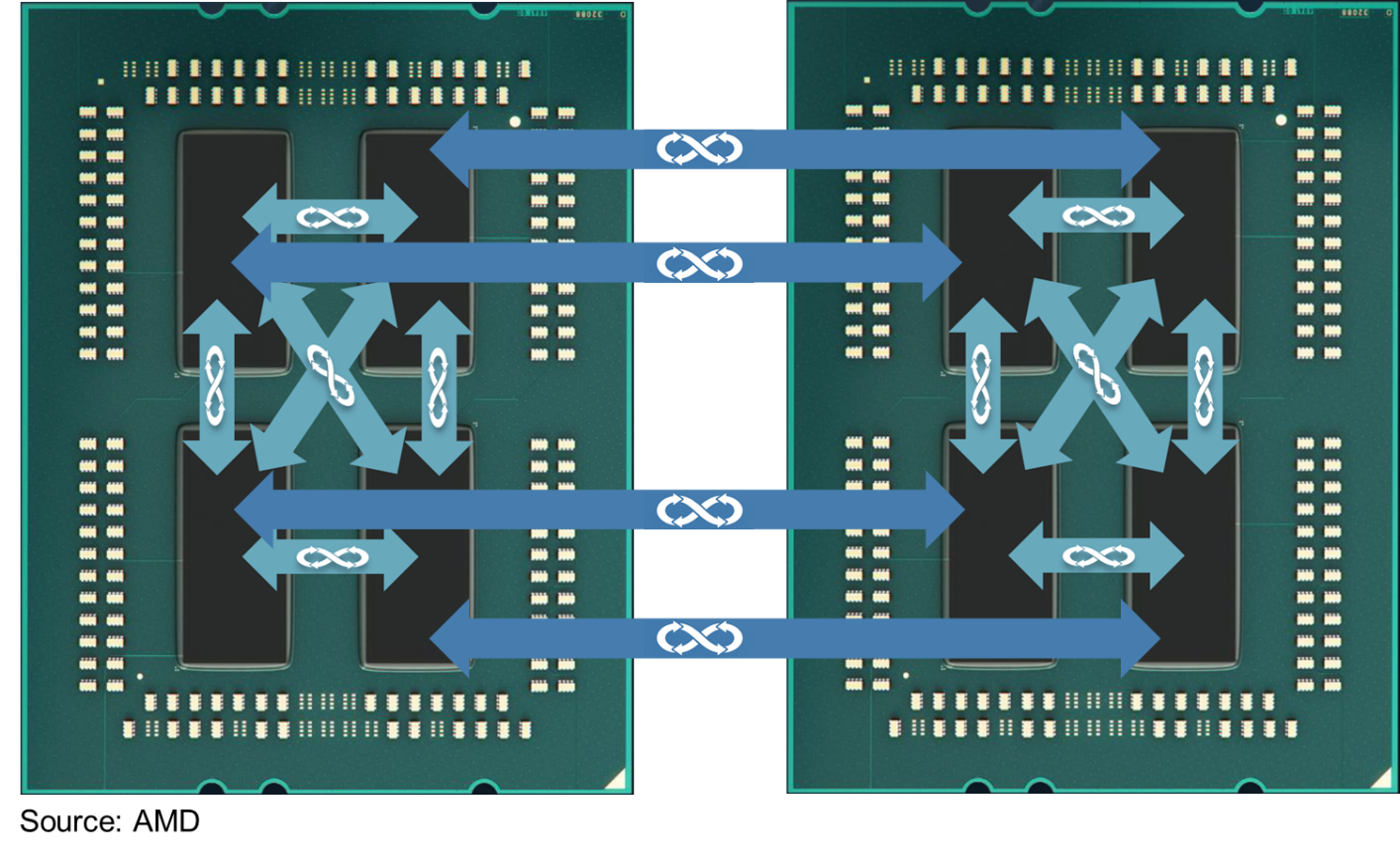
How Zen architecture influences memory and Infinity Fabric
From the first Ryzen processor, AMD integrated the memory controller into the processor itself, meaning that maximum capacity, supported frequencies, and performance with different modules depend directly on the Zen architecture and its revisions (Zen, Zen+, Zen 2, Zen 3, etc.). With each generation, RAM support has improved: more official frequencies, better stability, and fewer compatibility issues.
The first Ryzen processors (Zen 1) were particularly finicky with certain modules and XMP profiles. It was relatively common for a kit advertised at 3200 MHz to end up running at 2933 or 3000 MHz to maintain stability, especially with basic motherboards or less mature BIOS versions. With Zen+, significant work was done on the AGESA microcode, refining memory training and allowing more kits to reach their specifications without difficulty.
Zen 2 took another leap forward, improving both IOD and Infinity Fabric management, which resulted in greater ease in achieving RAM frequencies of 3600 MHz with FCLK at 1800 MHz . This 3600/1800 combination became the de facto "sweet spot" for many users, offering a very good balance between latency and stability. Zen 3 continued along these lines, even allowing some CPUs to push FCLK even further.
In all cases, the final performance depends not only on "what your processor generates" but also on how the memory frequency, the Infinity Fabric frequency (FCLK), and the memory controller frequency (UCLK) interact . When everything is synchronized, latencies are low and performance is high; when there are mismatches, latencies skyrocket, and the benefit of increasing RAM MHz is reduced or even becomes counterproductive.
Therefore, when we talk about "improved" memory support in a new generation of Ryzen, we are actually talking about a set of changes: a more robust controller, a more capable Infinity Fabric, and smarter memory training algorithms integrated into AGESA.
A very visible side effect is that, as generations progress, the list of problematic or manually adjustable memory modules shrinks , and it's more likely that you'll simply activate the DOCP/XMP profile and the PC will boot without any issues.
Capacity, number of modules and ranges: why it affects frequencies so much
When choosing RAM for a Ryzen processor , it's not just the speed advertised on the box that matters. Total capacity, the number of sticks installed, and whether each module is single-rank (SR) or dual-rank (DR) all significantly impact what the controller can handle simultaneously without having to lower the frequency or reduce latency.
When it is said that going from 2x8 GB to 2x16 GB or to 4x16 GB you will probably have to lower the maximum stable frequency or loosen timings , it is summarizing an electrical reality: the more chips and the more load you put on the memory lines, the more complicated it is for the controller to maintain a clean signal at high speeds.
Dual-range modules add an interesting nuance. A DR module, in very simplified terms, has two logical memory blocks connected to the same controller . This increases the load on the signal, yes, but it can also provide performance benefits thanks to better utilization of internal parallelization, especially in some intensive workload scenarios.
The problem is that when you add more memory modules (for example, four DR modules), the memory controller has to work harder to maintain signal integrity at high frequencies . Often, the practical solution is to reduce the effective RAM frequency to ensure stability. That's why AMD officially limits the supported frequencies for different module combinations in the technical specifications of each CPU.
That's why it's often better to install 2x16GB DR modules with fine-tuning than 4x8GB SR modules pushed to their limits, especially if you're looking for a balance between capacity, performance, and ease of configuration . More modules don't always mean more performance; they often mean more work for the controller and a greater likelihood of hitting the stability bottleneck of Infinity Fabric.
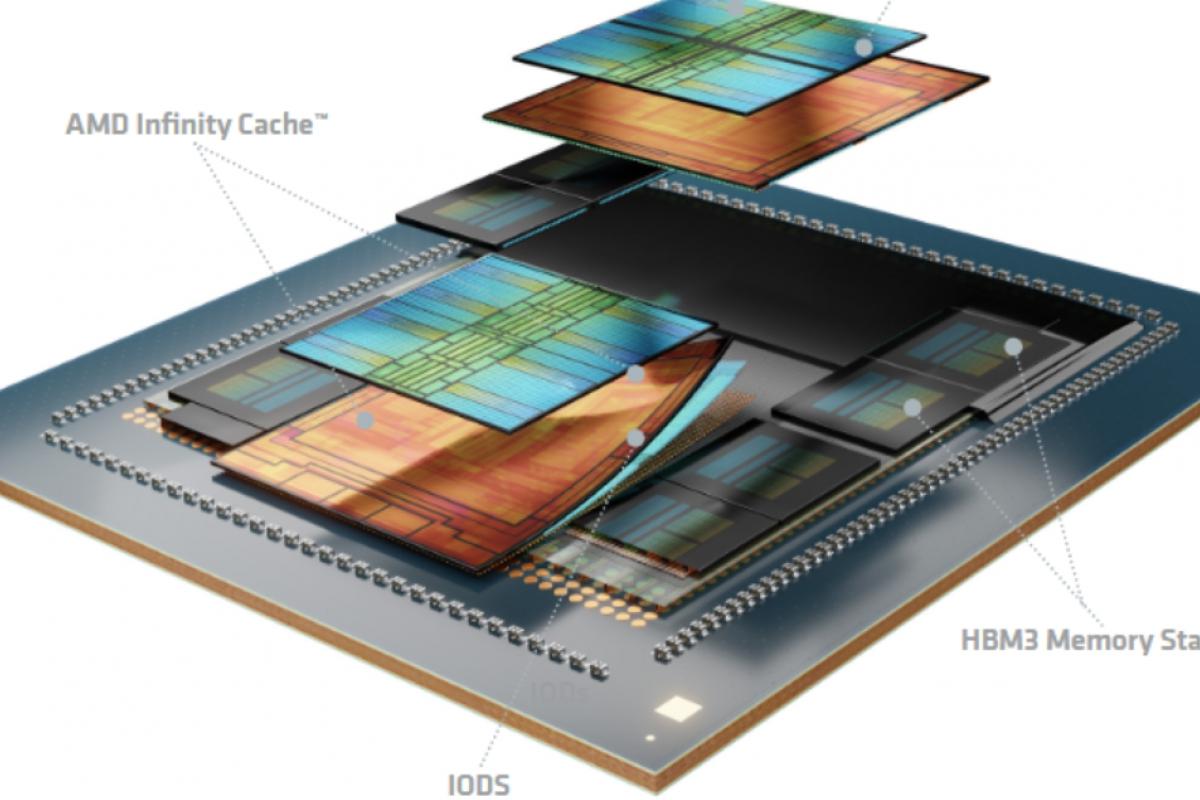
The silicon lottery, the memory controller, and the role of the motherboard
One of the most common comments among Ryzen users is that " your CPU's silicon quality determines how far you can push your FCLK and RAM speeds ." And it's true: while there are general guidelines, each chip is manufactured with slight variations that affect its stable operating range, both in core frequency and in memory controller and Infinity Fabric.
In practice, this means that a Ryzen 7 3800X can handle 1900 MHz FCLK without flinching, while another, seemingly identical one, can't even boot stably above 1867 MHz , even after tinkering with the BIOS. This difference can't usually be "forced" solely through voltage adjustments; there comes a point where you've simply reached the chip's physical limit.
Contrary to the idea that "RAM barely consumes power, so the motherboard doesn't matter," it's worth remembering that the stability of Infinity Fabric and the memory controller is closely tied to how the voltages of the SoC, VDDG, and other related domains are managed . A motherboard with poorly adjusted line calibration (LLC) or significant voltage drops can be the cause of those cold restarts that don't appear in standard stress tests.
Furthermore, successive versions of AGESA released by motherboard manufacturers correct behaviors, refine memory training, and introduce new parameters that allow for even better adjustment of the FCLK, UCLK, and MCLK ratios . It's common to see that, after a major BIOS update, a system is able to boot XMP profiles that previously failed, or that it no longer experiences micro-freezes associated with certain load scenarios.
From a practical standpoint, all of this means that when planning a Ryzen build designed to take full advantage of Infinity Fabric and RAM, it's not advisable to skimp on the motherboard if you want to run high frequencies or use a lot of memory . A well-designed B550 or X570 motherboard can make the difference between having to settle for 3200 MHz and being able to enjoy 3600-3800 MHz with stable FCLK.
Infinity Fabric and RAM overclocking: voltages, limits, and symptoms of instability
When you delve into overclocking IF and RAM, theory quickly becomes practice. A typical example is a CPU like the Ryzen 7 3800X, which won't boot at 1900 MHz FCLK under any settings and is only viable at 1867 MHz. But even then, very sporadically, complete system failures occur: a black screen and a cold restart, without a blue screen or clear errors in the event viewer.
In such situations, standard stress tests (Memtest, Prime95, Linpack, etc.) can run for hours without reporting a single failure, while the system crashes once every few days during everyday use . This combination is usually an indication that Infinity Fabric or the FCLK/MCLK/UCLK ratio is at its limit, even if the RAM itself appears stable in synthetic tests.
The most common voltage adjustments for stabilizing this part of the Ryzen platform include the SoC voltage and the VDDG voltage . The former powers the I/O complex, while the latter is closely related to the Infinity Fabric bus signals. It's quite common that when increasing VDDG to try to stabilize a high FCLK, the SoC voltage must also be increased to maintain a safe margin.
However, it's important to understand that higher voltage doesn't always mean greater stability ; there's a reasonable recommended range for SoCs (for example, around 1,05-1,1 V in many Zen 2 processors) and for VDDG, and exceeding it can have the opposite effect or, in the long run, degrade the silicon. Hence the importance of gradually testing different values and noting each change.
A sensible step when you suspect the FCLK is too high is to lower the frequency slightly, for example from 1867 to 1833 MHz, keeping everything else the same, and see if the random crashes disappear. If the system stops experiencing phantom restarts for weeks with just that adjustment , it's very likely you've reached the true Infinity Fabric ceiling for your CPU.
Another helpful aspect is adjusting the SoC line voltage (SoC LLC) calibration . An overly aggressive calibration can cause voltage spikes under load, while an overly lenient one can lead to dips that destabilize the IF at specific times. Setting this parameter to an intermediate level, which reduces vdroop without generating unnecessary spikes, is usually a good starting point.
Beyond the main voltages, recent AGESA revisions have added additional parameters for fine-tuning bus behavior and memory training . While each BIOS may name them differently, the idea is to give advanced users more control over how the platform negotiates boot frequencies, secondary timings, and the FCLK itself. Adjusting these parameters isn't essential for most users, but it can make a significant difference when striving for the highest stable frequency without hidden errors.
Taken together, this entire layer of adjustments means that overclocking Infinity Fabric and RAM isn't simply a matter of "raising the multiplier," but rather a balancing act between frequency, reasonable voltages, silicon quality, and total installed memory capacity . And, as always, carefully documenting the tests (for example, with HWinfo logs) is extremely helpful in identifying patterns when an isolated failure occurs.
Ultimately, understanding how the Zen architecture, Infinity Fabric, memory controller, and motherboard interact allows for more informed decisions when configuring a Ryzen system: choosing the right combination of memory capacity and number of modules, targeting RAM and Infinity Fabric frequencies where most CPUs perform optimally, and only adjusting key voltages as needed. Those who take the time to understand these details typically enjoy a faster, more stable PC with fewer headaches than those who simply try to squeeze out MHz without thinking.

Table of Contents
- 1 What is Infinity Fabric and why is it so important in Ryzen?
- 2 How Zen architecture influences memory and Infinity Fabric
- 3 Capacity, number of modules and ranges: why it affects frequencies so much
- 4 The silicon lottery, the memory controller, and the role of the motherboard
- 5 Infinity Fabric and RAM overclocking: voltages, limits, and symptoms of instability