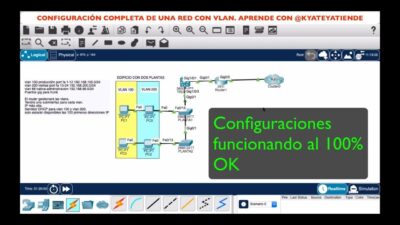
- VLANs segment the physical network into isolated logical networks, reducing broadcast traffic and improving performance.
- The correct use of access ports, trunks, and native VLANs is key to preventing VLAN hopping and switch spoofing attacks.
- Inter-VLAN routing should always be accompanied by ACLs or firewalls that precisely control who can talk to whom.
- VACL, PVLAN and rigorous management of unused ports strengthen security and control in complex enterprise networks.

If you manage a corporate network, you know that keeping everything running quickly and securely is no easy feat. As teams, services, and applications grow, broadcasts, bottlenecks, and security issues start popping up everywhere.
One of the most powerful tools for bringing order to this chaos is VLANs (Virtual LANs) . Well-designed and configured, they allow you to segment the network, reduce unnecessary traffic, isolate departments, and protect critical services… but poorly implemented, they can become a security sieve or an administrative nightmare.
What exactly is a VLAN and why does it matter for security?
A VLAN is essentially a separate logical network that runs on the same physical infrastructure: the same switches, the same cabling, the same Wi-Fi access points. Logically, the devices on a VLAN behave as if they were on a separate LAN, even if they are located on different floors or in different buildings.
This allows a group of PCs, servers, IP phones, printers, or IP cameras to form their own broadcast domain , isolated from other groups. Broadcast and multicast packets remain within their VLAN instead of flooding the entire network, improving performance and making it easier to control who can see whom.
In business environments, it's common to create VLANs for different departments (accounting, engineering, marketing) , to separate management traffic, for voice, for guests, for IoT, or even a dedicated backup VLAN. Each one has its own routing, security, and quality of service rules.
Furthermore, VLANs are a key component of segmentation and Zero Trust strategies : networks are no longer assumed to be "fully trustworthy," and attack surfaces are defined. A failure or infection in one VLAN should not cause the entire organization to collapse in a domino effect.
Basic concepts: access ports, trunks, and native VLAN
To fully understand VLAN configuration and security, three concepts are crucial: access ports, trunk ports, and native VLANs . Mastering these three concepts makes everything else much easier.
An access port is a switch port that carries traffic from a single VLAN to an end device: a PC, printer, IP camera, phone, etc. The traffic leaves the switch and travels to the device without an 802.1Q tag. Internally, the switch knows which VLAN the device belongs to, but the device doesn't see the tag.
A trunk port is a link between network devices (switch-switch, switch-router, switch-AP) through which multiple VLANs travel simultaneously . In this case, the frames carry the 802.1Q tag indicating which VLAN they belong to. This allows VLANs to be extended throughout the topology and multiple logical networks to pass over the same physical link.
The native VLAN is the VLAN used for untagged traffic on an 802.1Q link. Every frame entering a trunk port without a tag is assigned to this native VLAN. By default, on many devices, it's VLAN 1, and this is where security problems begin if this configuration isn't changed.
Network architecture and design with VLANs
In medium and large networks, a three-layer topology is commonly used : core, distribution, and access. Each layer has a specific role, and how these layers are combined with VLANs is of great practical importance.
The access layer consists of the switches that directly connect users and end devices. These switches have the most access ports and are where most user, voice, IoT, and other VLANs are defined. This is where port assignment and physical security practices (preventing unauthorized cable plugging) require the most attention.
The distribution layer consists of switches that aggregate traffic from multiple access switches . It is typically the point where routing between VLANs occurs, finer ACLs are applied, fiber links are terminated, links (EtherChannel) are added, and more advanced policies (QoS, storm control, etc.) are implemented.
The core layer houses the distribution links and the gateway to the internet or external networks. In very large networks, the core typically handles only high-speed switching , with very few additional functions, to reduce latency and complexity.
When designing a network with VLANs, it is advisable to first define which logical groups are needed (by function, criticality, level of trust, etc.) and then implement it in a well-planned IP scheme (subnets, masks, VLSM, dynamic and static ranges) and in a clear allocation of ports on each switch.
VLAN types and common uses
The most widespread standard for tagging frames on trunk links is IEEE 802.1Q . It adds 4 bytes to the Ethernet header with the VLAN ID and other fields, so the switch knows exactly which VLAN each frame belongs to without encapsulating the entire frame.
When configuring VLANs with 802.1Q on switches, each port can be marked as tagged or untagged for a specific VLAN. A port can be tagged in several VLANs (typical of a trunk) but only untagged in one of them (the one the end device will see if it's an access port).
In addition to standard 802.1Q-based VLANs, other commonly used modalities exist in corporate environments: port-based VLANs, MAC-based VLANs, management VLANs, control VLANs, custom native VLANs, hybrid VLANs, and even VXLANs in data center and cloud environments where millions of logical networks are required. Technologies such as 802.1X and dynamic VLANs for advanced allocation and security should also be considered.
The management VLAN is used exclusively for administrative access to switches, routers, access points, firewalls, and monitoring systems. It typically has its own IP subnet and strict access control lists (ACLs) that restrict who can enter. Managing devices from the same VLANs as users is a very bad idea.
The so-called control VLAN is dedicated to internal network protocol traffic: STP, routing protocols, CDP, LLDP, VTP, etc. Separating this traffic from data or management traffic reduces noise, improves stability, and allows for the application of specific security measures.
VLAN 1, native VLAN, and why they are a security problem
On most switches, VLAN 1 is configured as the default and native VLAN on all ports. This means that, if left unchanged, all untagged traffic entering a trunk will be routed into VLAN 1, and all ports will be considered part of it.
The problem is that any reasonably savvy attacker knows this. VLAN 1 is a prime target for VLAN hopping , switch spoofing, and other attacks that exploit default configurations to infiltrate other VLANs.
In a switch spoofing attack, for example, the attacker connects their device to a port where DTP is active in dynamic mode and negotiates a trunk link with the switch, gaining access to multiple VLANs that should never reach a host.
In a double tagging attack, two 802.1Q tags are mixed in the same frame, taking advantage of the fact that the native VLAN travels untagged, to try to jump from one VLAN to another through a poorly secured trunk.
For all these reasons, current security recommendations are clear: do not use VLAN 1 for users , do not leave it as the native VLAN on trunks, do not give it a management IP address, and if possible, isolate or even filter it so that it does not carry production traffic.
Best practices for port design and allocation
One of the key decisions when configuring VLANs is how to assign switch ports to each VLAN and what to do with unused ports. It seems trivial, but both performance and security depend on it.
On access ports, it's a good idea to always leave only one VLAN untagged (the one for that user or device) and mark the rest as excluded. This prevents the interface from "seeing" VLANs that don't belong to it, even if someone accidentally changes settings.
In trunk links, it's recommended to explicitly configure which VLANs are allowed (e.g., `switchport trunk allowed vlan 10, 20, 99`) instead of passing all VLANs from the network. Each trunk should carry only the VLANs it actually needs.
For unused ports, the safest practice is to shut them down , assign them to a "black hole" VLAN without a gateway or DHCP, and ensure they are not marked as a trunk port or have DTP enabled. This prevents someone from connecting a device and suddenly appearing on the production network.
In environments with a high number of ports, it's essential to thoroughly document what's plugged into each interface , label the cabling, and keep wiring diagrams up to date. Many VLAN connectivity problems are simply due to cables being moved without updating the documentation; a wiring guide helps prevent errors.
"Non-exit" VLANs and unused ports
A simple and very effective technique for protecting free ports is to create a "no-output" VLAN , that is, a VLAN without DHCP, routing and services, and put all the access ports that are not being used into it.
The idea is that even if someone connects a device to one of those ports, that host won't get an IP address, won't have a gateway, won't be able to reach other devices, and its traffic will remain completely isolated. It's a kind of network limbo.
In many environments, a recognizable ID, such as VLAN 777, 999, or 4094 , is used for this purpose. The switch is configured to exclude all other VLANs from those ports, no Layer 3 interface is defined for that VLAN, and it is not advertised on any router.
In addition, it is recommended that DTP be disabled on all access ports with switchport nonegotiate , so that they never attempt to automatically become trunks by negotiating with the neighbor.
VLANs for voice, data, and special devices
In networks with IP telephony and voice traffic , it's standard practice to separate voice traffic into a specific VLAN, distinct from that of the PCs. The reason is twofold: quality of service requirements and security.
Voice traffic is highly sensitive to latency, jitter, and packet loss. If it's mixed indiscriminately with heavy downloads, video streaming, or backups, calls quickly degrade. Separating voice into your VLAN allows you to prioritize it with QoS and apply more precise policies.
Furthermore, IP phones typically have their own VLAN tagging capabilities (802.1Q): they are cascaded with the PC, with the port to the network acting as a trunk (tagged voice, untagged data) and the port to the PC acting as the access port. This requires more precise port configurations to avoid security vulnerabilities.
It's also a good idea to separate IoT devices, home automation systems, IP cameras, televisions, smart plugs , etc., into specific VLANs. These devices often have poor security and poorly maintained firmware, and it's best to keep them off the same logical network as management PCs or critical servers.
In the WiFi world, most professional access points allow you to associate an SSID with each VLAN . This extends the segmentation of the wired network to the wireless network: management VLAN, corporate VLAN, IoT VLAN, guest VLAN, each with its own SSID and rules.
Routing between VLANs, ACLs, and firewalls
By design, VLANs cannot "see" each other at Layer 2. If you want devices on different VLANs to communicate, you have to go up to Layer 3: inter-VLAN routing. This is typically done in a router, firewall, or Layer 3 switch.
There are two main approaches. The first is to use an 802.1Q-compatible router or firewall connected to a switch backbone. The router creates subinterfaces (one per VLAN), assigns IP addresses to them, and acts as the gateway. The firewall , in addition, enforces fine-grained rules regarding who can communicate with whom.
The second approach is to use a Layer 3 managed switch at the distribution or core layer. VLAN interfaces (SVIs) are created on this switch, acting as gateways for each subnet. The switch itself handles internal routing and the corresponding ACLs, offloading work from the edge router.
In both cases, it's vital to accompany this routing with access control lists (ACLs) or strict firewall rules. The existence of an IP path between VLANs doesn't mean all traffic should be allowed. Filtering must be done based on source, destination, ports, protocols, and connection direction.
A typical example: the guest VLAN can only access the Internet, the IoT VLAN can only communicate with specific servers (such as NTP, syslog, or an MQTT broker), the student VLAN cannot access the management VLAN, the backup VLAN only initiates connections to the backup server, etc.
VLAN management protocols: VTP and company
In large networks with many switches, manually creating VLANs on each device is impractical and prone to errors. For this reason, protocols like VTP (VLAN Trunking Protocol) in the Cisco ecosystem allow for the centralized distribution of the VLAN list.
VTP defines three operating modes for a switch: server, client, and transparent . Servers can create, rename, or delete VLANs and send this information to clients within the same domain. Clients receive and apply the changes, but do not modify them. Transparent clients do not process the VLAN database; they only retransmit the information.
These types of protocols greatly simplify life, but they have their fine print: an error in a server switch, a poorly managed VTP password, or an old switch reintroduced into the network with an outdated database can suddenly destroy the VLAN configuration across the entire organization.
Therefore, in many current designs, it is preferred to use VTP in transparent mode or not to use it at all, managing VLANs with automation tools (Ansible, templates, centralized controllers, etc.) or with a more static and controlled design.
Advanced security: VACL, PVLAN and attack mitigation
As the network grows and criticality increases, VLANs alone fall short. To control traffic more granularly within a VLAN, VACLs (VLAN ACLs or VLAN maps) can be used , allowing traffic to be filtered or redirected at the VLAN level, not just on specific interfaces.
VACLs are configured by defining access maps per VLAN that use IP or MAC access lists and specify what to do with matching traffic: let it through, block it, send it to a monitoring port, redirect it, etc. They are then applied globally to one or more VLANs on the switch.
For cases where you want to isolate hosts within the same subnet, there are private VLANs (PVLANs) . These start with a primary VLAN, which is usually where the gateway is located, and then create associated secondary VLANs of two types: isolated and community.
Isolated secondary VLANs allow each host to see only the gateway, but not other hosts, even if they are on the same isolated secondary VLAN. Community secondary VLANs allow a group of hosts to see each other and the gateway, but not other groups on the same primary VLAN.
Regarding specific attacks, in addition to what has already been discussed about VLAN 1 and DTP, it is critical to mitigate VLAN hopping through double tagging . To do this, it is recommended to change the native VLAN to a VLAN not used by hosts, remove the native VLAN from trunks if possible, disable DTP, explicitly define ports as access or trunk, and use commands to ensure that the native VLAN is always tagged, discarding untagged traffic.
Diagnosis and maintenance of networks with VLANs
Setting up a network with VLANs is only half the job; the other half is maintaining it and troubleshooting issues without losing your mind. Typical VLAN connectivity problems often have fairly common causes. For practical guides and procedures, consult resources on network troubleshooting.
On one hand, there are physical errors: cables moved from one port to another without updating the documentation, ports configured as access where a trunk should be, or vice versa, poorly defined redundant links that end in loops if STP is not properly tuned.
On the other hand, there are logical failures: VLANs created on some switches but not on others, VLAN lists allowed on trunks that are incorrectly configured , DHCP ranges that do not match the masks, or gateways that are incorrectly set on the end devices.
The key diagnostic tools are the usual commands: show vlan, show interfaces trunk, show spanning-tree, show ip interface brief, ping, traceroute , etc. Combining these with traffic captures on specific ports and a good monitoring system helps a great deal.
It is also advisable to periodically review ACLs, firewall rules, PVLAN, VACLs, and management configurations to ensure that no gaps have been left open following project changes, expansions, or migrations.
Clear documentation (VLAN schemes, IP ranges, port assignments, description of inter-VLAN access policies) and rigorous change logging are almost as important as the configuration commands themselves.
With well-thought-out segmentation, properly labeled VLANs, prudent native VLAN management, ACL-protected inter-VLAN routing, and consistent maintenance habits, an enterprise network can gain a considerable leap in security, performance, and control without needing to rebuild the entire physical infrastructure.