- NVMe is a protocol designed for SSDs that leverages PCIe, offering thousands of command queues and extremely low latency compared to SATA and SAS.
- NVMe SSDs multiply the transfer speed and IOPS compared to SATA SSDs, with reads of up to 7.000–14.000 MB/s depending on the PCIe version used.
- Its energy efficiency, smaller physical footprint and scalability (including NVMe-oF) have made it the standard for high-performance storage in PCs and data centers.
- Taking advantage of NVMe requires motherboard compatibility and good cooling, but the leap in smoothness and loading times usually more than justifies the investment.

If you're thinking about upgrading your computer or building a lightning-fast server, choosing the right type of storage is almost as important as the CPU or RAM. For years, SATA SSDs have been the star improvement over mechanical hard drives, but that revolution has been overtaken by the arrival of a new player: NVMe storage.
This technology doesn't just slightly improve speed: it completely changes how the system accesses data . Near-instant boot times, lightning-fast game loading, blazing-fast databases, and servers that can handle significantly more traffic with the same hardware. Let's take a closer look at what NVMe is, how it works, how it differs from SATA and SAS, and what real advantages it offers for a home PC or a professional environment.
What exactly is NVMe storage?
NVMe (Non-Volatile Memory Express) is a communication protocol designed from the ground up to work with modern non-volatile memory, such as NAND Flash , taking advantage of the lanes of the PCI Express (PCIe) interface . Unlike SATA or SAS, which were originally designed for mechanical hard drives, NVMe was created with a clear goal: to maximize the speed, parallelism, and low latency of SSDs.
When an NVMe SSD connects to the system, it connects directly to the motherboard's PCIe bus , without needing to go through intermediate controllers like in AHCI. This direct path allows it to communicate at high speed with the CPU and RAM, avoiding bottlenecks typical of older interfaces and reducing response time to just a few microseconds.
Another key feature of NVMe is its ability to manage multiple input/output (I/O) queues . The standard supports up to 64.000 queues, and each can handle up to 64.000 simultaneous commands. This allows for processing a massive number of requests in parallel, taking full advantage of current multi-core processors in both PCs and servers.
Traditional protocols like AHCI, used in SATA, only allow a queue of 32 commands . This results in waiting times, higher latency, and less efficient use of computing power when many read and write operations are performed simultaneously—something increasingly common in modern applications, databases, and virtualization.
NVMe was developed between 2008 and 2011 with a clear objective: to replace SATA and SAS in scenarios where speed and efficiency are critical. Its advantages have been so evident that the standard has become the benchmark for high-performance storage, both in advanced home computers and data center environments.
Relationship between NVMe and the PCI Express interface
One of the major advantages of NVMe over previous technologies is that it relies directly on the system's PCIe lanes. PCIe offers enormous bandwidth and, moreover, allows the device to communicate with RAM without having to go through additional layers like the IOMMU in many cases, further reducing latency and processor resource consumption.
This direct connection allows the NVMe SSD to exchange data very quickly with the RAM and CPU , which is vital when handling large files or continuous data streams. For example, it's especially important for tasks like 4K or 8K video editing , 3D texture rendering in video games, professional 3D modeling, or analyzing large volumes of information.
In the early days of PCIe-connected SSDs, highly specific firmware was required and there was little standardization, which meant that the full potential of the bus wasn't being utilized. To solve this problem, the NVMe protocol was developed, defining how the operating system and the SSD communicate in a uniform, efficient, and extensible way.
Thanks to this protocol and the resulting common ecosystem among manufacturers, NVMe drives have become the dominant SSD type in modern mid-range and high-end PCs, as well as servers. Furthermore, NVMe was designed to evolve over time, allowing for upgrades and expanded capabilities through new firmware and specification versions.
Another key aspect is that NVMe is not limited to "local" PCIe: there is NVMe over Fabrics (NVMe-oF) , which allows this protocol to be extended over different types of networks, such as Ethernet, Fibre Channel, or InfiniBand. This opens the door to network storage architectures with performance very close to that of a local drive, but with the flexibility of a distributed system.
Physical formats and NVMe drive types
When we talk about NVMe, we're not just referring to the protocol, but also to the different physical SSD formats that use it. The most common ones in consumer computers and professional environments are the following:
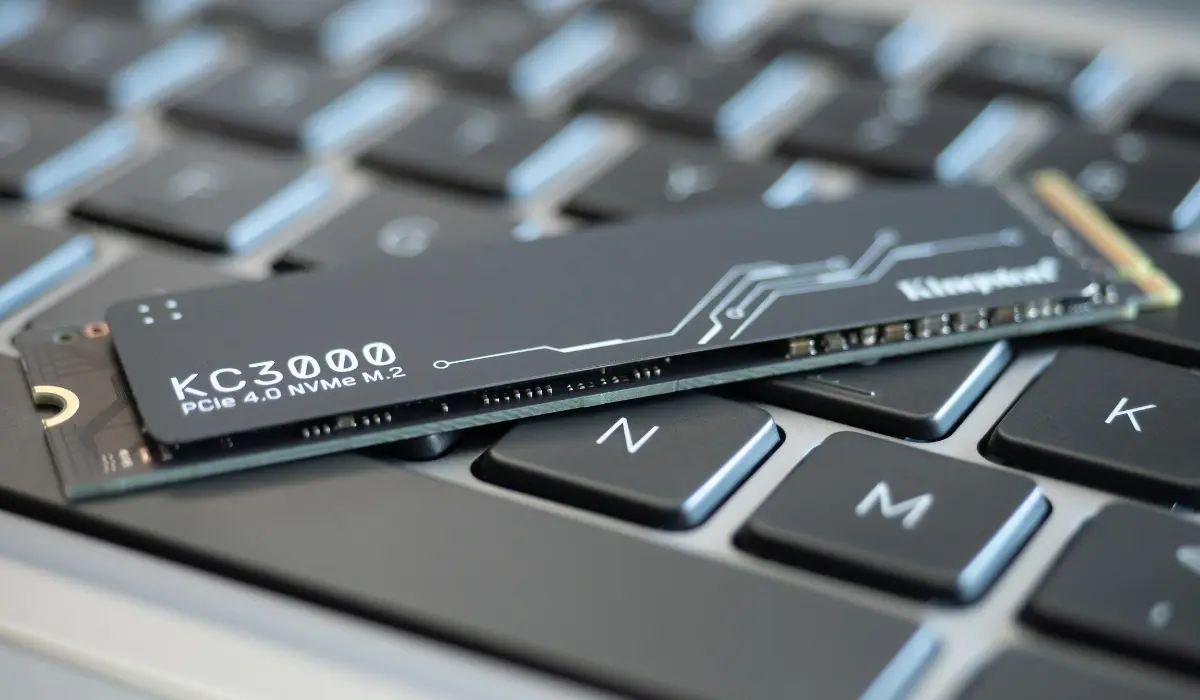
On one hand, we have NVMe SSDs in M.2 format , very popular in modern laptops and desktops. They are shaped like an elongated strip (similar to a piece of chewing gum) that connects directly to the motherboard without cables, saving space and improving airflow inside the PC case.
In professional settings, U.2 or U.3 drives are widely used . These are similar to 2,5-inch disks and can be hot-swapped in servers, which is essential for maintenance and quick replacement without turning off the machine.
There are also PCIe AIC (Add-in Card) cards , which are installed directly into a PCIe slot just like a graphics card. This format is primarily used for very high-performance storage or for mounting multiple NVMe drives on a single card in high-end servers.
In the consumer market, the M.2 format has been standardized with a series of sizes that share the same width of 22 mm but vary in length. These include 2230, 2242, 2260, 2280, and 22110 drives , where the first two digits indicate the width (22 mm) and the following two indicate the length in millimeters. The most widespread format today is the 2280, found in the vast majority of motherboards and laptops.
In addition to size, the type of M.2 connector must be considered . There are three main variants: M-Key, B-Key, and B+M-Key. The M-Key connector is associated with NVMe drives that use PCIe lanes (usually x4), the B-Key is associated with more limited devices (for example, PCIe x2 or certain communication modules), and the B+M-Key is largely reserved for SATA-based SSDs with more modest speeds.

Differences between NVMe and SATA SSDs (and other protocols)
In everyday language, we often say "I have an SSD" to refer to a solid-state drive connected via SATA , the same connector used by older mechanical hard drives. This leap forward already represented a huge improvement in boot and program loading times, but the SATA III interface has a theoretical limit of around 600 MB/s, which is already being completely exhausted.
When we talk about an NVMe SSD, we're still talking about a solid-state drive, but with a radical change: instead of using the SATA port, it connects to the PCI Express bus and communicates using the NVMe protocol. This combination allows for speeds several orders of magnitude faster than a traditional SATA SSD.
In practical terms, while a SATA SSD typically achieves sequential read and write speeds of around 500-550 MB/s , an NVMe drive on PCIe 3.0 can reach speeds of around 3.500 MB/s, exceed 7.000 MB/s on PCIe 4.0 , and approach 14.000 MB/s on PCIe 5.0 . This translates to speeds between 10 and 20 times faster in sequential transfer scenarios.
But MB/s speed isn't everything. NVMe excels particularly in IOPS (input/output operations per second) and latency. Thanks to its parallel command queues and modern design, an NVMe SSD can easily exceed two million IOPS and be up to 900% faster than an AHCI drive in certain workloads.
Compared to SAS, traditionally used in servers, NVMe offers significantly higher performance with lower power consumption and increasingly simpler implementation. SAS still has its niche, but for high-performance flash storage, NVMe has become the de facto industry standard.
In terms of user experience, this translates to the operating system booting in a few seconds , applications opening almost instantly, video games loading maps and textures without long waiting screens, and heavy operations with large files (copying, decompressing, editing) being performed in a fraction of the time.
How does NVMe work to achieve such high speeds?
To understand why NVMe is so fast, you have to look at how it manages input/output command queues . Every time the system needs to read or write data, it sends a request that is placed in a queue. With NVMe, the system isn't limited to a single short queue, but can have tens of thousands of queues, each with tens of thousands of requests.
This structure allows operations to be distributed among the different CPU cores , reducing blocking and waiting times. While one core processes one queue, another can simultaneously handle another, which fits perfectly with the multi-core architecture of current desktop and server processors.
Within the SSD itself, the key component is the flash controller , a microcontroller that runs the NVMe protocol and orchestrates access to the NAND memory chips. This controller functions similarly to a RAM controller, but working with non-volatile memory, managing wear-leveling, error correction, and internal data organization.
Thanks to this design, the most resource-intensive stages of the protocol are delegated within the SSD itself, freeing the system's main CPU from much of the workload. The result is a lower processor cycle count per I/O operation, which impacts both overall performance and energy efficiency.
Furthermore, by not carrying the legacy of mechanical hard drives, NVMe eliminates latencies associated with mechanical waits, sector reordering, and other historical limitations. Everything is designed to make access as direct as possible and to take full advantage of the features of modern flash memory.
Main advantages of NVMe storage
The first major advantage of NVMe is its raw performance . Compared to the approximately 0,6 GB/s of SATA III, an NVMe drive on PCIe x4 can reach 4 GB/s with previous generations of PCIe, over 7 GB/s with PCIe 4.0, and figures approaching 14 GB/s with PCIe 5.0. These numbers represent a giant leap for any task where storage is the bottleneck.
Another advantage is the extremely low latency . By having a direct link to the CPU and RAM and leveraging parallel queues, response time is drastically reduced. This is critical in applications where every millisecond counts, such as high-traffic databases, web services with thousands of simultaneous users, trading, real-time data analysis, or artificial intelligence environments.
NVMe also stands out for its energy efficiency . To perform the same tasks as a SATA SSD or a SCSI-based system, it requires fewer CPU operations and fewer physical devices to achieve the same performance. In a data center, this translates to lower power consumption, less heat generation, and reduced cooling requirements.
On a physical level, NVMe SSDs, especially in the M.2 form factor, take up very little space . This has allowed motherboard manufacturers to add multiple M.2 slots directly to the PCB and reduce the clutter of SATA cables inside the case. In laptops, the compact size is ideal for thin and light systems with high storage capacities.
Another advantage is scalability . Thanks to NVMe-oF, the same protocol can be used across networks like Ethernet or Fibre Channel, extending NVMe performance beyond the server chassis itself. This opens the door to shared storage solutions with very low latency and performance previously only available with highly specialized systems.
Finally, NVMe has been designed as a long-term standard . Its specification supports firmware updates and new features without requiring a complete architecture overhaul, allowing manufacturers to improve their drives over time and incorporate advancements such as zoned namespaces (ZNS), advanced security features, and remote boot support.
Disadvantages and considerations before choosing NVMe
It's not all advantages, and it's worth considering some limitations and requirements before buying an NVMe SSD. The first is compatibility: it's not enough for your motherboard to have an M.2 slot ; that slot must specifically support PCIe/NVMe and not just SATA.
To check, the most reliable method is to look up the exact motherboard model in the manual, on the manufacturer's website, or using tools like dxdiag and other diagnostic utilities. Many older motherboards include M.2 slots only for SATA drives, and in that case, an NVMe SSD either won't work or won't be recognized by the BIOS/UEFI.
You also need to check the PCI Express version supported by your motherboard and processor. If your system only supports PCIe 3.0, buying a PCIe 5.0 drive won't give you more performance than a PCIe 3.0 or 4.0 drive, although it will be compatible in most cases because the versions are usually backward compatible at the signal level.
Another practical aspect is heat management . NVMe drives, especially the faster ones, can get quite hot when working at full capacity. That's why many modern motherboards include dedicated heatsinks for the M.2 slots, and many high-end SSDs incorporate their own passive cooling system to prevent performance losses due to thermal throttling.
Regarding price, although it has dropped significantly in recent years, NVMe is still somewhat more expensive than SATA for the same capacity. However, the performance difference is so substantial that in most cases it more than justifies the small additional cost, especially if you use the computer for demanding tasks or if time is a critical factor in your work.
Finally, PCIe lane usage must be considered . Each NVMe SSD consumes a certain number of PCIe lanes (usually x4), which are shared with other devices such as the graphics card, high-speed network cards, or additional controllers. In systems with few available PCIe lanes, it's essential to carefully plan how many devices to install to avoid running out.
Use cases: when an NVMe SSD is worth it
In professional environments, NVMe is practically the default choice for databases, virtualization, and web services . Its minimal response times and ability to handle thousands of simultaneous requests make applications like e-commerce, CRM, ERP, and data analytics run much more smoothly and support more concurrent users.
In the world of cloud computing, NVMe enables the delivery of virtual machines and containers with extremely fast storage , reducing deployment times and improving the performance of critical applications. NVMe-oF also allows this performance to be shared across the network with minimal loss.
For home users, an NVMe SSD is ideal if you play modern games that constantly load textures and data, as it drastically reduces loading screens and helps prevent stuttering due to insufficient disk speed. It's also highly recommended if you work with video editing, high-resolution photography, or music production involving many large files.
Even for everyday productivity tasks, such as browsing the web, using office applications, or managing email, the system feels more responsive overall . Applications open instantly, the system doesn't lag when many tabs or programs are open, and updates and backups complete much faster.
If you're currently using a SATA SSD and your motherboard supports NVMe, the improvement is usually quite noticeable in loading times and overall performance, especially when using demanding software or performing intensive multitasking. For many users, it's one of the most significant performance upgrades you can make to a PC without changing the processor.
NVMe as the standard of the present and future
With all of the above, NVMe has established itself as the foundation of the new generation of storage . Its widespread adoption in laptops, desktops, and data centers, coupled with the continuous evolution of PCIe (Gen4, Gen5, and what's to come), solidifies it as the technology upon which today's high-performance systems are built.
As data processing needs increase in areas such as artificial intelligence, big data, and virtual and augmented reality , I/O requirements skyrocket. NVMe offers the combination of speed, latency, and scalability needed for these applications to run without being tied to storage.
The ability to update the firmware and incorporate new features into the standard itself ensures that NVMe can continue to adapt to industry changes for many years to come, without needing to reinvent the wheel with a completely new protocol. For now, there doesn't appear to be a near-term alternative that will displace it in the short or medium term.
Ultimately, choosing an NVMe SSD today means ensuring a system ready for years to come , with enough performance headroom to support new operating system versions, games, and professional applications without storage becoming a bottleneck. If your motherboard is compatible and your budget allows, it's one of those upgrades you'll notice from the very first boot.
