- PC chassis are mainly divided into Mini-ITX, Micro-ATX, ATX and E-ATX, each with different sizes and uses.
- ATX mid-tower cases are the standard for their balance of space, expansion, and cooling for most users.
- Full tower cases stand out for their compatibility with E-ATX and great expansion capacity, ideal for advanced systems.
- The choice of chassis should be based on available space, desired portability, expansion needs, and cooling requirements.
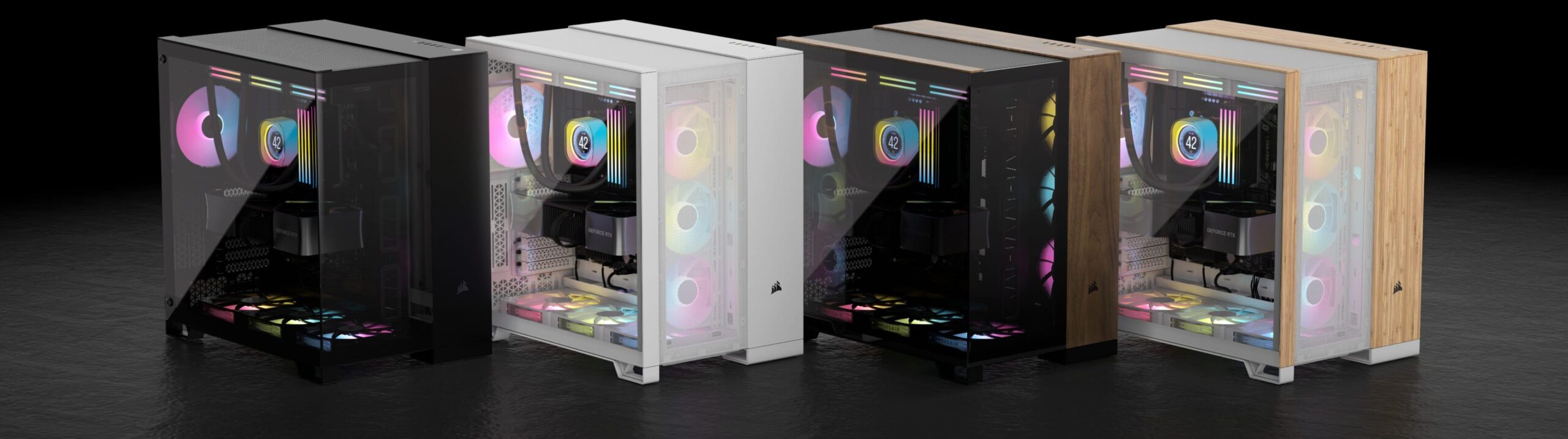
If you've been looking at components for a while, you've probably seen dozens of types of cases and are wondering what exactly a case is. full tower chassis and what the difference is of a normal PC case. With so many formats (Mini-ITX, Micro-ATX, ATX, E-ATX…) and sizes (mini, midi, full tower) it's easy to get confused, especially when each manufacturer invents its own commercial name.
In the following lines we will calmly break down the main tower formats and form factors We'll look at the types of cases used in desktop computers today, focusing on full-tower cases, which are highly sought after by demanding gamers and content creators. We'll examine actual dimensions, compatibility, advantages, disadvantages, and when it's worth investing in a massive chassis and when a more compact option is preferable.
What exactly is a PC chassis and why does it matter so much?
The PC chassis, case, or tower is much more than just a pretty enclosure: it's the structure where the components are mounted. motherboard, power supply, graphics cardthe cooling system and the rest of the hardware. Its main function is to keep all those components securely in place, protected, and with decent airflow so they don't turn into an oven.
In today's market there is a wide variety of boxes with different dimensions, materials, colors and ventilation systemsYou can find very understated black models, boxes with touches of blue, green, or redMesh fronts for better ventilation, tempered glass sides to show off the interior, and designs suitable for both discreet offices and gaming setups full of RGB lighting.
Besides the aesthetic aspect, the chassis determines the number of internal bays, expansion slots and space for large componentssuch as high-end graphics cards or bulky CPU coolers (for example, up to about 16,5 cm tall, a very common size for the most powerful air coolers). If you choose a case that's too small, the graphics card you want might not fit, or the airflow might be insufficient.
Another key function of the chassis is to make the most of the available space on your desk or officeIn a home or business where every centimeter counts, switching from a gigantic tower to a compact case can make the difference between having your PC fit in neatly or getting in the way everywhere.
The tower as the most common type of chassis
When we talk about desktop computers, the type of case most commonly seen in homes and offices is the classic tower mounted verticallyThis format has become the standard because it offers a good balance between size, expandability, and ease of assembly.
Tower-type chassis are primarily distinguished by their total height and the number of internal bays and PCIe slots available. Based on these characteristics, they are usually classified into small, medium, and large sizes, which most stores translate as mini tower, midi tower (half tower), and full tower (full tower).
One of the most important decisions when choosing a box is thinking about how many devices and expansion cards You want to install: 3,5” hard drives, 2,5” SSDs, M.2 drives with heatsinks, multiple PCIe cards (graphics card, capture card, dedicated sound card, controllers, etc.). The more slots and bays you want to use, the more sense it makes to increase the size of the chassis.
Inside the towers, the motherboard form factor also comes into play: Mini-ITX, Micro-ATX, ATX and E-ATX These are the most common formats. Each one occupies a different size and has a specific number of ports and slots; that's why not all cases are compatible with all motherboards.
The four major tower formats and their form factors
To clarify the picture, it is often helpful to divide PC cases into four main groups based on the combination of physical size of the case and motherboard form factor which admits:
- Small Form Factor / Mini-ITX: very compact computers.
- Mini tower / Micro-ATX: small size but with a little more expansion.
- Mid tower / ATX: the most widespread standard among users and gamers.
- Full tower / E-ATX: full towers, large and designed for advanced configurations.
These categories also include other less common formats, such as boxes compatible with BSE or EEB plates (derived from server standards), which usually share a philosophy with larger full tower chassis and are geared towards workstations, powerful home servers or builds with multiple graphics cards.
Small Form Factor: the domain of Mini-ITX
The format known as Small Form Factor (SFF) refers to very small cases, designed to house a 17 x 17cm Mini-ITX motherboardIn this type of chassis, the main objective is to save space and achieve a PC that is as small and light as possible.
Being so compact, these Mini-ITX cases usually include only two expansion slotsThis limits the possibilities to a basic graphics card or very specific configurations. Furthermore, the internal space for fans, radiators, or large heatsinks is quite tight, so each component must be chosen very carefully.
Its great advantage is the portability and tiny sizeThese cases are ideal for users who want to take their PC to LAN events, competitions, friends' houses, or who simply want a system that takes up almost no space in the living room or on their desk. Many gamers who enjoy in-person events choose these cases because they fit in a backpack or are easy to transport.
Conversely, Mini-ITX cases have less room for expansion: if you want to add more storage drives, a high-end graphics card, or a sophisticated liquid cooling system in the future, they will likely fall short. The internal airflow designbecause in such a small volume heat accumulates rapidly.
Mini tower: Micro-ATX as a compact middle ground
For those who want a relatively small PC but without completely giving up on expansion, there is the option of the mini tower compatible with Micro-ATX motherboardsThis format is halfway between SFF and mid-sized towers, and seeks a balance between portability and performance.
The mini towers allow assembly Micro-ATX (24 x 24 cm) and Mini-ITX motherboardsThis gives you room to choose a motherboard according to your needs. They typically offer up to four PCIe expansion slotsThis opens the door to installing a dedicated graphics card and some other additional cards without too many compromises.
In terms of physical size, this type of box usually ranges between the 30 and 45 cm in heightThis makes them much more manageable and easier to install than a mid-tower or full-tower case. They are still relatively portable, but offer more internal space than a pure Mini-ITX chassis.
This format is particularly interesting for users looking for a portable yet versatile PCFor example, a gaming computer that can be moved from time to time, or an office computer with some room for future expansions without taking up as much space as a normal tower.
Mid-tower: the ATX standard
The mid-tower, also called the half-tower, is probably the most popular type of box among most usersIt is designed to accommodate ATX motherboards, the standard format in desktop computers, while maintaining reasonable dimensions to fit under the desk or next to the monitor without problems.
A good mid-tower usually allows Mini-ITX, Micro-ATX and ATX boards (30 x 24 cm)This gives it enormous versatility. Furthermore, it offers between 7 and 8 PCIe expansion slots, varying slightly depending on the manufacturer and the specific case design.
One of the strengths of modern mid-towers is that they often incorporate cable management systemsCable trays and grommets to hide cables behind the motherboard tray, rubber seals on openings, ample rear space, etc. This makes it easier to keep the interior clean, optimizes airflow, and makes the case much more attractive if it has tempered glass side panels.
In terms of dimensions, the typical height of a mid-tower ranges between 45 and 60 cmThey are not as compact as a mini tower, but in return they allow you to mount high-end graphics cards, tall CPU coolers (around 16,5 cm or more in many models) and several fans or radiators without going to the limit of space.
For all these reasons, the ATX mid-tower is often The favorite choice of demanding and enthusiastic playersIt offers a very good balance between size, cooling capacity, expansion possibilities and ease of assembly, without the feeling of dealing with a giant monster every time you want to move the PC.
Full tower: the realm of E-ATX
The full tower, or complete tower, is the next step up and the focus of the search term we're discussing. These are large cases designed for assembling Very powerful systems, with many cards and an advanced cooling systemThis is where the E-ATX format and other large form factors like CEB or EEB really come into play in some server-oriented models.
A key feature of full tower chassis is that they usually offer up to 10 PCIe expansion slotsThis allows you to install multiple graphics cards, capture cards, dedicated sound cards, RAID controllers, and much more without running out of space. This is very useful for both extreme gaming rigs and professional workstations.
Regarding motherboard compatibility, a good full tower usually supports Mini-ITX, Micro-ATX, ATX and E-ATXAnd some specific models extend compatibility to server formats like CEB or EEB. This versatility is one of the reasons they are so highly valued by system administrators and content creators who need many PCIe lanes.
The price of all this space and flexibility is that full towers are bulky and heavy boxesIt is not uncommon for them to exceed half a meter in length and reach... 75 cm tall or moreThey are quite heavy even when empty. Moving one of these towers is not exactly convenient, and even less so once it's fully assembled with high-end components.
Another important point to consider is the internal coolingEven with plenty of space, if the airflow design isn't well thought out, such a large tower can create hot spots and overheat under load. Therefore, it's important to pay attention to the number of included fans, the possibility of adding large radiators for liquid cooling, and the placement of the air intake and exhaust vents.
Colors, aesthetics and internal layout in large chassis
Within the full-tower category, the market offers a huge range of designs. The most common type remains the box case. in a sober black color, in full tower or midi tower formatdesigned to easily integrate into any environment, whether it's a gaming room or a professional office.
However, boxes that incorporate details in blue, green or redWhether through LED strips, RGB fans, or decorative elements on the front and sides, this more striking aesthetic is especially appealing for gaming PCs or streaming setups, where showcasing the chassis's interior through a tempered glass side panel has become almost standard.
In a full tower chassis, the large available volume allows for a much more comfortable internal layout: independent hard drive trays, separate chambers for the power supply, ample space for cable management behind the motherboard, and multiple mounting points for fans or custom liquid cooling reservoirs.
This extra space also makes assembly easier long graphics cards and tall CPU coolers (around 16,5 cm or even more, depending on the case model), which in smaller form factors can become a real puzzle. If you're planning a multi-GPU setup or complex liquid cooling with multiple radiators, a full tower case becomes almost a requirement.
Advantages and disadvantages of the full tower format
Choosing a full-tower PC has several advantages that make it very attractive to certain types of users. large expansion capacity and compatibility with E-ATX motherboards They allow the creation of equipment that, in other formats, simply would not fit or would be too compromised by space and temperature.
On the other hand, a full tower offers room for install custom liquid cooling systems with tanks, pumps, large radiators and several water blocks. The spacious interior facilitates installation, maintenance and future expansions, without having to struggle with pipes and cables in tiny spaces.
However, it's not all advantages. The main drawback of a full tower chassis is its enormous size and weightThis complicates both transport and placement in small rooms. If you have limited desk space or like to move your PC frequently, a case like this can be more of a problem than a solution.
Furthermore, the cost of these cases is usually higher than that of a mid-tower, and you'll often be tempted to fill all that space with more hardwareThis further increases the overall budget for the system. For many users, a good mid-tower ATX case more than meets their needs, without needing to upgrade to such a large form factor.
How to choose the right type of chassis for your PC
When deciding what type of box to buy, the key question is not so much which format is “better”, but which format best suits your priorities and how you use your PCThere is no universal answer, because each user values different aspects.
If what matters most to you is that the equipment takes up very little space, is lightweight, and can be easily transported, then a Mini-ITX chassis or a Micro-ATX mini tower That makes perfect sense. You'll gain in comfort and desk space, but you should expect less room for future upgrades and more critical thermal management.
For most users, especially those who play demanding games or who need a versatile PC for work and leisure, the format ATX in a mid-tower It's usually the most balanced option. It offers enough space for multiple storage drives, a powerful graphics card, good cooling, and a clean internal layout without taking up half a room.
If your intention is to assemble an extreme team, with multiple graphics cards, an E-ATX motherboard, custom liquid cooling And perhaps even a couple of separate loops—that's where a full-tower chassis really makes a difference. Its large volume will save you headaches when it comes to fitting radiators, reservoirs, pumps, and all the cabling.
In any case, it's always a good idea to check the Specifications for maximum heatsink height, GPU length, and motherboard compatibility as indicated by the case manufacturer. A detail as simple as your air cooler measuring 16,5 cm and the case only supporting 15,8 cm can force you to change half your project.
Ultimately, the best chassis for you will be the one that allows you assemble the components you needMaintain good temperatures and adapt to the physical space where you will place the PC, without forcing you to sacrifice ease of use or short and medium term expansion capacity.
Choosing the right combination of a small Mini-ITX case, a Micro-ATX mini tower, an ATX mid-tower, or a large E-ATX full tower will save you trouble in the future and allow you to enjoy a balanced system with just the right amount of space for your components, adequate cooling, and a design that matches your style, whether in discreet black tones or with more striking blue, green, or red accents.
Table of Contents
- What exactly is a PC chassis and why does it matter so much?
- The tower as the most common type of chassis
- The four major tower formats and their form factors
- Small Form Factor: the domain of Mini-ITX
- Mini tower: Micro-ATX as a compact middle ground
- Mid-tower: the ATX standard
- Full tower: the realm of E-ATX
- Colors, aesthetics and internal layout in large chassis
- Advantages and disadvantages of the full tower format
- How to choose the right type of chassis for your PC