- Identify if your monitor lacks VESA or only needs spacers or adapter plates.
- Choose between universal or specific adapters depending on model, weight and size.
- Install the adapter respecting the maximum load and adjusting the ergonomics of the workstation.
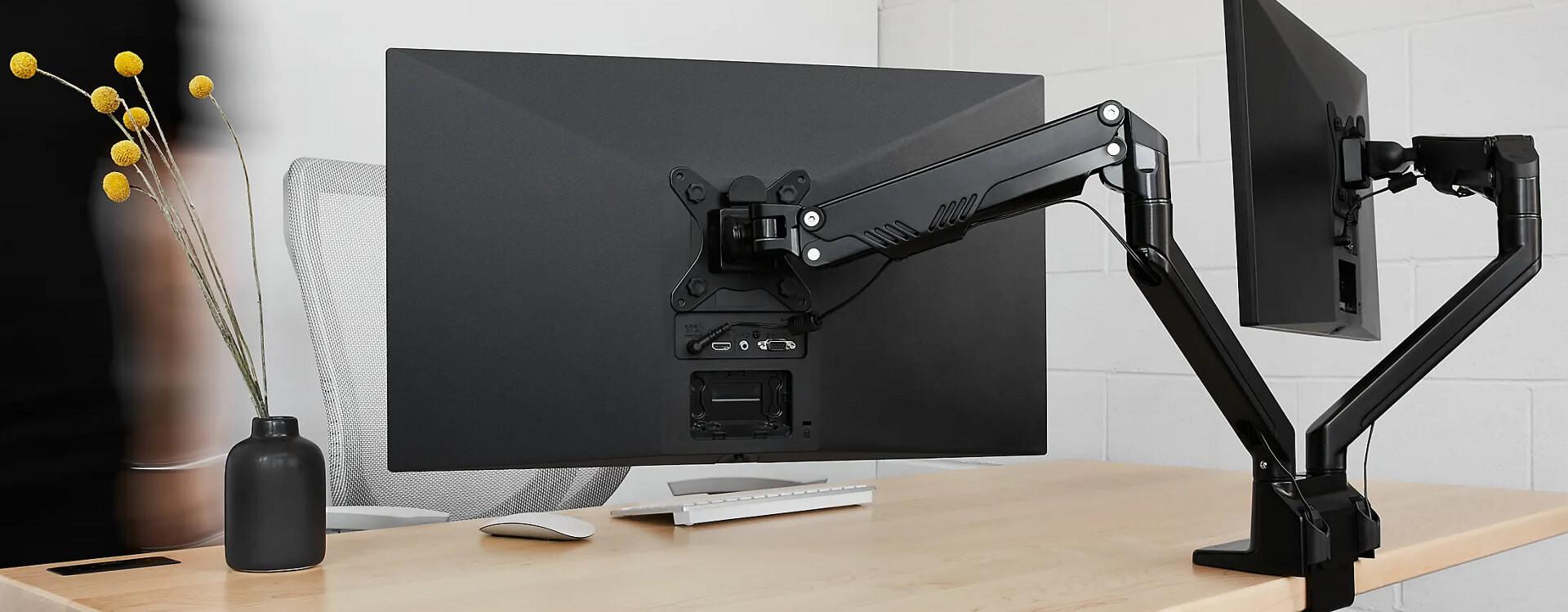
If you've reached this point, it's because you have one or more monitors without VESA mounts and you want to mount them on the wall or an articulating arm without having to change screens. This is a much more common situation than it seems: many manufacturers have focused on slim, minimalist design and have done away with the traditional four rear mounting screws.
This creates a rather annoying problem: you can't screw the monitor onto a standard stand , so it's stuck using its original base, taking up half the desk. Luckily, there are specific VESA adapters and very practical solutions for almost all models on the market (including some real pains, like certain curved Samsung 4K monitors or office monitors without mounts).
What is the VESA standard and why doesn't your monitor have it?
The VESA standard is essentially a pattern of four threaded holes on the back of the monitor , arranged in a square with a specific distance between them (for example, 75x75 mm or 100x100 mm). Desk stands, monitor arms, and wall mounts rely on this standard to be compatible with thousands of different screens.
When a monitor lacks those four screws, it's considered a non-VESA mount monitor . The back is usually either completely smooth or uses a proprietary mounting system attached to the monitor's stand. Many models from HP, Samsung, Asus, Acer, Dell, and even Apple have embraced this trend of prioritizing aesthetics over compatibility.
There are usually two reasons: firstly, to reduce costs and simplify the internal design ; secondly, to achieve very thin or curved casings where the structure for securing VESA screws would complicate manufacturing. This is especially noticeable in curved monitors from the Samsung Odyssey range, some older SyncMaster models, slim HP models like the M24f or M27f, and in designer displays from Asus or Apple.
The practical problem is obvious: if these holes aren't there, you can't screw the bracket on directly . Hence, there are two options: buy a specific adapter for your model or resort to homemade solutions (which are usually less safe and aesthetically pleasing).
What is a VESA adapter for monitors without a stand?
A VESA adapter for monitors without a stand is an accessory that acts as an intermediary between your monitor and the arm or stand . On one side, it attaches to the monitor using the slot or mount where the original stand is attached; on the other, it provides a plate with a standard VESA pattern (usually 75×75 mm and sometimes also 100×100 mm).
This way, you can make a monitor designed without VESA compatible with almost any ergonomic stand on the market. There are two main types: universal adapters and adapters specific to each model or brand.
Universal adapters, such as some from the NV100 series or similar models, attach to the monitor frame with clamps or arms that grip the casing . They typically work with screens from 17" to 27", with a maximum weight of around 6,5-8 kg, and create a 75x75 mm mounting pattern that screws onto the TV arm or stand. They are very practical for generic or older monitors without official mounting solutions.
Specific adapters, on the other hand, are custom-designed for particular models. They fit into the monitor's original stand (replacing it) and feature a standardized VESA mounting plate on the back. They are common for brands such as HP (M24f, M27f, Omen, etc.), Samsung (especially curved monitors), Asus, Acer, Dell, and even Apple iMacs and Thunderbolt Displays.
When do you really need a VESA adapter?
Not all problematic monitors lack VESA mounts entirely. Before spending money on an adapter, it's a good idea to do a few quick checks on the back of the screen to see what kind of solution you need.
First, check if the back surface is completely smooth and without holes. If you don't see a square with four threaded holes, your monitor doesn't have a VESA mount , and yes, you'll need a specific adapter.
Secondly, some monitors do have the mounting holes, but they're recessed into a gap or cavity . In these cases, the problem isn't the absence of a VESA mount, but rather that the stand plate doesn't make flat contact. A full monitor adapter isn't needed here; instead, a set of spacers or spacer screws will suffice to compensate for the height difference.
Third, your monitor might have a different VESA pattern than the stand. Imagine the screen is 75x75 mm and the arm is 100x100 mm . In this case, we're talking about a size incompatibility, not a lack of VESA compatibility, and it's solved with a simple adapter plate or VESA extension that converts one pattern to the other.
Finally, if you already have a stand and the monitor doesn't have anything usable on the back other than the original base mount, you'll need an adapter designed to fit exactly into that proprietary mount or a universal adapter that securely hugs the frame.
Brand compatibility: HP, Samsung, Asus, Acer, Dell, and Apple
Each manufacturer has its own quirks when it comes to designing the back of the monitor, so professional VESA adapters have become specialized brand by brand and model by model . It's worth reviewing the most common cases so you know what to expect.
At HP, it's very common for office and mid-range models like the HP M24f, M27f, or various Omen displays to omit the four standard mounting holes. In these cases, the adapter usually replaces the original stand entirely: the base is removed, the adapter is inserted in its place, and you get a VESA plate ready to use with an ergonomic arm.
In the Samsung range, this problem is very common with curved monitors, such as some older Odyssey or SyncMaster models that lack VESA mounting holes . In these cases, specific adapters are needed to adapt to the curvature and the base's recess, ensuring stability and preventing unusual stress. There are also cases like the Samsung U32R59x, a very popular 4K office monitor, which doesn't come with a VESA mount, requiring an adapter if you want to mount it vertically or on an arm.
Asus, Acer, and Dell have several slim design series (for example, some Asus VX/VZ models and ultra-thin monitors ) that lack VESA mounting holes or have them in non-standard positions. For these models, various manufacturers have developed custom adapters that ensure a stable mount without stressing the monitor's casing.
And then there's the case of Apple. Many iMacs and Thunderbolt Displays are manufactured without VESA mounts and with a very distinctive integrated stand. Special solutions exist for these products that allow them to be mounted on rotating arms while maintaining the screen's style and ensuring the integrity of its internal spine, which is also different from that of a conventional PC monitor.
How to choose the right adapter for your monitor
Choosing the right adapter is crucial: if you select the wrong model, you might end up with an accessory that doesn't fit or makes your monitor unstable . That's why it's important to follow a simple check before buying.
The first step is to locate the exact model name of your monitor . This is usually found on a sticker on the back (for example, “HP 24es”, “Samsung C27F390”, “Samsung U32R59x”, etc.). This code is key to finding the compatible adapter.
Once you have it, go to the website or store where you want to buy the adapter and enter the model in the search bar . Specialized manufacturers usually have a filtering system that shows you directly which adapters are compatible with your screen and which are not.
Another important point is to check the monitor's weight and size . Many universal adapters are designed for screens between 17″ and 27″ (around 43 to 76 cm diagonally) and accept maximum weights of about 6,5 to 8 kg. If your monitor is larger or heavier, it's essential to verify that the adapter's maximum load capacity supports it.
It's also worth noting that installing the adapter may slightly change the monitor's height or depth . Some models shift the mounting point up or down. If this disrupts your ideal ergonomics, you can compensate by using height-adjustable VESA mounts or monitor arms that offer good vertical adjustment.
Practical examples of use: secondary and vertical monitors
A classic scenario is someone who buys a new monitor and decides to reuse the old one as a secondary screen, mounted vertically . These are usually monitors between 16 and 19 inches (40-48 cm) that, due to their age or price range, don't have VESA mounts. The plan sounds perfect for saving space, but when you turn it over and look at the back, you discover there's no way to screw anything in.
In these cases, a universal adapter that fits around the monitor frame may be sufficient. Thanks to its adjustable arms and clamping mechanisms , it allows you to position the monitor horizontally or vertically without it moving. As long as you respect the maximum weight and width limits, you shouldn't have any problems.
Another much-discussed case is that of 4K office monitors like the Samsung U32R59x . It's an ideal model for use with a primary ultrawide monitor and a secondary one in portrait orientation, but it doesn't come with VESA mount compatibility. The alternative here is to find a specific adapter that replaces the original stand and offers a 75x75 or 100x100 mounting plate, or a robust universal adapter capable of handling the extra weight of a 32" screen.
If you don't have access to a 3D printer or don't want to design your own homemade mount (which, by the way, can be risky if you don't calculate the load correctly), the most sensible option is to choose a commercially available adapter. These products have been tested with the specific models they are designed for and, in most cases, include clear assembly instructions to avoid mistakes.
In situations with very limited desk space, an adapter that allows you to position the secondary monitor vertically can make a huge difference. It frees up horizontal space, leaving more room for other devices or documents , and also improves productivity if you work with code, long documents, or data feeds.
Key aspects of installation, safety and ergonomics
Once you've chosen the right adapter, it's time to install it carefully. Although the process isn't usually complicated, there are some critical points to follow to avoid damaging either the monitor or the stand.
On monitors without VESA mounts, you usually need to remove the original stand first . Sometimes it's as simple as pressing a button and pulling, while on other models you have to loosen a hidden screw. It's advisable to check your monitor's manual or look for an official assembly and disassembly video to avoid damaging plastic parts that could break.
Once the anchor is released, the adapter is fitted. In custom-designed solutions, this is usually a piece that fits precisely into the base and is secured with the supplied screws. In universal adapters, the arms or clamps adjust to the width and height of the monitor housing and are tightened until the monitor is firmly attached.
After attaching the adapter's VESA plate, screw it to the articulating arm or wall mount using the screws from the mount itself or those included with the adapter. It is essential that all screws are securely fastened and that the arm or mount you use is also rated to support the total weight of the assembly.
From an ergonomic standpoint, it's advisable to adjust the monitor's height and tilt so that the top of the screen is approximately at eye level or slightly below . If the adapter has moved the monitor up or down, you'll need to compensate by adjusting the arm to maintain a comfortable posture and avoid neck and back pain.
Guarantees, returns, and common problems when buying adapters
When you buy a VESA adapter or stand online, it's important to know what return rights and warranties you have, in case you discover upon receiving it that it doesn't fit your monitor or doesn't meet your expectations.
Many online stores offer a 14-day return period from the date of delivery. During this time, they typically accept returns as long as the product is in perfect condition, unused, and with its original packaging and seal intact; in other words, the box must be unopened or in a condition suitable for resale.
Return shipping costs are usually the responsibility of the buyer , except in special categories like clothing or footwear, where some stores offer free returns. In the case of computer accessories, the customer typically pays for shipping, which usually involves a fixed fee per pickup if arranged by the store.
If the store arranges for the product to be picked up, the cost is usually around a few euros per shipment, which will be deducted from your final refund. Once the item is received, the quality department inspects it to ensure it is in optimal condition and shows no signs of use . If everything is in order, the refund is processed using the same payment method used for the order, typically within two weeks.
Regarding shipping errors, if you receive a product different from the one you ordered, the standard procedure is to contact the store within 72 hours of receiving the package . They will usually ask for photos of the product in its original packaging and the barcode (EAN) to verify the error. If it is confirmed that it was their mistake, they will arrange for collection at no additional cost to you and send you the correct product or process a refund.
It's also possible that the product may arrive damaged in transit or with manufacturing defects . Again, you're usually required to notify us within the first 72 hours and provide clear photographs so we can assess the problem. After verification, a courier will be sent to replace or collect the merchandise. In all cases, it's advisable to also notify the shipping company if you notice any damage to the outer packaging.
It's important to note that, for hygiene reasons, many stores exclude certain personal care, underwear, health, hygiene, and bath products from returns if they have been opened. This doesn't usually apply to monitor adapters and accessories, but it is essential that the product is unused and with all its seals intact for the return to be accepted without problems.
Finally, if the error in purchasing the adapter was yours (wrong model, different VESA pattern, etc.), you will usually have to cover the return shipping costs . That's why it's so important to double-check the exact monitor model and review the compatibility charts before finalizing your purchase.
Having a monitor without VESA mount no longer means resigning yourself to the original stand and a desk full of clutter; with the right adapters, you can turn almost any current screen into a perfect candidate for use with articulating arms, wall mounts, and vertical or horizontal configurations, as long as you choose the right accessory, respect the weight limits, and treat the installation with the care that a device deserves, since it still works perfectly and doesn't have to become obsolete just because of a handful of screws that the manufacturer decided to save on.
