- A well-balanced budget gaming PC can offer great performance without overspending if you choose your CPU, GPU, RAM, and storage wisely.
- The right peripherals (monitor, keyboard, etc.) are key to getting the most out of your equipment and achieving a comfortable and smooth gaming experience.
- Specialized stores assemble, test and guarantee affordable gaming PCs, optimizing compatibility and future upgrades.
- Reviewing technical specifications, warranties, shipping, and financing options helps you find the best budget gaming computer for every budget.

If you're looking for a cheap but powerful gaming PC and don't want to spend a fortune, you've come to the right place. These days, you can play very well without having to go for absurdly expensive systems, as long as you choose the right components and know exactly what you need and what you don't.
In this guide you will find comprehensive information about budget gaming PCs : which components are key, which peripherals are worth adding, what configurations specialized stores usually assemble, and what details to look for to choose the right PC for your next setup, whether for gaming, studying, working, or all at once.
Advantages of a well-configured cheap gaming PC
A good, affordable gaming PC lets you enjoy your favorite games smoothly without having to sacrifice other everyday expenses. The trick is finding the right balance between cost, performance, and future upgrade options.
Compared to a console, a PC offers the advantage of being able to upgrade specific components over time: change the graphics card, expand RAM, add more storage or improve cooling, without having to buy a completely new system every few years.
Furthermore, an affordable gaming PC can be used for much more than just gaming : from office tasks and remote work to light video editing, streaming, or studying, and, if you want, you can even learn how to optimize your new PC's performance . With a well-planned configuration, you'll have a versatile machine that will last for years.
Computers assembled by specialist shops typically use the latest generation components with a good price-performance ratio , ensuring a well-balanced system. There's no point in installing a very powerful graphics card if the processor is underpowered or the power supply is insufficient.
Another important advantage is that many of these budget gaming PCs are hand-assembled and undergo stress and compatibility testing , reducing initial failure issues and ensuring that all components work at their maximum capacity from day one.
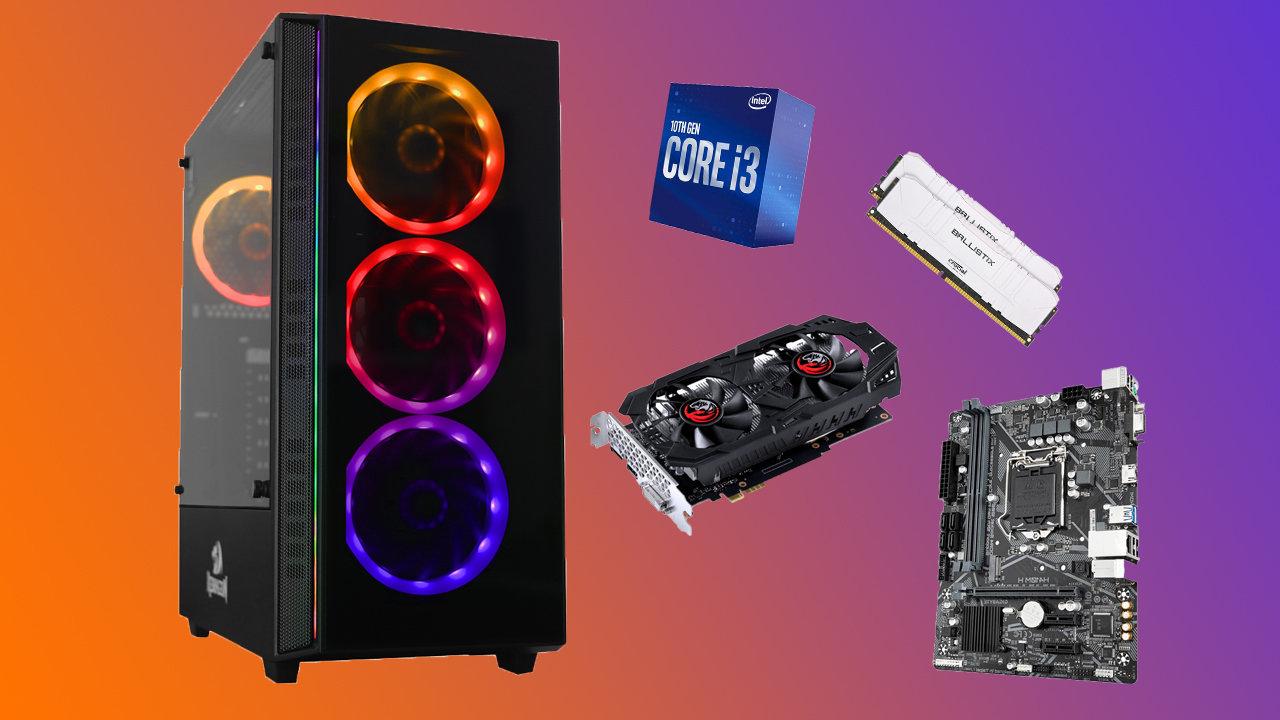
Key components of a good budget gaming PC
For a budget gaming PC to truly perform, it's essential that each component meets certain minimum requirements . It's not just about the final price, but about ensuring that no single part bottlenecks the others.
Processor (CPU): the heart of the computer
The processor is responsible for managing the workload of games and multitasking . In gaming, multi-core, multi-threaded models perform best, especially in modern titles that take full advantage of parallelism.
In the mid-range, Intel Core i5 and i7 processors and Ryzen gaming processors like the Ryzen 5 and Ryzen 7 are the most common in gaming setups offering good value for money. For tighter budgets, some retailers also offer i3 or Ryzen 3 processors, suitable for less demanding games or for playing at medium settings.
Choosing the right CPU is important because a powerful graphics card can be limited if the processor isn't up to par. That's why many pre-built PCs aim for a balance, avoiding pairing very basic processors with mid-to-high-end graphics cards and understanding what overclocking is if you plan to squeeze out more performance.
Graphics card (GPU): the muscle for gaming
The graphics card is the component that has the biggest impact on actual gaming performance , as it's responsible for rendering all the graphics, effects, and textures in real time. If gaming is your priority, this is where you shouldn't skimp.
In the budget gaming PC range, you'll often find NVIDIA GeForce and AMD Radeon models , with options ranging from entry-level cards for eSports and less demanding games, to graphics cards capable of running AAA titles at 1080p with medium-high settings.
Some configurations also include graphics cards from the GeForce RTX or Radeon RX series , which allow you to enjoy modern technologies such as ray tracing (in compatible models) and better frame rates, always adjusting the graphics quality to the budget.
RAM memory: don't lack fluidity
RAM allows the system to handle multiple tasks and processes simultaneously without lag. In today's gaming environment, a realistic benchmark for smooth gameplay is at least 16 GB of RAM.
Many specialty stores offer basic computers with 16 GB of storage , enough for most games and for running background applications (browser, voice chat, etc.). For more demanding users, configurations with 32 GB or even 64 GB are also available, ideal for gaming, streaming, and working with resource-intensive programs.
In addition to the amount, it's worth considering the frequency and dual-channel configuration , which provide a small performance boost, especially on Ryzen platforms where faster RAM makes a noticeable difference. If you notice your system is running slowly, resources such as how to speed up a slow Windows system can help improve the experience without spending money on new hardware.
Storage: SSD vs. HDD
The type of storage makes a difference in game loading times and system boot times . SSDs (solid-state drives) have become standard even in budget gaming PCs, gradually replacing traditional mechanical hard drives (HDDs).
The most common setup in these systems is an SSD of at least 512 GB for the operating system and several games. Many gamers choose to combine this main SSD with a larger HDD to store a large game library, videos, music, and other large files; and, if you're going to install one, it's helpful to know how to avoid mistakes when installing an SSD in a new PC.
The advantage of an SSD is that it drastically reduces loading times and improves overall system responsiveness, making everything run much more smoothly. This is especially noticeable in open-world games or games with many textures.
Cooling: keeping temperatures under control
A decent cooling system is essential for maintaining stable performance and extending the lifespan of components . When the CPU or GPU overheats, frequencies drop and performance suffers.
Budget gaming PCs typically feature high-quality air coolers and good internal airflow, with fans strategically placed at the front, rear, and, if necessary, top of the chassis, and applying a good PC thermal paste to improve heat transfer.
AIO liquid cooling is also found in more advanced configurations, offering better temperatures and less noise , although it is more expensive. In any case, the important thing is that the build is well thought out and the system doesn't become an oven after just a few minutes of gaming.
Motherboard: the foundation of the entire system
The motherboard is responsible for connecting and coordinating all the components . Although it often goes unnoticed, it should have good connectivity, adequate power phases, and expansion options.
In the gaming environment, it's important that the motherboard offers enough USB ports, plenty of RAM slots, and compatibility with the latest Intel or AMD CPUs. Some even allow configurations with multiple graphics cards, although this is less common in tight budgets.
Connectivity and ports: all plugged in and ready
A good budget gaming PC should have a well-distributed variety of ports to easily connect monitors, keyboards, mice, headphones, controllers, and other peripherals; therefore, it's advisable to check exactly which PC ports the computer includes.
Ideally, you should have enough USB ports (both Type A and Type C) , video connections such as HDMI and DisplayPort, analog audio outputs, and, if possible, additional ports on the front of the case for quick access.
In terms of wireless connectivity, these devices increasingly include built-in Wi-Fi and Bluetooth , which facilitates wireless network connection and the use of wireless accessories such as controllers or headphones.
The tower or chassis: more than just aesthetics
The chassis not only influences the appearance of the system, but it's also crucial for airflow, internal space, and future upgrades . A good case design makes a difference in temperatures and ease of assembly.
For a budget gaming PC, it's advisable to choose cases that offer good front ventilation, space for long graphics cards, and areas designed for cable management . LED or RGB lighting is an aesthetic extra that many users appreciate, but it's not essential.
If you're looking for a complete computer setup, remember that in addition to the tower, you'll need a monitor, keyboard, mouse, and other accessories . Many stores allow you to buy the PC separately from the peripherals, so you can adjust your budget to what you actually need.
Peripherals and accessories to complete your budget gaming setup
A good gaming PC doesn't look or perform as well without a top-notch set of peripherals . Monitor, keyboard, mouse, and even headphones can make all the difference in comfort and performance during gameplay.
The key, just like with a PC, is to look for products that balance price and performance . You don't need to go for professional-grade models to enjoy them, but it's best to avoid the most basic options if you're going to spend many hours in front of the screen.
The gaming monitor: an essential piece for immersion
The monitor is what you'll be looking at all times, so it's worth taking some time to choose the right one. A budget gaming PC gets the most out of a screen that balances resolution, refresh rate, and response time.
In most cases, the best value for money is a 1080p (Full HD) monitor , as it allows you to achieve higher FPS with modest graphics cards while still offering very good sharpness. If your GPU supports it and you have the budget, 1440p might be a good option for a more detailed image.
The refresh rate, measured in hertz, indicates how many times the image is updated per second. In competitive gaming, 144Hz monitors are the most common , although you'll also find 60Hz and 240Hz models. The higher the refresh rate, the smoother the movement appears and the less lag there is.
Response time indicates how long it takes a pixel to change color. In fast-paced games like shooters or competitive titles, screens with response times close to 1 ms are preferred , as this reduces motion blur and ghosting when rotating the camera.
Another interesting point is the presence of adaptive synchronization technologies such as NVIDIA G-Sync or AMD FreeSync, which synchronize the monitor's refresh rate with the FPS output of the GPU, preventing tearing and stuttering for a much smoother experience.
Regarding panel type, IPS panels offer better viewing angles and more vibrant colors , TN panels are more affordable and very fast in response, and VA panels fall somewhere in between with good contrast. The choice depends on whether you prioritize image fidelity or pure performance.
Don't forget to consider aspects like ergonomics (height and tilt adjustment) and connectivity: the differences between USB-C and HDMI are important when choosing how to connect your monitor. Some models also include built-in speakers or a 3,5 mm mini-jack audio output for connecting headphones or external speakers.
Gaming keyboard: comfort and precision
The keyboard is one of the peripherals where the difference between a basic keyboard and one designed for gaming is most noticeable. Mechanical keyboards are a favorite among gamers because they offer a very crisp keystroke feel, great durability, and very consistent responsiveness.
Each key on a mechanical keyboard has its own switch, allowing for faster and more precise keystrokes , which is very useful in shooters, MOBAs, or games where every millisecond counts. Furthermore, they can withstand much more wear and tear than membrane keyboards.
Backlighting is more than just an aesthetic luxury. A keyboard with adjustable lighting helps you see the keys better in dimly lit rooms and allows you to customize colors or effects to differentiate areas (WASD, skills, macros, etc.).
Many gaming keyboards include programmable keys or macros , which are very useful in games that require executing complex combinations of commands with a single press. Dedicated multimedia controls are also often included, allowing you to raise or lower the volume without leaving the game.
Ergonomics is key if you spend hours gaming: look for keyboards with comfortable designs, wrist rests, and good key spacing to avoid hand and wrist fatigue. As for connectivity, the most common option is a wired USB connection, although there are also wireless models designed for gaming, with very low latency.
How do stores specializing in cheap gaming PCs work?
Many online stores specialize in offering pre-built gaming PCs with a good price-performance ratio . These systems are usually grouped into ranges or families, designed for different types of gamers and budgets.
A clear example is the series of budget gaming PCs that are hand-assembled by their own technicians , choosing the processor, RAM, graphics card, power supply, motherboard, storage, and cooling to ensure everything is balanced and there are no incompatibilities.
These configurations always aim for the maximum possible performance for every euro invested . That's why they use components with a very good price-performance ratio: mid-range Intel Core and AMD Ryzen processors, GeForce RTX, Radeon RX, or even Intel ARC graphics cards, and RAM with capacities of 16 GB and up.
Stores usually provide each PC with a very detailed technical data sheet for each component , specifying the exact processor model, motherboard chipset, SSD type, power supply capacity, cooling system, and any other relevant information for the buyer.
An added advantage is that many of these budget gaming PCs are designed with future upgrades in mind: case space, spare RAM and storage slots , power supplies that support more powerful graphics cards, etc. This allows you to gradually improve your PC without having to replace the entire system.
In addition, these types of stores usually offer long warranties, up to 3 years in many cases, along with safe and fast shipping (usually within 24-48 hours) and financing options tailored to the customer, making it easier to cover the cost of the equipment.
Some large retailers also provide additional information about shipping limited to certain areas, promotion conditions, and financing options through their own cards or partner entities, clarifying that certain offers only apply to online purchases and products sold directly by them.
These pages usually explain that product ranking in internal searches depends on factors such as matching the search term, product popularity, availability, category relevance and novelty, as well as possible special campaigns or promotions that give more visibility to some models.
In the case of interest-free financing, conditions such as minimum amount to finance, number of installments, APR and AER are explained , as well as the fact that in many specific campaigns the total cost of credit is zero because the interest is subsidized by the store or the brand itself.
It is also common to find notices about raffles or special promotions linked to purchases of a certain amount, the need to register on their own applications or subscribe to newsletters, and acceptance boxes for general conditions and privacy policies, complying with data protection regulations.
On the other hand, more and more businesses are starting to highlight aspects of sustainability and carbon footprint , reporting that certain products have measured, reduced and offset their emissions during the life cycle, with external certifications that validate this environmental commitment.
Specialized websites also usually include information on customer service hours, contact channels and social networks , so that the buyer can resolve doubts before buying or receive support after the sale.
This whole set of services and guarantees means that, when buying a cheap gaming PC, many people prefer to opt for a pre-assembled and professionally tested system rather than venturing to build their own without experience.
If you carefully analyze components, peripherals, assembly services, warranties, and purchase conditions, it's possible to get a cheap, balanced gaming computer ready for several years of gaming, work, and study, without spending a fortune and with the peace of mind of having support and future upgrades when it's time to take the next step.
