- The LGA 1851 socket is the indispensable standard for Intel Core Ultra 200 series processors.
- The Z890 chipsets offer the most advanced overclocking capabilities and Thunderbolt 4 connectivity.
- DDR5 memory is mandatory in this generation, supporting extreme speeds through XMP 3.0 profiles.
- It is essential to prioritize the format (ATX, Micro-ATX or ITX) according to the chassis space and the need for expansion.
Building a PC these days can seem like a real headache with so much new technology coming out all the time. If you've ever worked with an Intel Core Ultra processor , you know you can't just throw any motherboard in the case; you need one that speaks the same language as your CPU to avoid sacrificing performance and common PC building mistakes that could turn your machine into an expensive paperweight.
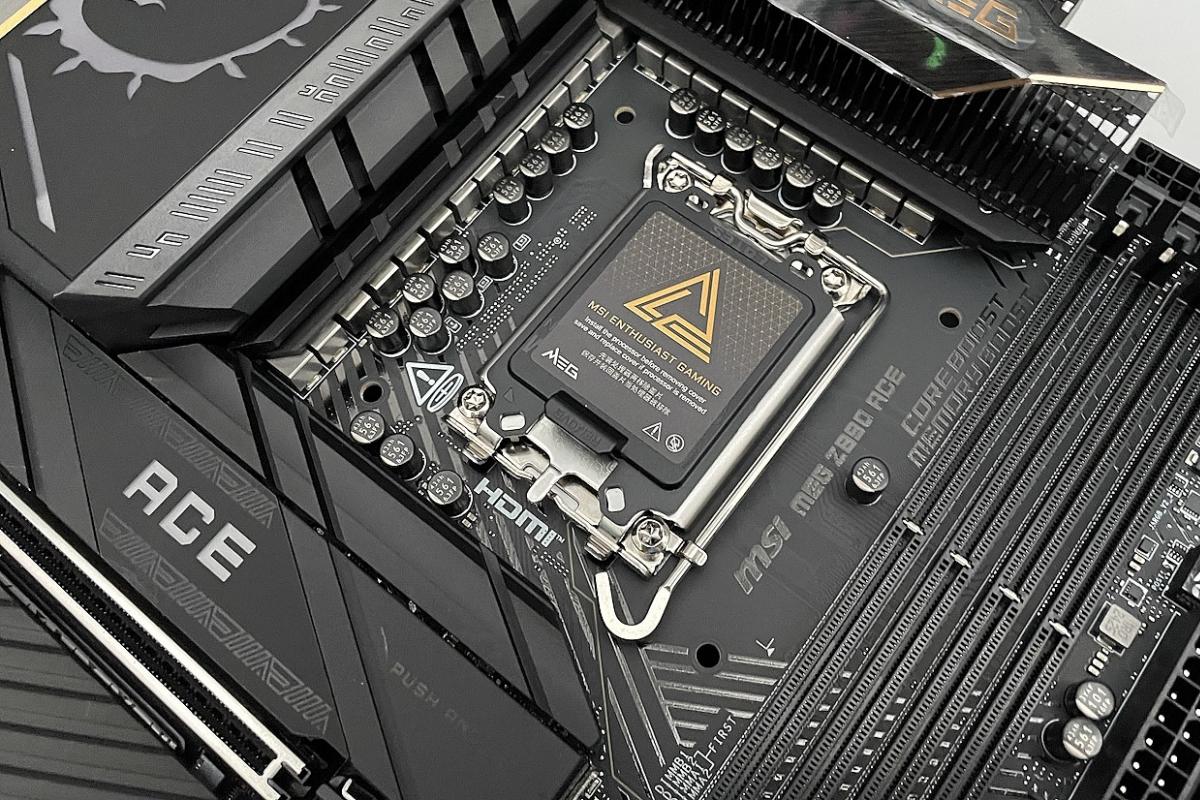
The key to this whole setup lies in the socket and the chipset. For the most advanced models, like the 200 series, we're dealing with the LGA 1851 socket ecosystem . It's not just about the processor physically fitting, but about the motherboard being able to handle the power, DDR5 RAM speeds, and PCIe 5.0 lanes that these chips demand to perform exceptionally well, requiring a solid understanding of how a modern motherboard works .
Featured models and recommendations according to profile
If you're looking for the absolute best and don't mind a hefty budget, the MSI MEG Z890 ACE is a true beast. It's designed for those who want to overclock effortlessly, boasting an enviable digital power system and an aluminum backplate that not only looks great but also helps keep everything cool. It includes 10GbE connectivity and Wi-Fi 7 , making it ideal for environments where bandwidth is at a premium.
On the other hand, if you're a hardcore speed enthusiast, the ASUS ROG MAXIMUS Z890 APEX is the logical choice. This motherboard is obsessed with CPU and GPU overclocking techniques , limiting the memory slots to just two DIMMs to optimize the DDR5 RAM signal and reach ridiculously high frequencies. It's a precision tool for those looking to break records, even though its price tag is close to €600.
For those who prefer a balance between aesthetics and power, the Gigabyte Z890 AORUS MASTER stands out with its spectacular design that blends mirrors and dark tones. A technical gem that includes a front HDMI connector , very useful if you want to install those LCD screens that are so popular in modern cases, as well as high-fidelity sound.

If you're on a tighter budget or looking for something more versatile, we have some excellent options. The MSI MAG B860 TOMAHAWK WIFI is probably one of the most well-rounded motherboards on the market, offering PCIe 5.0 and Thunderbolt 4 without breaking the bank. Likewise, if you need something compact yet powerful, the ASUS ROG STRIX B860-G GAMING WIFI in Micro-ATX form factor is a fantastic motherboard that doesn't compromise on the essentials.
Critical factors when choosing your motherboard
Before spending any money, it's vital to consider the form factor. The ATX standard is king for those who want expandability and easy cooling, making it ideal for various types of PC towers . If you prefer something more manageable for a small case, Micro-ATX offers almost everything ATX does but is cheaper. And for the more adventurous or those who love small form factors (SFFs), the Mini-ITX form factor is the option, although be prepared to pay a premium for the miniaturization and have only two RAM slots.
Regarding memory, forget DDR4 if you're going for a Core Ultra; DDR5 is the way to go . To get the most out of it, look for motherboards that support XMP 3.0 profiles and speeds exceeding 7200 MHz. Keep in mind that capacity can reach up to 256 GB on high-end motherboards, which is a huge amount of space for any professional workflow, similar to when you need to expand RAM and virtual memory.

State-of-the-art storage and connectivity
Storage has taken a quantum leap. Ideally, the motherboard should have at least one M.2 PCIe 5.0 slot connected directly to the CPU to take advantage of SSDs with real-world speeds exceeding 10 GB/s. However, PCIe 4.0 drives remain the smartest option when comparing NVMe SSDs to SATA in terms of price and performance for most users.
In terms of networking, don't settle for the basics. If you work with large files, look for 2.5 GbE Ethernet or even 10 GbE . For wireless connectivity, Wi-Fi 7 with a 320 MHz bandwidth is the standard to follow to minimize latency and maximize download speeds, provided you have a compatible router at home.
Final details: Power and Audio
For those who push their CPU to the limit, the power delivery system (VRM) is crucial. A motherboard with a 16+1+2 phase design ensures stable voltage and prevents components from overheating during intense rendering or gaming sessions. Don't neglect audio either; models with dedicated DACs and electromagnetic shielding make a significant difference for audiophiles.
To complete the picture, remember that if you're using the motherboard as a home server with Proxmox or AI, prioritize stability and the number of M.2 and SATA slots over RGB lighting or an aggressive design. Ultimately, what matters is that the hardware can handle a constant flow of data without overheating or creating bottlenecks in data transfer.
