- PC chassis are mainly divided into Mini-ITX, Micro-ATX, ATX and E-ATX, each with different sizes and uses.
- ATX mid-tower cases are the standard for their balance of space, expansion, and cooling for most users.
- Full tower cases stand out for their compatibility with E-ATX and great expansion capacity, ideal for advanced systems.
- The choice of chassis should be based on available space, desired portability, expansion needs, and cooling requirements.
If you've been looking at PC components for a while, you've probably seen dozens of types of cases and are wondering exactly what a full-tower chassis is and how it differs from a regular PC case. With so many form factors (Mini-ITX, Micro-ATX, ATX, E-ATX…) and sizes (mini, midi, full tower), it's easy to get confused, especially when each manufacturer comes up with their own brand name.
In the following lines, we'll calmly break down the main tower formats and form factors used in desktop computers today, focusing on full-tower cases, highly sought after by demanding gamers and content creators. We'll look at actual dimensions, compatibility, advantages, disadvantages, and when it's worth investing in a massive chassis and when a more compact option is preferable.
What exactly is a PC chassis and why does it matter so much?
The PC case, chassis, or tower is much more than just a pretty enclosure: it's the structure where the motherboard, power supply, graphics card , cooling system, and the rest of the hardware are mounted. Its main function is to keep all those components securely in place, protected, and with decent airflow so they don't overheat.
The current market offers a wide variety of cases with different dimensions, materials, colors, and ventilation systems . You can find very understated black models, cases with touches of blue, green, or red , mesh front panels for better airflow, tempered glass side panels to showcase the interior, and designs suitable for both discreet offices and gaming rigs packed with RGB lighting.
Besides aesthetics, the chassis determines the number of internal drive bays, expansion slots, and space for large components , such as high-end graphics cards or bulky CPU coolers (for example, up to about 16,5 cm in height, a very common size for the most powerful air coolers). If you choose a case that's too small, you might not be able to fit the graphics card you want, or the airflow might be insufficient.
Another key function of the chassis is to make the most of the available space on your desk or in your office . In a home or business where every inch counts, switching from a gigantic tower to a compact case can make the difference between having your PC fit perfectly or getting in the way everywhere.
The tower as the most common type of chassis
When we talk about desktop computers, the most common type of case seen in homes and offices is the classic vertical tower . This format has become the standard because it offers a good balance between size, expandability, and ease of assembly.
Tower cases are primarily distinguished by their overall height and the number of internal drive bays and PCIe slots available. Based on these characteristics, they are usually classified into small, medium, and large sizes, which most retailers refer to as mini-tower, midi-tower, and full-tower.
One of the most important decisions when choosing a case is considering how many devices and expansion cards you want to install: 3,5” hard drives, 2,5” SSDs, M.2 drives with heatsinks, multiple PCIe cards (graphics card, capture card, dedicated sound card, controllers, etc.). The more slots and bays you want to use, the more sense it makes to choose a larger chassis.
Inside the towers, the motherboard form factor also comes into play: Mini-ITX, Micro-ATX, ATX, and E-ATX are the most common formats. Each occupies a different space and has a specific number of ports and slots; therefore, not all cases are compatible with all motherboards.
The four major tower formats and their form factors
To clarify the picture, it is often helpful to divide PC cases into four main groups based on the combination of physical case size and motherboard form factor it supports:
- Small Form Factor / Mini-ITX: very compact computers.
- Mini tower / Micro-ATX: small size but with a little more expansion.
- Mid tower / ATX: the most widespread standard among users and gamers.
- Full tower / E-ATX: full towers, large and designed for advanced configurations.
Within these categories, other less common formats also appear, such as cases compatible with CEB or EEB boards (derived from server standards), which usually share a philosophy with the larger full tower chassis and are geared towards workstations, powerful home servers, or builds with multiple graphics cards.
Small Form Factor: the domain of Mini-ITX
The Small Form Factor (SFF) design refers to very small cases, designed to accommodate a 17 x 17 cm Mini-ITX motherboard . The main goal of this type of chassis is to save space and create the smallest and lightest PC possible.
Being so compact, these Mini-ITX cases typically only include two expansion slots , limiting the possibilities to a single graphics card or very specific configurations. Furthermore, the interior space for fans, radiators, or large heatsinks is quite tight, so each component must be chosen very carefully.
Their biggest advantage is their portability and tiny size : they're ideal for users who want to take their PC to LAN events, competitions, friends' houses, or who simply want a setup that takes up almost no space in the living room or on their desk. Many gamers who enjoy in-person events choose these cases because they fit in a backpack or are easy to transport.
On the other hand, Mini-ITX cases have less room for expansion: if you want to add more storage drives, a high-end graphics card, or a sophisticated liquid cooling system in the future, they will likely fall short. The internal airflow design is also more critical , as heat builds up quickly in such a small volume.
Mini tower: Micro-ATX as a compact middle ground
For those who want a relatively small PC but without completely sacrificing expandability, there's the option of a mini-tower compatible with Micro-ATX motherboards . This format is halfway between small form factor (SFF) and mid-tower cases, striking a balance between portability and performance.
Mini-tower cases allow you to install Micro-ATX (24 x 24 cm) and Mini-ITX motherboards , giving you the flexibility to choose one that suits your needs. They typically offer up to four PCIe expansion slots , which allows you to install a dedicated graphics card and other expansion cards without too many compromises.
In terms of physical size, these types of cases typically range from 30 to 45 cm in height , making them much more manageable and easier to place than a mid-tower or full-tower case. They are still relatively easy to move, but offer more internal space than a pure Mini-ITX chassis.
This format is especially interesting for users looking for a portable but versatile PC : for example, a gaming computer that can be moved from time to time, or an office computer with some room for future expansions without taking up as much space as a normal tower.
Mid-tower: the ATX standard
The mid-tower case is probably the most popular type of case among most users . It's designed to house ATX motherboards, the standard format for desktop computers, while maintaining reasonable dimensions to fit under the desk or next to the monitor without problems.
A good mid-tower case typically supports Mini-ITX, Micro-ATX, and ATX (30 x 24 cm) motherboards , offering tremendous versatility. It also typically features between 7 and 8 PCIe expansion slots, with the number varying slightly depending on the manufacturer and the specific case design.
One of the strengths of modern mid-tower cases is that they usually incorporate cable management systems : trays and cable management channels to hide cables behind the motherboard tray, rubber grommets on the openings, ample rear clearance, etc. This makes it easier to keep the interior clean, optimizes airflow, and makes the case much more visually appealing if it has tempered glass side panels.
In terms of dimensions, the typical height of a mid-tower case ranges between 45 and 60 cm . They are not as compact as a mini-tower, but in return they allow for the installation of high-end graphics cards, tall CPU coolers (around 16,5 cm or more in many models), and multiple fans or radiators without exceeding the space limit.
For all these reasons, the ATX mid-tower is often the favorite choice of demanding and enthusiastic gamers : it offers a very good balance between size, cooling capacity, expansion possibilities and ease of assembly, without the feeling of dealing with a giant monster every time you want to move the PC.
Full tower: the realm of E-ATX
The full tower, or complete tower case, is the next step up and the focus of the search term we're discussing. These are large cases designed to house very powerful systems, with numerous graphics cards and advanced cooling . This is where the E-ATX format and other large form factors like CEB or EEB (in some server-oriented models) truly come into play.
A key feature of full-tower cases is that they typically offer up to 10 PCIe expansion slots , allowing you to install multiple graphics cards, capture cards, dedicated sound cards, RAID controllers, and much more without running out of space. This is very useful for both extreme gaming rigs and professional workstations.
In terms of motherboard compatibility, a good full-tower case typically supports Mini-ITX, Micro-ATX, ATX, and E-ATX , and some specific models extend compatibility to server form factors like CEB or EEB. This versatility is one of the reasons they are so highly valued by system administrators and content creators who require many PCIe lanes.
The price of all this space and flexibility is that full tower cases are bulky and heavy . It's not uncommon for them to exceed half a meter in length and reach 75 cm in height or more , with a considerable weight even when empty. Moving one of these towers isn't exactly convenient, and even less so once it's fully assembled with high-end components.
Another important point to consider is internal cooling : even with plenty of space, if the airflow design isn't well thought out, such a large tower can create hot spots and overheat under load. Therefore, it's worth paying attention to the number of included fans, the possibility of adding large radiators for liquid cooling, and the placement of the air intake and exhaust vents.
Colors, aesthetics and internal layout in large chassis
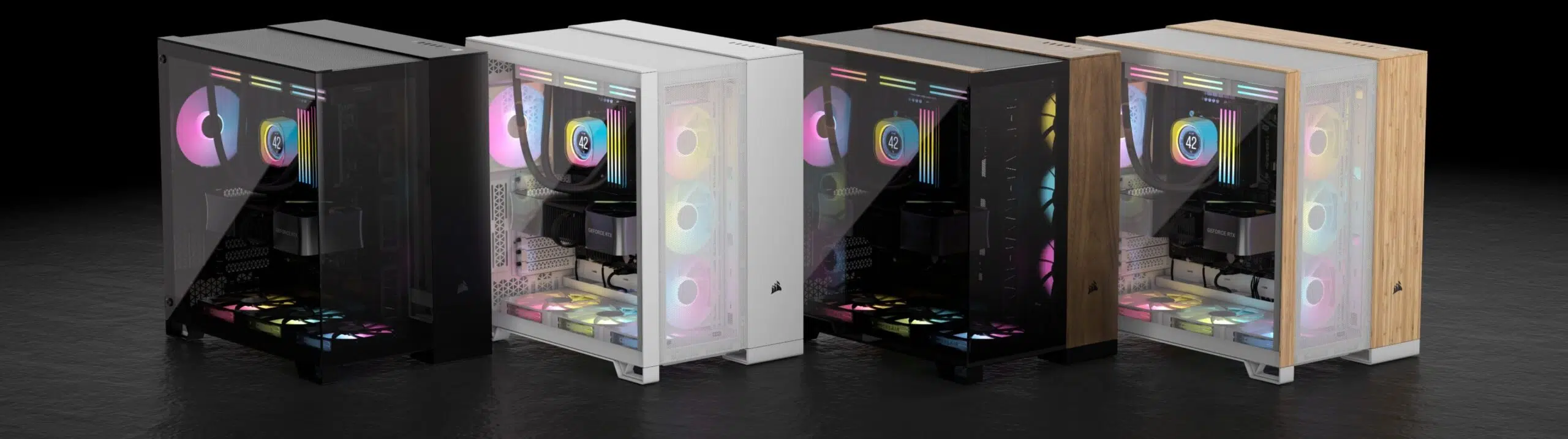
Within the full-tower category, the market offers a huge range of designs. The most common are still cases in a sober black color, in full-tower or mid-tower formats , designed to easily integrate into any environment, whether it's a gaming room or a professional office.
However, cases incorporating blue, green, or red accents are becoming increasingly common , whether through LED strips, RGB fans, or decorative elements on the front and sides. This more striking aesthetic is especially appealing for gaming PCs or streaming setups, where showcasing the chassis's interior through a tempered glass side panel has become almost standard.
In a full tower chassis, the large available volume allows for a much more convenient internal layout : independent trays for hard drives, separate chambers for the power supply, ample space for cable management behind the motherboard, and multiple mounting points for fans or custom liquid cooling reservoirs.
This extra space also makes it easier to install long graphics cards and tall CPU coolers (around 16,5 cm or even more, depending on the case model), something that can be a real headache in smaller form factors. If you're planning a multi-GPU setup or a complex liquid cooling system with multiple radiators, a full-tower case becomes almost a requirement.
Advantages and disadvantages of the full tower format
Choosing a full-tower PC has several advantages that make it very attractive to certain types of users. Its high expandability and compatibility with E-ATX motherboards allow you to create systems that, in other form factors, simply wouldn't fit or would be severely compromised by space and temperature.
On the other hand, a full tower case offers ample room for installing custom liquid cooling systems with reservoirs, pumps, large radiators, and multiple water blocks. The spacious interior facilitates installation, maintenance, and future upgrades without having to struggle with tubing and cables in cramped spaces.
However, it's not all advantages. The main drawback of a full-tower chassis is its enormous size and weight , which complicates both transport and placement in small rooms. If you have limited desk space or like to move your PC frequently, this type of case can be more of a problem than a solution.
Furthermore, these cases are usually more expensive than a mid-tower, and you'll often be tempted to fill all that space with more hardware , further increasing the overall system budget. For many users, a good ATX mid-tower more than meets their needs, without needing to upgrade to such a large form factor.
How to choose the right type of chassis for your PC
When deciding which type of case to buy, the key question isn't so much which format is "best," but which format best fits your priorities and how you use your PC . There's no single answer, because each user values different aspects.
If your top priority is a compact, lightweight, and easily portable system, then a Mini-ITX or Micro-ATX mini-tower case makes perfect sense. You'll gain convenience and desk space, but be prepared for less room for future upgrades and more critical thermal management.
For most users, especially those who play demanding games or need a versatile PC for work and leisure, the ATX mid-tower form factor is usually the most balanced option. It offers enough space for multiple storage drives, a powerful graphics card, good cooling, and a clean internal layout without taking up half a room.
If your intention is to build an extreme system, with multiple graphics cards, an E-ATX motherboard, custom liquid cooling , and perhaps even a couple of separate loops, then a full-tower case makes all the difference. Its large volume will save you headaches when it comes to fitting radiators, reservoirs, pumps, and all the cabling.
In any case, it's always advisable to check the maximum CPU cooler height, GPU length, and motherboard compatibility specifications provided by the case manufacturer. A simple detail like your air cooler being 16,5 cm tall and the case only supporting 15,8 cm can force you to completely redesign your project.
Ultimately, the best chassis for you will be the one that allows you to mount the components you need , maintain good temperatures, and adapt to the physical space where you will place the PC, without forcing you to sacrifice ease of use or short- and medium-term expansion capabilities.
Choosing the right combination of a small Mini-ITX case, a Micro-ATX mini tower, an ATX mid-tower, or a large E-ATX full tower will save you trouble in the future and allow you to enjoy a balanced system with just the right amount of space for your components, adequate cooling, and a design that matches your style, whether in discreet black tones or with more striking blue, green, or red accents.